textmode way to color the value | Community
Skip to main content
Level 2
September 23, 2025
Question

textmode way to color the value

  • September 23, 2025
  • 1 reply
  • 309 views

Hi Guys,

seeking help here,
I want to color the value using textmode, 
scenario: if Aging Days value is greater than SLA Value, color it red.
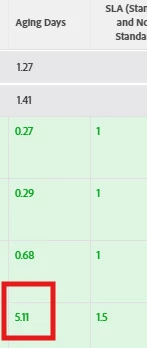


how to insert a code to an existing code?
here is the existing code in the "Aging Days" column.

Thanks, 


1 reply

IvanBebek-iX
Level 5
September 23, 2025

Hi @geraldfa,


Yes you can use the text mode but you can also make your life easier and build initial skeleton logic for the colors and conditions and then later on modify them in the text editor, this can also help you to figure out how the comparisons work in general in the text mode as you can see how the text version looks like (once you save of course).


Please refer to the following screenshots

First we have to go to the advanced options

After that we have to add a new rule for the desired column

Once this is done we can fine tune the desired display logic and we can also choose if we want to apply the same logic for the row (meaning it colors the row not just the column if certain condition is pleased)


Once this is done you would see something like this after saving and switching to the text mode

descriptionkey=status enumclass=com.attask.common.constants.OpTaskStatusEnum linkedname=direct listsort=string(status) namekey=status.abbr querysort=status shortview=true sortOrder= sortType= stretch=0 type=enum valuedatatype=class java.lang.String valuefield=status valueformat=val width=150 styledef.case.0.comparison.leftmethod=status styledef.case.0.comparison.lefttext=status styledef.case.0.comparison.operator=in styledef.case.0.comparison.operatortype=string styledef.case.0.comparison.righttext=AWF styledef.case.0.comparison.icon=false styledef.case.0.comparison.isrowcase=true styledef.case.0.comparison.trueproperty.0.name=bgcolor styledef.case.0.comparison.trueproperty.0.value=A85151 styledef.case.0.comparison.trueproperty.1.name=textcolor styledef.case.0.comparison.trueproperty.1.value=FFFFFF styledef.case.1.comparison.leftmethod=status styledef.case.1.comparison.lefttext=status styledef.case.1.comparison.operator=in styledef.case.1.comparison.operatortype=string styledef.case.1.comparison.righttext=NEW styledef.case.1.comparison.icon=false styledef.case.1.comparison.isrowcase=true styledef.case.1.comparison.trueproperty.0.name=bgcolor styledef.case.1.comparison.trueproperty.0.value=6DE835


Please let me know if this is helpful. 


Best regards,
Ivan Bebek 

GeraldFaAuthor
Level 2
September 23, 2025

Hello @ivanbebek-ix,

I appreciate your long suggestion but it does apply to me, 
the Advance options is now greyed-out since there is an existing code in the textmode.


IvanBebek-iX
Level 5
September 23, 2025

Hi @geraldfa,


This might be because you already have advanced text logic and aggregation defined, but this is not stopping you from defining the logic on some other numeric field and then just replacing the name of the field with the one that you have?


For example take some other numeric field and define logic and extract text and copy paste here and do the adaptation needed for your specific case and field.


For example in your case this might work, color green if under 5, and color red if 5 or more

styledef.case.0.comparison.leftmethod=datevariance styledef.case.0.comparison.lefttext=datevariance styledef.case.0.comparison.operator=lt styledef.case.0.comparison.operatortype=double styledef.case.0.comparison.righttext=5 styledef.case.0.comparison.icon=false styledef.case.0.comparison.isrowcase=true styledef.case.0.comparison.trueproperty.0.name=bgcolor styledef.case.0.comparison.trueproperty.0.value=1BE31B styledef.case.1.comparison.leftmethod=datevariance styledef.case.1.comparison.lefttext=datevariance styledef.case.1.comparison.operator=gte styledef.case.1.comparison.operatortype=double styledef.case.1.comparison.righttext=5 styledef.case.1.comparison.icon=false styledef.case.1.comparison.isrowcase=true styledef.case.1.comparison.trueproperty.0.name=bgcolor styledef.case.1.comparison.trueproperty.0.value=F50707


Please let me know if this works.


Best regards,
Ivan