New Home Experience Discussion | Community
Skip to main content
mattfuller1
Level 2
July 10, 2023

New Home Experience Discussion

  • July 10, 2023
  • 18 replies
  • 12226 views

I was reviewing the upcoming 23.3 release and saw that they dropped in a New Home Experience update (link). I find this new layout very promising, but after playing around in preview still very much in the camp of, this is not ready to be a default option. The widgets are inconsistent, we're losing functional features of the My Work list, and overall a bit confusing at this point. I was surprised with such a major feature announcement there was nothing out here in the community yet. What are other's thoughts on this new feature and how are they approaching any change management.

This post is no longer active and is closed to new replies. Need help? Start a new post to ask your question.

18 replies

RandyRoberts
Community Advisor
Community Advisor
July 10, 2023

Nowhere near ready for prime time. This is an alpha release at best. If they would just widgetize the current worklist so we didn't lose functionality, it would be fine. I don't see how you can take away functionality and not call it a major downgrade.

KierstenKollins
Community Advisor
Community Advisor
July 21, 2023

Agreed! My teams would very much struggle with the New Home right now and I would need to make more dashboards to support them which defeats the purpose of the New Home.

RandyRoberts
Community Advisor
Community Advisor
July 10, 2023

Here's how handling this rollout was explained to me by our awesome Success Manager:

(I unchecked the New Home default)

New Home Experience:

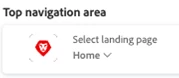
With this release, a new Home experience is launching. If your users land on Home (as set on their layout template as shown below) at the 23.3 release launch, they will land on the new Home experience.

If your users do not land on Home in their layout template as shown above and instead are directed to a dashboard, report, etc. the experience will not change. Users can still access Home if it is a widget in the Main Menu (waffle) per their layout template. Last, System Admins can opt users out of this new experience through two ways:

  1.  Allow users to opt-out in their own view by selecting the “Go back to the current home” button that will appear on their Home screen to go back to the old experience.
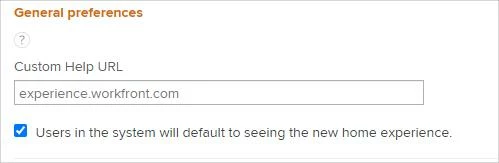
  2. In Preferences, unclick the option to allow users to see the new Home experience (screenshot below).

Community Advisor
July 11, 2023

Thank you so much for sharing that info, Randy. The anxiety of the forced change was starting to build, but it looks like I can mitigate that a bit by making sure none of my users land on Home. The new home "My Work" widget is enough for me to slam on the breaks on releasing the new home view to my users. I never fully appreciated all the options on Home until they were taken away in the beta.

skyehansen
Community Advisor
Community Advisor
July 10, 2023

broad summary: I think many of us who looked at it provided feedback around lack of custom fields (as well as filters and groupings); missing functionality such as work object delegation; concerns around nomenclature and its interaction with Terminology functionality; and last but not least, the need for governance. The feedback was well received, and I think it was a major factor in producing the checkbox to opt out of the functionality so that it wouldn't impact those users who rely on how Home currently works. I think the team is also working on improvements driven in some part by the feedback.


That said, if you have users on your team who have to log time frequently, or field requests through teams, these users are probably a good source for you to trial the New Home with.

FrancesDurhamEvans
Level 3
July 13, 2023

Adobe Workfront seems to, more than ever, have their own agenda regarding new features and functionality, forcing Sys Admins onto their immediate timeline. The new Home is a perfect example of where they are trying to be speed-to-market but key existing functionality is missing. 

Adobe Workfront - Please allow Sys Admins the ability to be strategic and intentional with the release of new updates for their instances! 


On a related note, it's wonderful that Randy still has a Customer Success Manager. Our dedicated Workfront CSM was taken away recently per Adobe Workfront’s new “dynamic support model.” It was unexpected and disappointing to lose this key partner that we have had for years, for our large, growing instance. We were told that the criteria to have a dedicated Workfront CSM has shifted to include an organization’s entire Adobe footprint, yet they wouldn’t share what type of footprint would be required in order to be able to transition back to the dedicated Workfront CSM model, to which other companies are still privy. Because we no longer have a dedicated CSM, it was an inefficient, time consuming, uphill battle to get just a portion of the information Randy’s CSM shared with him.

Heather_Kulbacki
Community Advisor
Community Advisor
July 20, 2023

I've opted our instance out of the new Home. We're working on implementation now, with completely new users most of them don't know enough about what they will need to see to set up Home themselves. Without a way for Admins to give them a starting place, we've decided to opt out for now.


BUT today we're seeing the blue bar across the top of the Home EVERY time we go back to Home no matter how many times anyone clicks the X. I've already had comments saying that is annoying and I'm sure I'll get lots more questions asking what this is and I'll have to spend time explaining that it's not ready for them yet.


If Admins decide to opt out, users shouldn't see something continuously asking them to opt in.

RandyRoberts
Community Advisor
Community Advisor
July 20, 2023

Just another example of Adobe thinking they know what's best for our users and taking away our governance. Pure arrogance.

Level 5
July 21, 2023

I was hoping I could replace my custom dashboard with the new home, but there aren't nearly enough filters, views or groupings at my disposal to do that switch. 


Mostly I am confused at the top that tells me how many tasks are due today, this week or this month but no way to actually see what those specific tasks are. That part isn't clickable. Am I missing something??

RandyRoberts
Community Advisor
Community Advisor
July 21, 2023

It isn't you that's missing something.

Level 5
July 21, 2023

So weird. Why is that information helpful if I can't see what the tasks are?! It's kind of anxiety-inducing. I have 10 tasks due today but no idea what they are!

Level 3
July 24, 2023

I agree, typically we're used to having a lot more control and prep for a rollout this big on the admin side. I missed the original announcements since it was buried in other release announcements and all of our users were blindsided by this rollout on 7/21. 


This dramatic change to our user experience should have been treated like the New Experience rollout with high-visibility on documentation, recommendations for implementation and system admin control on who sees the new view when. Just like the new experience rollout, we would have gradually introduced this new view, set up any templates if possible to make the view what admins see fit to start off with for our users, set up training and do a soft roll out before an official launch. 


We had to do an emergency communication to have everyone revert back to the current/old Home view for now until my admin team can figure out the new view ourselves, search through for documentation and plan out a transition plan properly, but I feel like we missed the boat on a huge change and Friday morning on 7/21 was very jarring to our users including myself. I would like to know when the current view will be discontinued so I can plan accordingly. I'm hoping there is communication/documentation out there that speaks more to this.

Level 4
July 24, 2023

I totally agree. Now some of my users have contacted me because it won't let them add something to the "to-do" widget. I checked and none of my worker license people can do it. In the release notes it does say some widgets are only available to certain license types, but it doesn't say which one and which licenses.


Why a worker license can't add something to a to-do list is beyond me. In addition, I do not like the fact that these show up on the timesheet. We do not want our user to log time to a 'to-do' item. We want them to log to a specific task, project, or even general hour category. 


I wish we would have opted everyone out of this, but we already sent a communication to our users. 

Heather_Kulbacki
Community Advisor
Community Advisor
July 25, 2023

Ugh, I participated in some of the demos of the Home widget while it was still in planning and repeated multiple times that To-Do items can't have time logged to them. As with the personal tasks from the current Home, they are technically connected to a project, but that project doesn't get created until someone creates their first personal task - and I, as an Admin, can't spend time constantly looking for these new projects in order to place the correct custom form on them for our billing process.

FrancesDurhamEvans
Level 3
July 25, 2023

Does anyone else find that the new Home blue banner instantly triggers the jarring thought that you are in a lower environment instead of Production? Poor color choice on Adobe Workfront's part for this banner as it is almost the exact same lower-environment blue and, as others have stated in this thread, it's not possible to make the banner go away even after clicking the X.  

Christina_Jarosz
Level 9
July 26, 2023

This deployed while I was on vacation...ouch.

Level 6
August 8, 2023

I agree with the sentiment that this is not yet ready for prime time. 


I've noticed that some users can log their time from the My Work module in the new home, but the time logging feature does not appear for everyone. Our normal process, across teams is for users to rely on their Home Worklist to manage work and log hours, so this inconsistancy is throwing a wrench in the works.  Has anyone else seen this or have suggesions on how to correct?


I also wish sort and grouping selections were retained.  Its' a hassle to have to reset them every time