How to create Request Form for users without Workfront log-in to use? | Adobe Higher Education
Skip to main content
AndersonDeLima
Level 2
December 21, 2022
질문

How to create Request Form for users without Workfront log-in to use?

  • December 21, 2022
  • 3 답변들
  • 3292 조회

Can we create a Request Form in Workfront that a user without a Workfront log-in can use? Meaning, any user with or without a Workfront log-in submit a request?

3 답변

Level 2
December 21, 2022

We use SSO.

AndersonDeLima
Level 2
December 21, 2022

Thanks for the reply. We also use SSO (Single Sign-On) for security purposes, but I am not sure how that will help users outside our company, meaning external users.   Some of our teams use other tools like Microsoft Forms, and Smartsheet Forms, and also offered in Google Forms, where the submitter can just add their email as the submitter, but there is no need to create an account with those platforms for them to use the Form. I am looking if there is a way to replace those Forms with a Workfront request Form, but give them the same ability for users without a Workfront account to easily use submit a request. Let me know if you think your idea is a solution. Thank you!

Level 3
December 26, 2022
Madalyn_Destafney
Community Advisor
Community Advisor
January 6, 2023

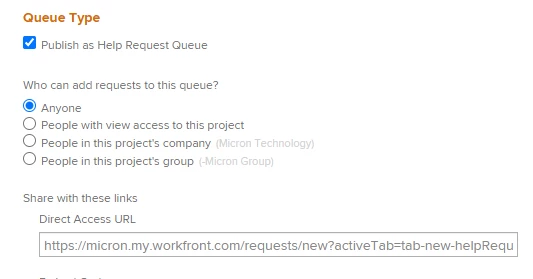
Hi there, have you tried creating a queue with 'anyone' can submit and as long as the folks you have in mind have the link to the form, I think they should be able to without a WF account...This is a screenshot of the project's (where the requests would go) Queue Details. The direct access URL is what they'd need if not in WF...maybe try setting up a fake one in preview and sending the link to someone you know not in WF to see if it works for them to access. 


One caveat, I think anyone who does submit to the queue and isn't in WF, they will be created as an 'external user' in your instance.


If this helped you, please mark correct to help others : )
lgaertner
Level 9
January 10, 2023

Hello,


unfortunately this will not work. Choosing the option Anyone here, does mean


Any Workfront user with an active account can view this request queue and add requests to it


Regards

Lars

Madalyn_Destafney
Community Advisor
Community Advisor
January 10, 2023

Hi, we use the 'anyone' setting and I know that people in our company without a WF account have submitted requests in the queue. As long as the link to the request queue is made available somewhere for these non-WF users to use, they should be able to submit a request. 

If this helped you, please mark correct to help others : )