
Have you seen the new project creation and template attachment updates planned for 21.4 release in Preview? | Adobe Higher Education
Skip to main content
Anna_Asatryan
Adobe Employee
Adobe Employee
September 15, 2021

Have you seen the new project creation and template attachment updates planned for 21.4 release in Preview?

  • September 15, 2021
  • 10 respostas
  • 5398 Visualizações

Hi All,

I wanted to draw special attention to the updates planned for the 21.4 release in the experience of creating projects from templates and attaching templates to projects in New Workfront Experience. We have updated the experience to allow you:

  • preview key information about the template before deciding if that's the one you want to use
  • quickly access the favourited templates without the need to scroll through all the templates in the systems you have access to
  • for the new project from template flow, see layout template configuration applied to that screen as well similar to edit project, project details pages

You can find more documentation about the functionality on our help site: Attach a template to a project, Create a project using a template and in the release notes.

In order to have smooth transition from the current experience to the new one in terms of having quick access to the favourite templates, we would recommend favouriting the most commonly used templates in production environment so that once the functionality is available you can continue seeing those in the dropdown for the new project creation. But don't worry, even if you/your users don't do that prior to the release the new search and preview template screen will make it super easy to find and favourite templates.
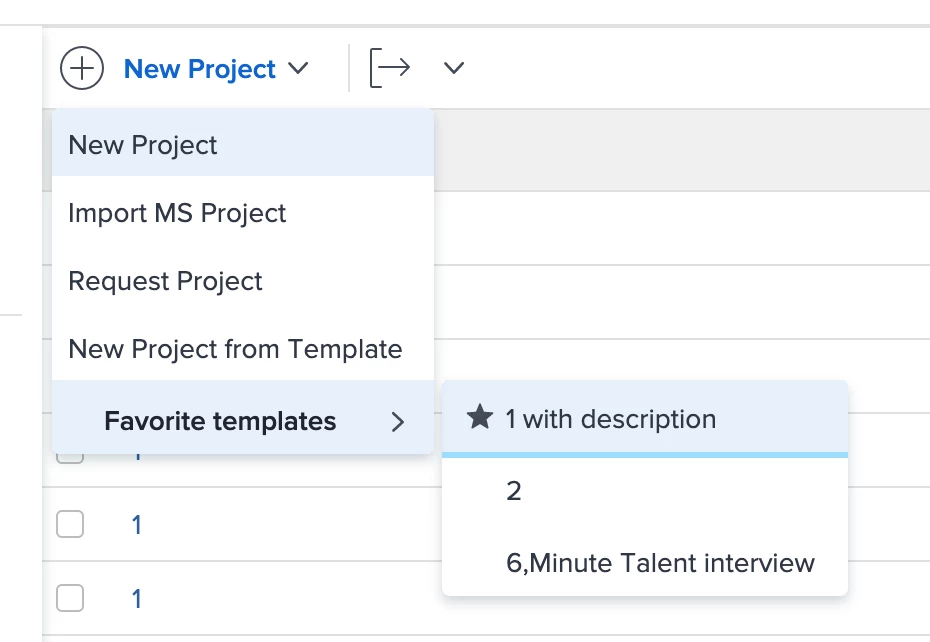
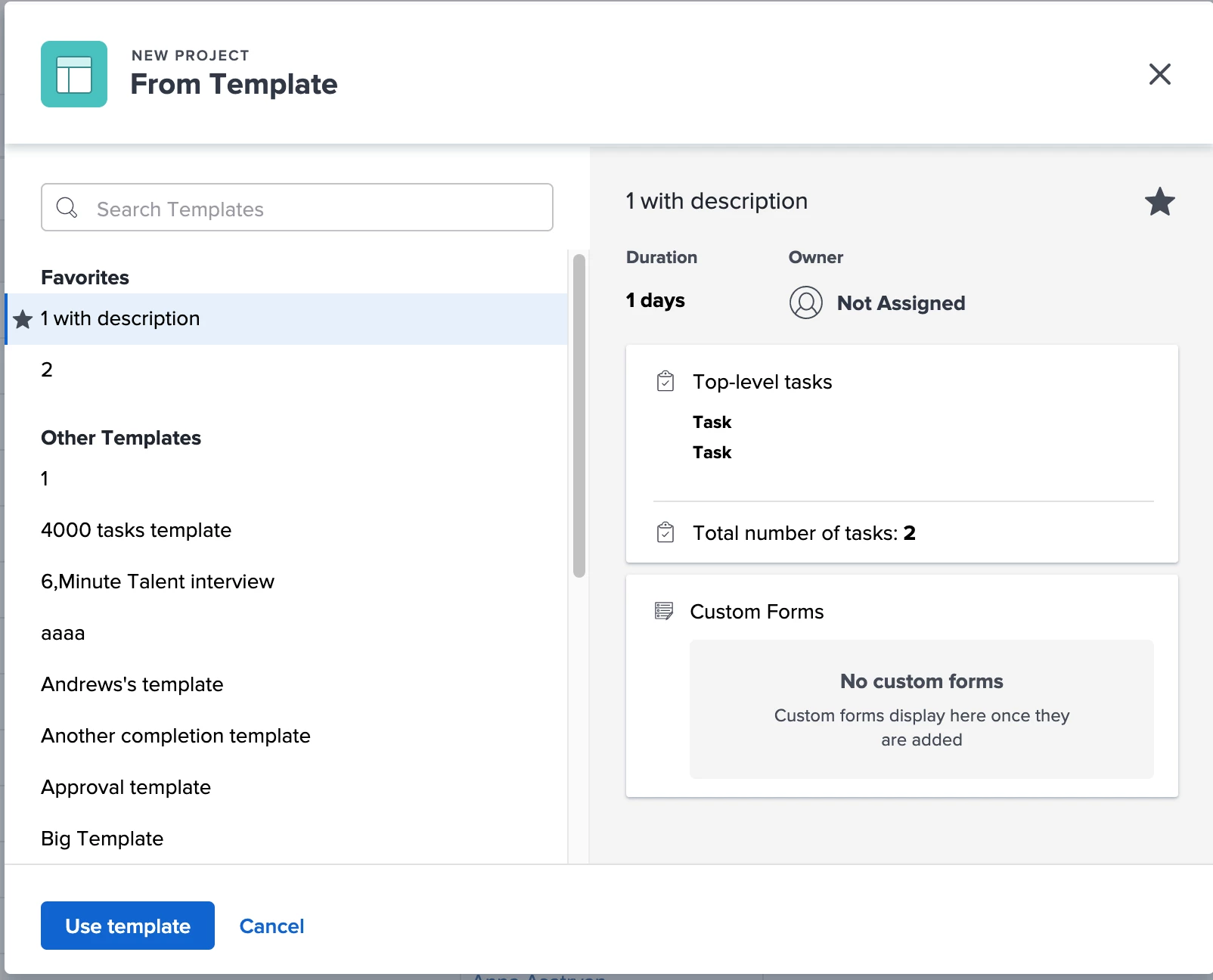
Please review this functionality in Preview and let us know if you have any questions/comments.

Kind regards,

Anna Asatryan,

Product Manager

Este tópico foi fechado para respostas.

10 Respostas

Level 4
September 20, 2021

Hi @Anna Asatryan‚,

I love this idea of marking templates as favorites due to the long list of available templates. I also like the preview of the template with the basic information on it.

I hope that this new appearance will also be implemented in the conversion process, e.g. 'Convert a request to a Project from Template'.

Kind regards,

Femke Crijns

Anna_Asatryan
Adobe Employee
Adobe Employee
September 20, 2021

Hi @Femke Crijns‚ ,

Thank you for your feedback!

Converting a request from template is something we are going to work on next!

Level 3
September 24, 2021

I like where you are going with the template preview but it is disappointing in the current iteration. The information shown in the preview does not distinguish one template from another in our use case. (Our templates all have the same top level task and the same custom forms attached). It would be more useful to have a description field or be customizable.

Thanks,

Nancy

Anna_Asatryan
Adobe Employee
Adobe Employee
September 27, 2021

Thank you for the feedback Nancy! We will be definitely collecting feedback for future enhancements.

Wondering though, what's the difference between the templates except for the description? Are the number of tasks, duration, planned hours, owner identical? I understand that a template user might know all this by heart but if they use the template frequently some of these key components can be something they can orient by.

Thank you in advance for the additional information.

Level 3
September 27, 2021

Hi Anna,

Number of Tasks, Duration, Planned Hours, and Owner vary by template but are not enough to distinguish differences between the templates in order to select one.

Key information that would be helpful to select a template is being able to see if the template includes specific task trees (e.g. does the template have Location Photography tasks, or Studio Photography, does it include Premedia, or Printing?), if these were shown under "Top Level Tasks" , that would be great but I only see the highest level Parent Task which encompasses the entire project from start to finish and is the same on all of our templates.

Custom Fields: We have many custom fields on a project and some of them could be used to distinguish the difference in the template.

Other distinguishing items: Milestone Path, Program.

Regards,

Nancy

Level 3
September 27, 2021

@Anna Asatryan‚

I'm looking forward to seeing this feature once we are able to convert an ISSUE into a project and then select a template.

Any idea of a launch date for that missing piece?

Anna_Asatryan
Adobe Employee
Adobe Employee
September 27, 2021

Hi Jonathan,

The conversion through a template workflow is currently targeted for the next release, i.e. 22.1. We will do our best to get it to preview environments as soon as it's ready.

Thank you for your patience!

Level 4
October 4, 2021

Hi @Anna Asatryan‚ - super happy to see this additional favoriting functionality! Definitely helps remove some noise when scrolling through a large list of templates.

We're seeing a minor bug in which the warning message doesn't display alerting a user that they're over their 40 maximum favorites when you over-allocate favorites in this new "Template Preview" window . I'll tag you in a support ticket I've just opened detailing the issue.

Anna_Asatryan
Adobe Employee
Adobe Employee
October 4, 2021

Thank you Satchell!

I am glad that the functionality will help eliminate the frustration of finding the right template.

For the bug, I am glad to say that it's been fixed internally and should be in production with the release.

RandyRoberts
Community Advisor
Community Advisor
October 5, 2021

When we can hide the New Project choice and force template use, I'll be happy. And maybe hide the MS Project Import, it's just in the way for the vast majority who will never use it.

Level 4
October 7, 2021

Yes, I would also encourage this idea of hiding the New Project option to force template use.

Great suggestion!

Anna_Asatryan
Adobe Employee
Adobe Employee
October 8, 2021

Hi Randy, Femke,

Thank you for providing the feedback, we weren't able to get to this due to other priorities but we might revisit this in the future. I wish I could provide better news here.

skyehansen
Community Advisor
October 8, 2021

I like the new functionality. I will definitely be looking in preview over the next couple of months to see it made available to those converting a request to a project.

I'd love to see some functionality added to layout templates to that we can configure what shows up in the "template information" section.

Thanks Anna! Great job.

Anna_Asatryan
Adobe Employee
Adobe Employee
October 11, 2021

Thank you for the feedback Skye! We will take into account the feedback for the future improvements.

ChrisBudgen
Level 5
October 11, 2021

We found one - for us - major issue (ticket with Support pending): if you have custom forms on the templates to which the user creating the project from the template has no access to (because they will be used by another user along the process), the project cannot be created anymore. This worked well before this release and due to this bug, a big portion of our over 1k plan/work users were blocked last week :-(

Anna_Asatryan
Adobe Employee
Adobe Employee
October 11, 2021

Hi Chris,

I apologise for the problems we have caused with that workflow. The ticket is with the development team, the fix is in place, and after the testing round it will be included in this week's patch.

Level 3
October 13, 2021

HI @Anna Asatryan‚

Thanks for getting this fix pushed this week with the patch. Can you confirm exactly what this fix will correct and what other fixes will be pushed in this patch (if any)?

Also when do you expect the patch to go live?

Thank you. 🎃

Level 2
October 11, 2021

Hello,

If you favorite a template, does it become a favorite for that single user or all users in the organization? Thanks

Anna_Asatryan
Adobe Employee
Adobe Employee
October 26, 2021

Hi Kristine,

Sorry for the delay in replying to you.

Favouriting applies only to the currently logged in user, not for the whole organisation.

Let me know if you have any additional questions.

skyehansen
Community Advisor
January 4, 2022

hi @Anna Asatryan‚ thanks so much for making the favorited templates available in request conversion for release 22.1. I'll be testing this out over the next few days but very excited to talk to my users about this.

I'm less excited about the new "Convert to a blank project" for two reasons:

1) I can't really trust users to know what a blank project is. A certain number of them assume any new project is "blank".

2) I feel like so many customers WANT their users to use templates that making this option "first" or easier to get to, really doesn't help. It would have been nice to hide this at the bottom of the list (e.g. here's a list of templates and at the bottom, the "I have no template" option) or better still, if you can give the system admins the ability to hide the line option for blank project I know at least a couple of us would be thankful.

That said, I am looking forward to 22.1.

Anna_Asatryan
Adobe Employee
Adobe Employee
January 5, 2022

HI Skye,

Thanks a lot for your feedback and readiness to test the functionality prior to the release. That does help us to prevent any unforeseen problems.

For the blank project option: I am hearing more and more of similar feedback. Since we are going to update the experience of converting to blank project as well, I will review the possibility of introducing the ability to control the visibility of it.

I might reach out to you for additional information around that topic.

Heather_Kulbacki
Community Advisor
Community Advisor
January 10, 2022

Agree with Skye on the "Convert to blank project." We wouldn't want our project managers using this. We have a "No Tasks" template which allows them more customization of the tasks they need, but includes the custom forms that all our projects need in order to pull into various reports.

RandyRoberts
Community Advisor
Community Advisor
January 10, 2022

Having a favourites option for templates is useless for us unless the admins can set the favourites. That way we can put the templates they need right in front of them.

I get that Workfront wants to empower everyone but the reality is when it's left to the everyday users with no oversight, it becomes a jumbled mess. Their job is to get work done, not to organize and manage Workfront.

Anna_Asatryan
Adobe Employee
Adobe Employee
January 24, 2022

I totally understand your point, Randy. At this point, unfortunately, there is no other way to add items to favorites. We did our best to make the experiencing of favoriting the templates while converting the issues or creating projects as easy as possible, so that users don't have to do a lot of actions. We hope that will reduce the maintenance on the end user side.