Filtering when adding a Dashboard to a Task | Community
Skip to main content
Level 2
October 14, 2025
Question

Filtering when adding a Dashboard to a Task

  • October 14, 2025
  • 1 reply
  • 320 views

Hello, 

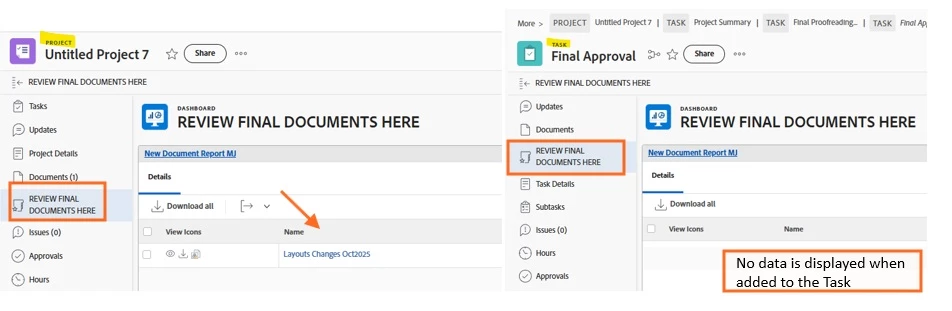
I created a Dashboard that will display Documents only from one specified folder ("Final").  When added at the Project level it works well, but when added to the Task level it displays no value.

How do I modify the text mode:

EXISTS:a:$$EXISTSMOD=EXISTS

EXISTS:a:$$OBJCODE=DOCFLD

EXISTS:a:documentID=FIELD:ID

EXISTS:a:folder:name=Final 

EXISTS:a:folder:name_Mod=eq

so that the Dashboard applied to the Task displays documents from the Project "Final" folder when accessed from the Task?

Thanks!
1 reply

JustinRenteria2
Level 6
October 14, 2025

Does the task have any documents on the Documents tab?  The screenshot does not show a number next to the "Documents" tab on the task like it does for the Project.  On the project it shows: "Documents (1)"  which indicates there is one document on the project. 

Level 2
October 14, 2025

Documents are only added at the Project level, in predetermined template folders.  Hence the need to see the specific "Final" folder contents while in the "Final Approval" task to ease the Approvers process of finding the documents to review (uploaded in the "Final" folder at the Project level).

Thanks!

JustinRenteria2
Level 6
October 14, 2025

Oh that wont work then. When you add a dashboard to an object, the dashboard filter will be constrained to that object and that object only.