Display: Comma separated numbers in custom fields and calculated fields | Community
Skip to main content
July 17, 2025
Question

Display: Comma separated numbers in custom fields and calculated fields

  • July 17, 2025
  • 2 replies
  • 507 views
  1. Is it possible to display numeric values with comma separators in both input custom fields and the associated calculated fields for better readability?

  2. Currently, when users update the underlying custom fields multiple times after saving the input form, the calculated fields do not reflect these changes dynamically. Is there a way to auto-refresh the calculated fields to reflect the latest updates without requiring an additional save?

 

2 replies

Kurt_Jones
Community Advisor
Community Advisor
July 18, 2025

ApaliNa1 -

I'm not sure I'm understanding your items but for 1, you could try to use the Validation filter to see if the field contains a comma to help the user input the comma.  For 2, calculated fields should be auto-refresh so if you're not seeing that happen then open a support ticket.  Again, I can't see what you're looking at to better understand but hopefully this provides some direction.

ApaliNa1Author
July 25, 2025

Hello, 

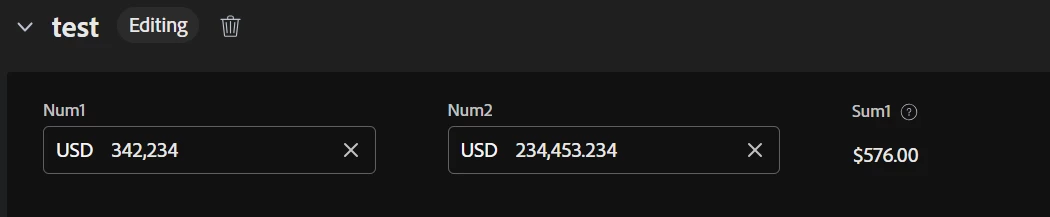
Sharing the snippet: When I use Num1 and Num2 as currency field with a calculated field Sum (currency)with expression,its not calculating the digits placed after comma and the sum value too is incorrect: refer below screens


NUMBER(SUM({DE:Num1},{DE:Num2}))
 

Question is :How can I use other currency option besides USD in custom fields and how to accurately calculate sum of currency values?

2:what's the best way to define cross currency values in a custom from and introduce fx rates for conversion to base local currency.


ApaliNa1Author
July 25, 2025

The ask was simple by business, I want the money values to be separated by comma as we done in International Number system format, for better readability.

kautuk_sahni
Community Manager
Community Manager
July 29, 2025

@apalina1 Just checking in — were you able to resolve your issue? We’d love to hear how things worked out. If the suggestions above helped, marking a response as correct can guide others with similar questions. And if you found another solution, feel free to share it — your insights could really benefit the community. Thanks again for being part of the conversation!

Kautuk Sahni