Adobe Workfront 2021.2 Release | Community
Skip to main content
Adobe Employee
May 14, 2021

Adobe Workfront 2021.2 Release

  • May 14, 2021
  • 6 replies
  • 4971 views

This week we rolled out our Adobe Workfront 21.2 release! You can find more information about the new enhancements of this release on the Product Release page. If you have questions that arise about any of the new features released, please comment below in this thread and I’ll be sure to address them or get the right people here to respond.

This post is no longer active and is closed to new replies. Need help? Start a new post to ask your question.

6 replies

May 14, 2021

Hi there!

This is feedback on the new placement of "Projects I'm On" and "Projects I Own" In the Projects header area. I understand this was to increase the visibility of these options, but from a UI perspective, it is leading our users to think these can be used as supplemental to any filtering options they've already applied to the project list.

For example, someone has selected a View, Filter, and Grouping, with a filter for certain project attributes, which narrows the list of projects accordingly. Then they think when they select either Project I'm On or Projects I Own, Workfront will further narrow the existing list by this additional criteria (not just completely change the filter.) The expectation is that it will act as a 'refine filter' capability and they're disoriented when it gets rid of the filter they had configured/selected.

I can sort of see where they're coming from, the placement and visual treatment of these new options does make it seem like it's different from setting a filter through the filter control. These are users in NWE, by the way, and many of them never used Classic.

Final 2 cents is that I think it would actually be really cool if it did work the way they think it does :-).

Thanks!

jbostonAdobe EmployeeAuthor
Adobe Employee
May 14, 2021

Great feedback and thank you for passing along this from your users! Yes, this update was to increase the visibility of these two filters. I have sent this feedback directly to the Product Manager.

May 19, 2021

Hey Josh,

One other comment on these buttons - we noticed that the 'Projects I'm On' and 'Projects I Own' filters shows inactive/complete projects. It would be great if it only showed the active projects. Is this something that you are looking into?

Thanks!

May 14, 2021

I love the new release feature for recurring task! Does anyone know if there is a way to make the parent and child tasks recurring as well? For example, we create and deploy monthly emails and would like keep the Parent/child tasks grouped together and recurring as opposed to the individual copy, design, review and deploy tasks being grouped together when set to recurring . I hope this makes sense. Thanks

jbostonAdobe EmployeeAuthor
Adobe Employee
May 14, 2021

Thank you for the feedback Kathleen. I am not aware of a way to have recurring parent and child tasks as you are detailing with this new feature. However, I have reached out to the Product Manager over this area to help provide more clarity or a possible workaround. We will follow back with you as soon as possible.

May 17, 2021

Good morning. I'm not sure if this is related to the new release or something else...when we go to assign someone to a task, it does not appear to be recognizing secondary job roles. For example: we have a co-worker that has copy editor as her primary and copy writer as her secondary job role. Previously, if I would assign her to a task that had the copy writer job role attached, the job role would go away once I assigned her. Today, the job role only goes away if I assign her to a task for copy editor, her primary job role. I have to now manually delete the job role if I assign her to a copy writer task.

May 18, 2021

Good morning,

We noticed on our "New Request" form, a few of the fields that were obvious dropdown choices previously now appear to be free form fields. When you click into the field, you see the available dropdown choices . Not terrible, but the confusing part for our users: You can type something else into the field, but then receive an error message stating this is a required field. Additionally, the "dropdown" choices that appear look very similar to the autofill suggestions that appear on what are truly free form fields. Will this be updated, or do we need to re-do our forms? Thanks.

Adobe Employee
May 20, 2021

Hi James,

I'm sorry to hear that you had trouble with drop-downs in the request form.

I just wanted to let you know that we are looking into ways to update the look & feel of drop-down fields to avoid any confusion with free form fields.

That is on our radar, and I'll post an update once the changes are finalized.

I hope this helps.

Thanks,

Gevorg

May 20, 2021

Thanks for letting me know Gevorg. Good to know you're looking into it.

James

May 25, 2021

Hi,

I have a few minor problems with the new release:

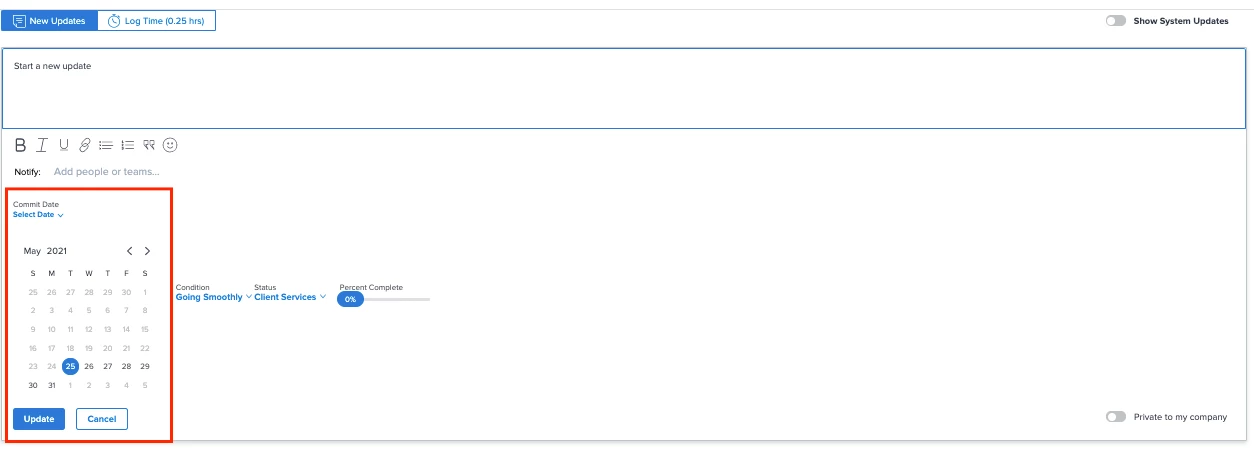
In the conversations, we now have the "Commit Date" pop-up in the "New Updates" field. How do I remove this?

Also the Text Formatting in Custom Forms is awesome, but it's missing the functionality of the other fields. We can't use the calculated field on the text formatting fields.

Best,

May 26, 2021

Yeah we need the Commit Date calendar gone as well. We don't use commit dates and it's a huge waste of screen real estate having it auto-open like that.

May 26, 2021

Yeah I am sticking my head in the sand rather than worry about misuse of this suddenly in-your-face calendar.

June 4, 2021

I followed the instruction on creating a journal report to determine the various status of a project and determining when the project was changed to that status. But I did not get the desired results following the instructions in the article. This is a highly requested feature. I am excited it is available. Now I need more information on how to make it happen.

jerflo
Adobe Employee
Adobe Employee
June 4, 2021

Hi @Benetta Perry‚ - thanks for posting and for your excitement in regards to this new report. This article contains instructions on how to build a report that shows what status changes occurred. Search See What Status Changes Occurred; Is this the article you referenced?

June 8, 2021

"See what status changes occurred" Attached is the results of my following the instructions. I can't see how to update this easily. Still working on it. This is all from 1 project. The column "task" is throwing me off because I am wanting to see the "project" status change - not a task status change. Again, I followed the instructions. Thanks for your help.