


Add some visual pizzazz to your Workfront
Creative teams tend to have users that are very visually-oriented. Here are some ideas to make Workfront more user-friendly and enticing for the team (even for groups outside of Creative)!
Encourage everyone to have a profile picture
Especially as your user base grows, you’ll start having duplicate names. A picture helps everyone ensure they’re tagging the right person in updates, tasks, etc. A picture can be much easier to identify in a list than rows and rows of the default gray user icon. Putting a face with the work can make a remote work setting feel more personal, too. Their picture doesn’t necessarily have to be their face though, just something unique to them - a pet, an emoji, or even a favorite character works, too.
Use color in your views and reports
Make information easier to digest at-a-glance. Is something past due? Turn the box red using conditional formatting. Just be careful not to make everything a color - only call out what’s really important. Below, I'm comparing the planned completion date with the wildcard $$TODAY, so the report is always up-to-date.
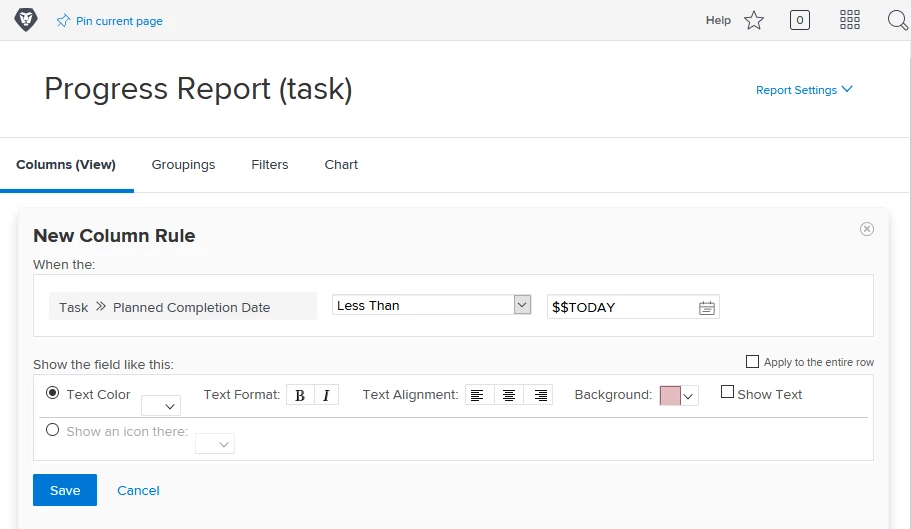
Want to take it to the next level?
You can customize the colors by changing the Hex color code in text mode. Swap the six digits with the six digit color of your choice. If you're not familiar with hexadecimal color codes, there are tons of hex color tools online or you can search something like "hex teal color" or "hex magenta code" online and find a shade you like. Only put in the numbers here, you don't need the #.
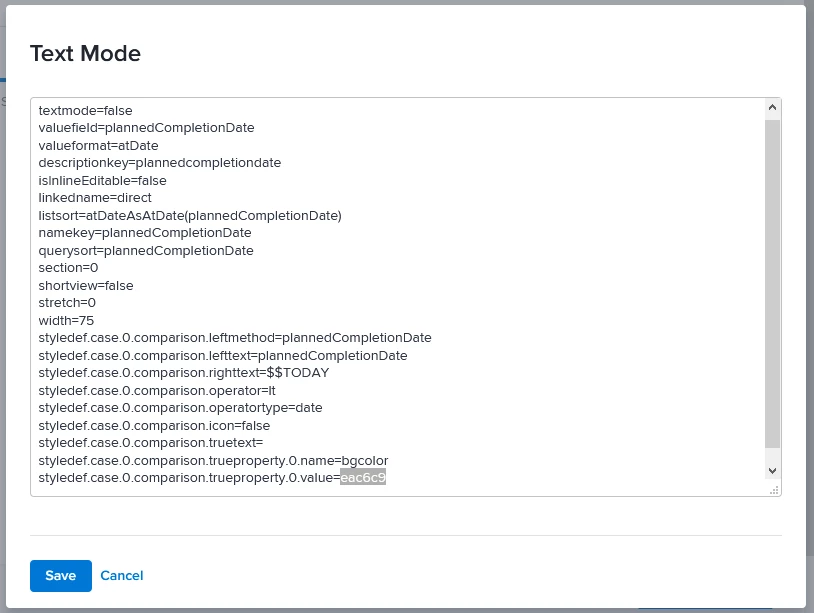
Pro tip: Build out the report or view exactly as you want it before you go into Text Mode to change the colors. Any edits you make in Text Mode can make it a little more complicated to update in the future. You may lose some settings if you switch back to Standard Mode. Color adjustment should be the very last thing you do. You’ll also want to make sure you view your work when you’re done to ensure the text is still legible on the background color.
This blog post walks through a similar example and also has some great details on how to update colors on charts, too.
What are some things you’ve done to help your creatives visualize their work in Workfront?
@Creative Agencies‚ @Marketing‚




