Need ordered list to continue numbering when first steps are a conref | Community
Skip to main content
Level 3
August 18, 2022
Solved

Need ordered list to continue numbering when first steps are a conref

  • August 18, 2022
  • 2 replies
  • 1179 views

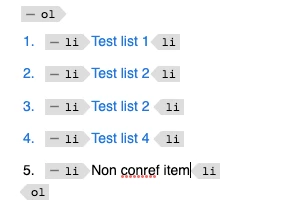
The first three steps of my content are an ordered list that I conref into the topic. I need to have the ordered list continue numbering after the first three steps and not start over at 1. How can I do this?
This post is no longer active and is closed to new replies. Need help? Start a new post to ask your question.
Best answer by GunjanK

Here you have conref on the ordered list. That is why you cannot edit inside the ordered list.


If you want to extend the ordered list and use conref, then use conref on the list item. You can also use conrefend to have multiple list items as conref. This way, you can add a new list item to the ordered list with list items using conref.


2 replies

Adobe Employee
August 18, 2022

You last <li> is under a separate <ol>, that's why the number is restarting. Can't you move this <li> in the previous <ol>? If that is not an option then you can put outputclass and restart the number from 4. But it will be error-prone, if the number of <li> in the previous list changes then this will go out of sync.

ndlholm1Author
Level 3
August 18, 2022

When I attempt to add a new <li> within the conref <ol> it continues the numbering, but it's trying to add it to the conreffed list. 

I've tried adding a new <li> by placing my cursor and pressing enter after the last <li> in the conref list, but it just adds a new <p> element.  

GunjanKAdobe EmployeeAccepted solution
Adobe Employee
August 19, 2022

Here you have conref on the ordered list. That is why you cannot edit inside the ordered list.


If you want to extend the ordered list and use conref, then use conref on the list item. You can also use conrefend to have multiple list items as conref. This way, you can add a new list item to the ordered list with list items using conref.