In the AEM Guides Repository Panel, can't see the "Author", "Manage" and "Output" tabs | Community
Skip to main content
Level 2
December 22, 2023
Solved

In the AEM Guides Repository Panel, can't see the "Author", "Manage" and "Output" tabs

  • December 22, 2023
  • 1 reply
  • 1202 views

When viewing a DITA Map in Guides I'm trying to see the "Broken Links" report. However, I can't even get to the "Manage" view in the AEM Guides repository panel because the "Author", "Manage" and "Output" menu links aren't even there. (see attached screenshot of what I SHOULD be seeing but am not seeing). Everyone else on my team can see the links. When I am logged in as others, I still cannot see the links and when I am logged in as an Admin, I can't see the links. When others are logged in as Admin, they can see the links. I'm running AEM 6.5.1.9.0. and maybe Guides 4.3.0 although I'm not certain because I don't know where to look to confirm this. Any guidance on this would be greatly appreciated.
 

This post is no longer active and is closed to new replies. Need help? Start a new post to ask your question.
Best answer by DivrajSingh

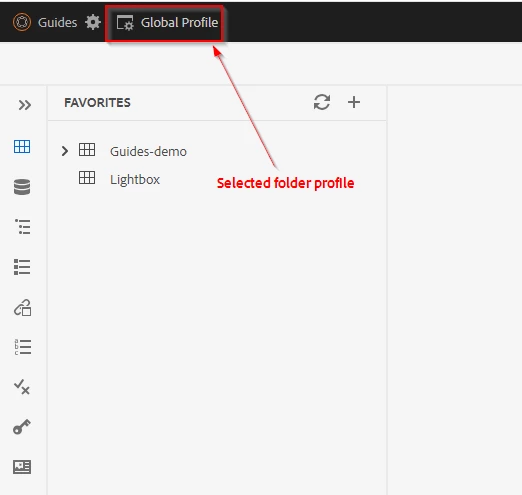
@davidl38471046 : Probably check the Folder Profile selected on the webeditor (See [1]) and for that folder profile re-upload the default ui_config.json from the Folder profile - check this tutorial to know where can you do this with Folder Profile - check this document/tutorial


Also, since you said that others are able to see those tabs - you can check which Folder Profile they are working with. You may have to switch to that Folder Profile in web-editor to see similar behavior.


One of the above should resolve the issue.


[1]: webeditor selected folder profile


1 reply

Adobe Employee
December 22, 2023

You must open a map file to see the Manage and Output tabs. Try and let us know if you still face the problem.

Level 2
December 22, 2023

I have a map file opened and still cannot see the Manage and Output tabs. Thank you for the reply. What other things might be causing this issue?

Adobe Employee
December 23, 2023

Try in incognito mode of the browser. Just trying to rule out any caching issues.