How to customize name field lower case for the create new topic popup in the advanced map editor | Community
Skip to main content
Level 4
November 6, 2023
Solved

How to customize name field lower case for the create new topic popup in the advanced map editor

  • November 6, 2023
  • 1 reply
  • 1649 views

Hi,

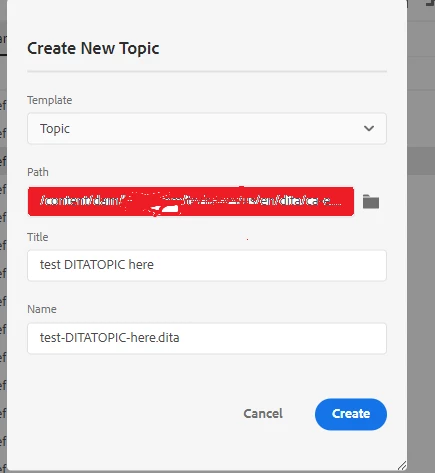
Is there any way to make name field lowercase  for the create new topic popup in the advanced map editor. Also please suggest what is the path in the lib folder ?

I customized \libs\fmdita\xmleditor\wizard\createditatopicwizard\.content.xml path by copying \apps\fmdita\xmleditor\wizard\createditatopicwizard\.content.xml, but it is working only when we create from dam folder.


This post is no longer active and is closed to new replies. Need help? Start a new post to ask your question.
Best answer by AswiniLakshminarayanan

This was fixed for on-prem in 4.3.1 Version. 

1 reply

Adobe Employee
November 6, 2023

Which version of Guides are you using? This lowercase conversion is already available for the cloud release. Will update here shortly for the on-prem release version.

Ref no. DXML-11316

file location: /libs/fmdita/clientlibs/titletoname/js/title2name.js

AswiniLakshminarayananAdobe EmployeeAccepted solution
Adobe Employee
November 7, 2023

This was fixed for on-prem in 4.3.1 Version. 

Beaula123Author
Level 4
November 7, 2023

Hi, 

We recently upgraded our Guides to 4.3.

Thanks