How do I search through my map for all conrefs? | Community
Skip to main content
Level 2
September 16, 2022
Solved

How do I search through my map for all conrefs?

  • September 16, 2022
  • 1 reply
  • 1161 views

I have a map migrated from another CCMS with a couple hundred topicrefs. Within these are the occasional conref, targeting an element in one of several topics that are not included in the map as topicrefs.
To follow best practices, I want to find all of these conrefs in the map--in whichever topic they may appear--and link these conref targets as "processing-role=resource-only". I can't seem to find a way to search inside the map for these... does anyone know how I can do that?

This post is no longer active and is closed to new replies. Need help? Start a new post to ask your question.
Best answer by punagpal

If you are using AEM Guides build 4.2 then you can see these in following way :

  • Open Guides editor
  • Open your map
  • Go to manage tab
  • Got to Reports -->TopicList
  • You can see all files which are refereed indirectly i.e (could be conferred files  )


if you are using earlier than AEM Guides build 4.2 then , follow :

  • Open given ditamap in map dashboard
  • Go to Baseline
  • Create new baseline
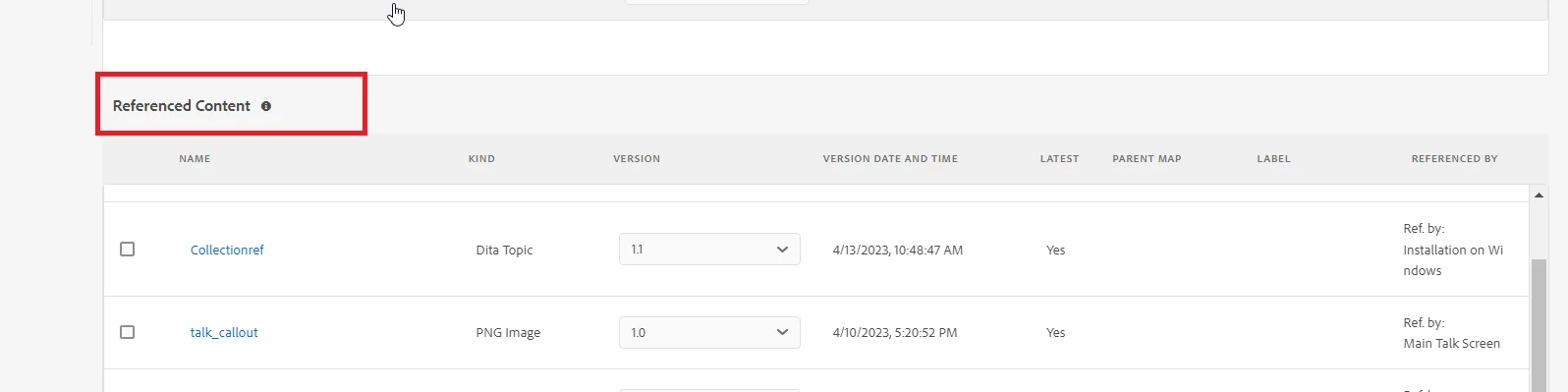
  • Scroll down and you will see section "referenced content " , It will contain all indirectly conferred files in map


1 reply

punagpal
Adobe Employee
Adobe Employee
January 6, 2023

@eric_amble 

Few questions to understand better 

  1. Are you using UUID or Non-UUID AEM Guides?
  2. Are these conref broken or its just that they are not included in Map as topicref?

-Pulkit Nagpal

Level 2
January 19, 2023

Hi Pulkit,

This is for the UUID version of AEM Guides, and the conrefs are not broken--they just target a variety of 'boilerplate'-type elements in other topics elsewhere in the DAM.

Thanks,
Eric

punagpal
Adobe Employee
punagpalAdobe EmployeeAccepted solution
Adobe Employee
April 18, 2023

If you are using AEM Guides build 4.2 then you can see these in following way :

  • Open Guides editor
  • Open your map
  • Go to manage tab
  • Got to Reports -->TopicList
  • You can see all files which are refereed indirectly i.e (could be conferred files  )


if you are using earlier than AEM Guides build 4.2 then , follow :

  • Open given ditamap in map dashboard
  • Go to Baseline
  • Create new baseline
  • Scroll down and you will see section "referenced content " , It will contain all indirectly conferred files in map