'Failed to download asset' error message using Guides 4.01 and FrameMaker 16.04 | Community
Skip to main content
Level 2
April 10, 2023
Solved

'Failed to download asset' error message using Guides 4.01 and FrameMaker 16.04

  • April 10, 2023
  • 1 reply
  • 995 views

I'm suddenly receiving an error message when trying to open a topic or ditamap via FrameMaker 16.04 connecting to AEM 4.01 via the connection manager. Connection to AEM is successful, but opening of topic/ditamap is not. I can connect to another AEM server instance and topics/ditamaps open without fail. I'm not sure if this is a FM issue or an AEM issue; posting here in hopes someone else has seen it. I've tried rebooting, restarting FM, resetting the AEM connection in FM via the conneciton manager. All fail.
This post is no longer active and is closed to new replies. Need help? Start a new post to ask your question.
Best answer by punagpal

To fix this ,

  • Open FrameMaker
  • Go to Edit->Preferences ->CMS->Adobe Experience Manager
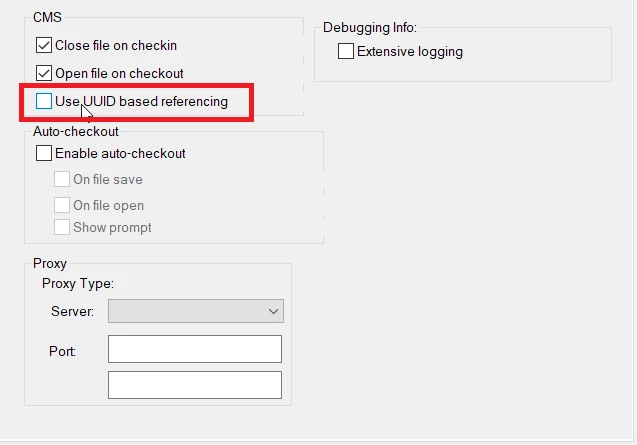
  • Make sure "Use UUID based referencing " checkbox is checked if you are using UUID based AEM Guides and unchecked if you are using Non-UUID based AEM Guides.


    Let me know how it goes for you

1 reply

punagpal
Adobe Employee
punagpalAdobe EmployeeAccepted solution
Adobe Employee
April 11, 2023

To fix this ,

  • Open FrameMaker
  • Go to Edit->Preferences ->CMS->Adobe Experience Manager
  • Make sure "Use UUID based referencing " checkbox is checked if you are using UUID based AEM Guides and unchecked if you are using Non-UUID based AEM Guides.


    Let me know how it goes for you
sfrostAuthor
Level 2
April 11, 2023

This is the fix! Thanks so much!