Expand my Community achievements bar.

SOLVED

conkeyref behaviour in the Attributes panel for Prolog elements

Avatar

Level 2

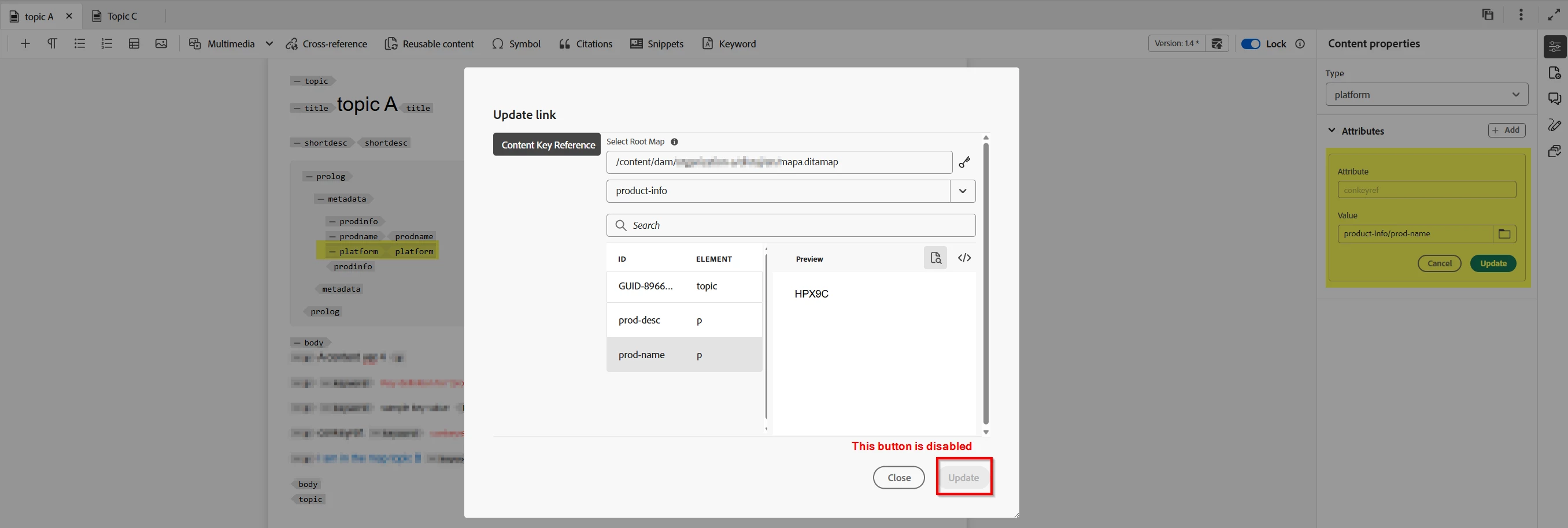
I want to use conkeyref to add values for elements in the prolog, for eample, prodname or category. I have created the required keys and bound it to the map/topic. I am able to add the conkeyref in the content of the topic, say within a <p> tag, but not with the Prolog. The key list is displayed, but upon selection of a key, the Update button in the dialog box is displayed. So, I used the source mode, and added the conkeyref. It picks up as conkeyref within the prodname or category is DITA valid. 


In short, here is the observed behavior:

  • The Attributes panel in Web Editor does not allow updating conkeyref on elements inside <prolog>.

  • Even using “Insert → Reuse Content” or moving the conkeyref to a dedicated attribute on <prodinfo> does not enable the Update button in this context.

Is there a configuration that I am missing? OR is this an out-of-the-box behavior in AEM Guides. There’s no configuration to get the conkeyref working for Prolog from the Author view of Web Editor using the Attributes panel.


@DivrajSingh Please confirm. 


1 Accepted Solution

Avatar

Correct answer by
Employee

@AravindAnand : to understand this - do you mean that:

  • the usage of conkeyref (sample)
  • does not allow you to update the conkeyref in author mode i.e. the "Update" button is disabled? 
  • and you are able to add the expected value in source mode?

See screenshot below [1] from what I understood from your problem statement


Please confirm if this is what you are facing.


[1]

DivrajSingh_0-1761705398501.png


View solution in original post

8 Replies

Avatar

Employee

Hi there, 


By rule, <p> is not allowed in the prolog. 

lsteinbacher_0-1761655490051.png

It is meant for topic-level metadata. 

lsteinbacher_1-1761655573015.png

Try creating a keydef that uses one of the allowed elements within prolog. Then you should be able to conkeyref that element.


lsteinbacher_2-1761655901038.png


lsteinbacher_3-1761656005028.png

I hope this helps. 


Avatar

Level 2

Thanks @lsteinbacher for your input. I will try what you have suggested. On other hand, if <p> or <ph> is not allowed for any of the elements prolog, how is that I am able to add <conkeyref> in source mode. If it is a violoation of DTD structure or AEM constraints, an error should be displayed and the file should not be saved. That is not case. When <conkeyref> is added in the source mode, it seems to accept, but not through the UI dialog box. Any reasons for it? 

Avatar

Employee

Can you send me a screenshot of your conkeyref in source mode? When I try to add a <p>, I get an error message. 


lsteinbacher_0-1761663960861.png


Also, <ph> is allowed in some contexts within the prolog. 


lsteinbacher_1-1761664138260.png


Avatar

Level 2

Thanks @lsteinbacher for trying it out. You are right <p> tag is not allowed in the prolog. You may be aware that conrefkey is an attribute that can be used for any of the DITA elements, including ones in prolog; for example, <category> or <author>, and so on. So, which one cannot add a <p> tag directly in <prolog>, conrefkey can be defined as an attribute of a DITA element in prolog. I have attached screenshot for reference to describe the issue that I am facing.  

conkeyref-issue-aemguides.png

Avatar

Correct answer by
Employee

@AravindAnand : to understand this - do you mean that:

  • the usage of conkeyref (sample)
  • does not allow you to update the conkeyref in author mode i.e. the "Update" button is disabled? 
  • and you are able to add the expected value in source mode?

See screenshot below [1] from what I understood from your problem statement


Please confirm if this is what you are facing.


[1]

DivrajSingh_0-1761705398501.png


Avatar

Level 2

Thanks @DivrajSingh for your response. Yes, the issue is just as you have described. I have attached screenshot for your reference. 

Avatar

Employee

Thanks for confirming.

Please raise a support ticket for this - this should be logged as change request in product.

Avatar

Level 2

Thanks; will raise a support ticket for the issue described.