AEM Native PDF: Print=No, ToC=No | Community
Skip to main content
Level 4
June 10, 2024
Solved

AEM Native PDF: Print=No, ToC=No

  • June 10, 2024
  • 2 replies
  • 1736 views

Hi there!


I'm trying to suppress some topics in a map from making it to the Native PDF output. For these topics, I'm using the attribute of print=no. Is there something that I need to set up in a stylesheet to prevent these topics showing up in the PDF? Is conditionalizing the only way to currently accomplish this? Can I utilize deliverytarget for this somehow?

I have a similar question with the toc=no attribute. We had previously used this to suppress ToCs in our old system. Is there another method for making this work? Is another Native PDF template without the ToC the way to go?


Thanks for your help!

Josh
This post is no longer active and is closed to new replies. Need help? Start a new post to ask your question.
Best answer by PrashantPa

@timdo3 ,

You can achieve this by applying outputclass to the topicref which you want to exclude like below: 

<topicref href="topic.dita" outputclass="no-toc"/>


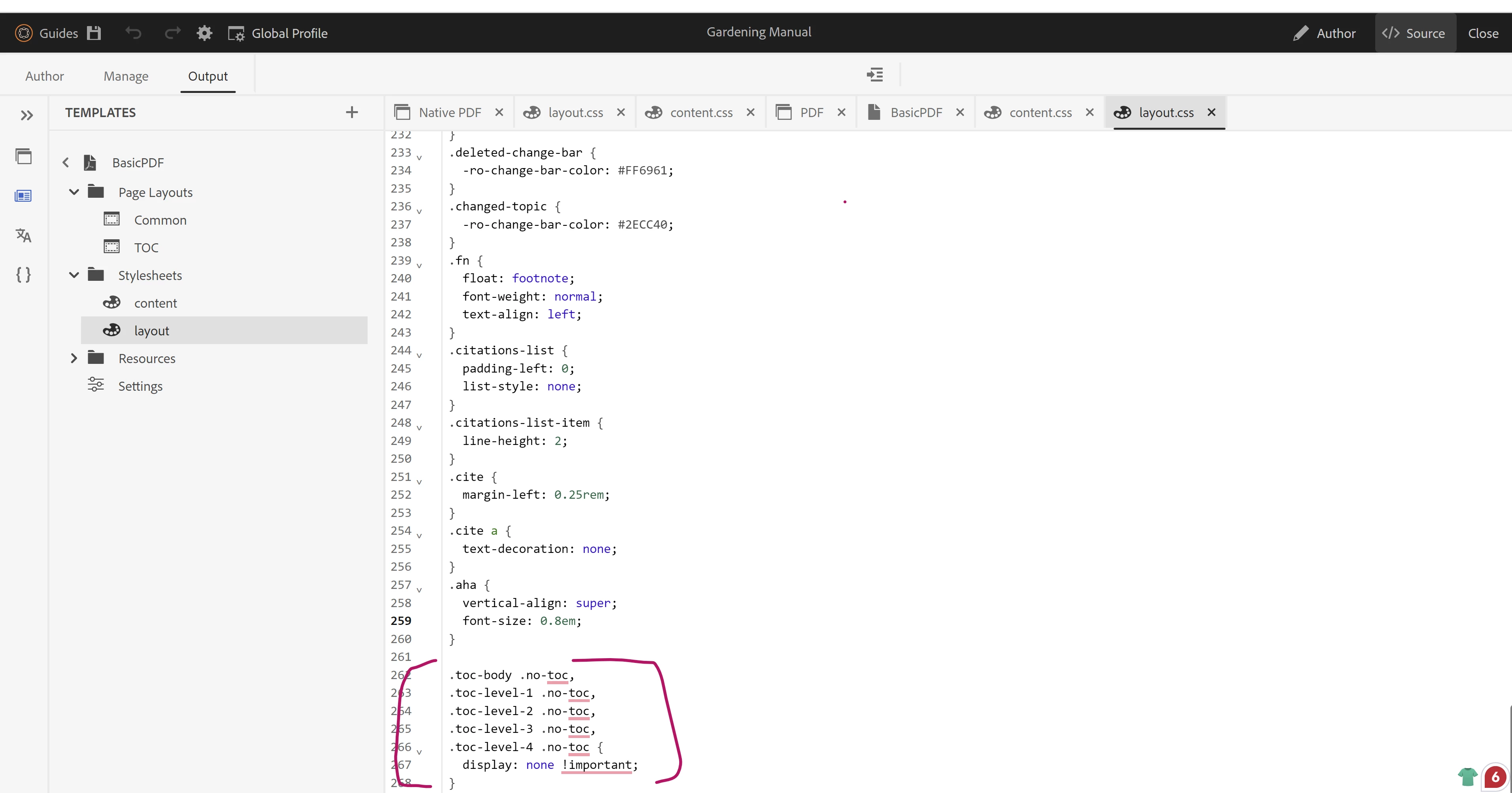
Now navigate to template Stylesheets and add below css in layout.css to exclude toc from pdf output.


CSS Rule:

.toc-body .no-toc, .toc-level-1 .no-toc, .toc-level-2 .no-toc, .toc-level-3 .no-toc, .toc-level-4 .no-toc { display: none !important; }


Please let me know if that doesn't works.


Thanks,

Prashant


2 replies

Vijendra1
Adobe Employee
Adobe Employee
June 11, 2024

Did you try setting the processing-role="resource-only" as follows

<topicref href="GUID-b9023d35-2f2b-44f2-a98d-7f16a79855af.dita" type="concept" processing-role="resource-only"/>


For TOC, there is a toggle that can be used in template or custom logic (using javascript) to suppress based on your business logic.

Level 4
June 11, 2024

The processing-role attribute did the trick - thank you!!


Could we incorporate the ToC=no to suppress the ToC? If I wanted to omit the ToC from maps, as needed, what type of javascript could I use to accomplish this?


Thanks again!

Josh

Level 2
September 30, 2024

processing-role="resource-only" will omit the whole topic from being processed in the content body as well as the toc.


I would like to to remove it from the toc only.  Usually that is done with toc="no" in the topicref in the map.

How can I accomplish this using native pdf?

punagpal
Adobe Employee
Adobe Employee
September 30, 2024

You are correct that using processing-role="resource-only" will remove the entire topic from both the content body and the Toc, while toc="no" in the topicref typically only excludes it from the Toc. 
I see toc="no" is not excluding topicref in Native PDF.

I've flagged this behavior internally for further investigation, and our team is actively looking into it.(GUIDES-20156).
I will share if I have any more updates or workaround here.

PrashantPaAdobe EmployeeAccepted solution
Adobe Employee
September 30, 2024

@timdo3 ,

You can achieve this by applying outputclass to the topicref which you want to exclude like below: 

<topicref href="topic.dita" outputclass="no-toc"/>


Now navigate to template Stylesheets and add below css in layout.css to exclude toc from pdf output.


CSS Rule:

.toc-body .no-toc, .toc-level-1 .no-toc, .toc-level-2 .no-toc, .toc-level-3 .no-toc, .toc-level-4 .no-toc { display: none !important; }


Please let me know if that doesn't works.


Thanks,

Prashant