AEM Guides Search Customization - NOT Working as Documented | Community
Skip to main content
Samba_Kolusu
Level 2
August 25, 2025

AEM Guides Search Customization - NOT Working as Documented

  • August 25, 2025
  • 1 reply
  • 375 views

Hi,

I am trying to create a few custom search filters onn the AEM Guides Search dialog, as explained in the documents: 

https://experienceleague.adobe.com/en/docs/experience-manager-guides/using/install-guide/cs-ig/web-editor-configs-cs/config-text-filters

https://experienceleague.adobe.com/en/docs/experience-manager-guides/using/install-guide/on-prem-ig/web-editor-configs/conf-custom-file-filters

NOTE : i am trying this over a repository initialized with aem-cloud-sdk-quickstart-2024-11 and aem-guides cloud package 2025.02

i did enable metadata extraction in the system/console/configMgr, and ran the "Extract DITA Metada" over the DAM folder where my DITA topics and maps exist; and i do see the extracted metadata under the jcr:content/ditameta node of every topic.

however, when i uploaded the modified ui_config.json file to the Global Profile under Tools > Guides > Folder Profiles / XML Editor Configuration, with the following changes to the repositoryFilters 

, { "title": "Title", "property": "jcr:content/metadata/dc:title", "widgetId": "title_filter", "operation": "like", "itemConfig": { "component": "textfield", "placeholder": "Title" }


i only see the Title label, but not the input field that should correspond to the textfield value for the "component" property of the relevant itemConfig, and an "Invalid Component: undefined is not available", as shown in the screenshot
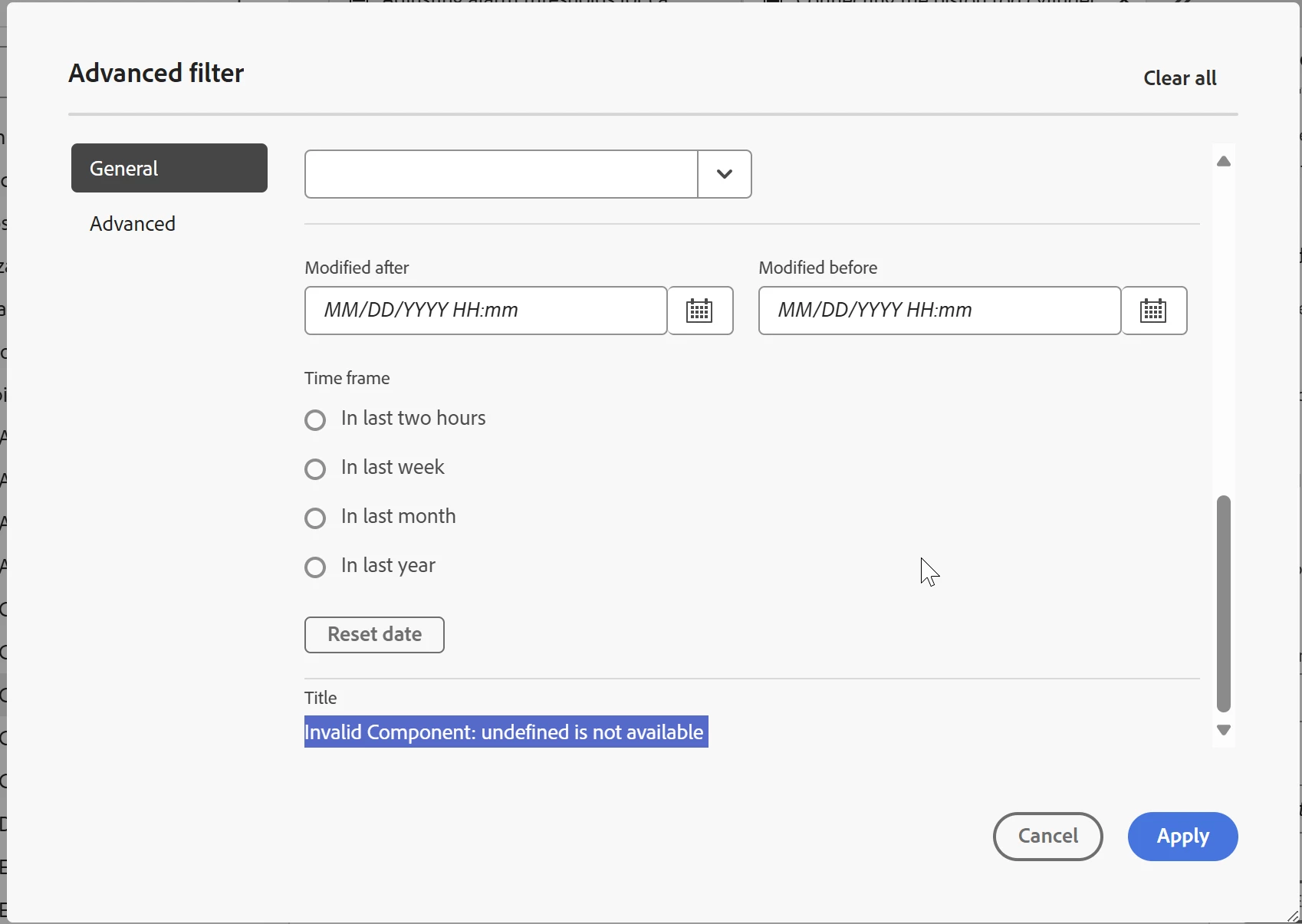

there is no difference whether i included itemConfig or not; it is the same "invalid component undefined" error. 

by the way, some filters have "widgetId" and some do not; what is the significance of that? and incliuding or excluding widgetid also did not make any difference

what am i doing wrong here?

moreover, i noticed a post in the Adobe Guides Discussion forum about this feature being available only after April-25 release for cloud and 5.1 for on-prem?

https://experienceleaguecommunities.adobe.com/t5/experience-manager-guides/how-to-add-custom-filters-in-the-guides-editor/td-p/762547

am i hitting the same limitation or is that different?

Thanks,
Sambba 

1 reply

DivrajSingh
Adobe Employee
Adobe Employee
August 27, 2025

@samba_kolusu : I see two inputs that you need to consider:


  1. The issue was resolved in release 2504 for cloud - check 2504 release notes - change id 21193 (and for non-cloud it will come out with release 5.1) - so instead of testing it on 2502 please try this with latest maybe (2508 is also available on software distribution portal)
  2. The second issue is with the json that you are using to add a filter. Specifically,
    1. the widget_id "title_filter" is an internal name as well - probably you copied it from another default filter in ui_config.json. You can omit that line and
    2. also add children element as a required field for textfield type filter


try with following:

{ "title": "DC Title", "property": "./jcr:content/metadata/dc:title", "operation": "like", "itemConfig": { "component": "textfield", "placeholder": "DC Title" }, "children": [ { "title": "Title DC " } ] }


Note: for your consideration, currently only "textfield" and "checkbox" are supported as custom filters

I hope this helps


Samba_Kolusu
Level 2
August 29, 2025

Thanks Divraj,

i upgraded my instance to 2025.08, and after including the 'children' element the text filter showed up. however, for checkbox filter i had to remove the itemConfig and add each checkbox option as an element of the children array

here is what worked for me - hoping it helps others

, { "title": "Title", "property": "jcr:content/metadata/dc:title", "operation": "like", "itemConfig": { "component": "textfield", "placeholder": "Document Title" }, "children": [ { "title": "document_title" } ] }, { "title": "Status", "property": "jcr:content/metadata/docstate", "operation": "equals", "children": [ { "title": "Draft", "value":"Draft", "checked": false }, { "title": "Edit", "value":"Edit", "checked": false }, { "title": "In Review", "value":"In Review", "checked": false }, { "title": "Reviewed", "value":"Reviewed", "checked": false }, { "title": "Rejected", "value":"Rejected", "checked": false }, { "title": "Approved", "value":"Approved", "checked": false }, { "title": "Done", "value":"Done", "checked": false } ] }