Add Placeholder Text to a DITA template in Guides | Community
Skip to main content
April 23, 2024
Solved

Add Placeholder Text to a DITA template in Guides

  • April 23, 2024
  • 1 reply
  • 738 views

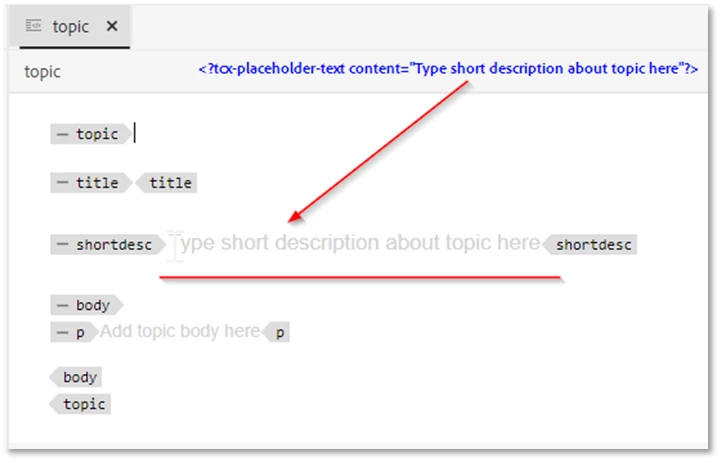
I recall that it is possible to add a bit of code to a paragraph tag in a DITA template (e.g., Topic) that would display a prompt for the author regarding the text to enter in that tag. When the author clicks within the tag, the prompt text disappears. Does any remember the specifics of that?
This post is no longer active and is closed to new replies. Need help? Start a new post to ask your question.
Best answer by DivrajSingh

@michaelai1 : you can add following element in the template element:


<?tcx-placeholder-text content="placeholder content goes here"?>


I hope this helps. 


1 reply

DivrajSingh
Adobe Employee
DivrajSinghAdobe EmployeeAccepted solution
Adobe Employee
April 24, 2024

@michaelai1 : you can add following element in the template element:


<?tcx-placeholder-text content="placeholder content goes here"?>


I hope this helps.