Sum Columns using Formcalc | Community
Skip to main content
March 4, 2013
Solved

Sum Columns using Formcalc

  • March 4, 2013
  • 9 replies
  • 13638 views

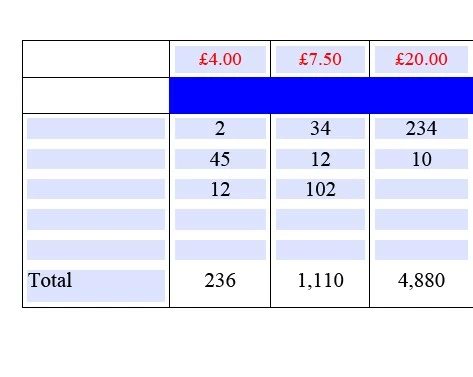
I have created a form with 12 Columns and 23 fixed rows. In Row 1 of the table is a value, the remaining 22 rows allow the user to enter a number, what I would like to do is in the footer row be able to add up the numbers in the 22 columns and then multiple that by the value in Row 1 to give a total.

Any help would be appreciated.

This post is no longer active and is closed to new replies. Need help? Start a new post to ask your question.
Best answer by Mandy_Wiesener

Hi Steve,

at the moment I send you your pdf with the calculation script.

You have to use in each column in the total field the following script

- Sterling is the objectname from the user entry field in column 1 in each row

- Other is the objectname from the user entry field in column 1 in each row

- ...

  1. Column $ = Sum(Row1[*].Sterling)* Row1.TTValue
  2. Columns $ = Sum(Row1[*].Other)* Row1.OtherValue
  3. Column $ = Sum(Row1[*].Banking)* Row1.BankingValue

You understand it?

You have to use the [*] for the repeated thing, in yours is this the Row1. You see it on the Row1[0]..Row1[1). And your amount, for example  4 oder 7,50 needs an static cross reference per column.

I hope I could help?

Mandy

9 replies

Mandy_Wiesener
March 4, 2013

Hi,

You have to do the following.

  1. Create your table with the 12 columns with ONE Row (without header- and footer row).
  2. Rename the currenx field for example "amount".
  3. Add the next rows with STRG+D.
  4. You will see in the hierarchy that the rows have a [0]..[1]..
  5. Then go to the calculate event from your target field and use there the following code:

Sum(NameOfYourRow[*].amount)

Have you more instances of the amount field (amount[0], amount[1],...) in your hierarchy then you have to use:

Sum(amount[*])

I hope it's helpul for you?

Mandy

March 4, 2013

Hi Mandy,

I am struggling to understand how the total will work, I have enclosed a

sample of the table I am working on, the first column of each row is a

date field, if I use the 2nd column as an example it shows £4.00 as a

charge at the top, the user would then enter a number in the column and at

the bottom I want to be able to add up the numbers and multiple it by the

£4.00

Kind regards

Steve

Mandy_Wiesener
March 4, 2013

Hi Steve,

I'm not sure if I understand you right. Could you sketch your table?

first column | second column | third column

----------------------------------------------------------

date field     | user entry??      |  user entry * 4.00?

----------------------------------------------------------

date field     | user entry??      |  user entry * 4.00?

----------------------------------------------------------

date field     | user entry??      |  user entry * 4.00?

----------------------------------------------------------

                                                  | sum of all entries in the third column?

A screenshot would be helpful.

Regards Mandy

March 4, 2013

I have £4.00 at the top of Column 2 as you can see when I put the first 2

in the column it calculates 8 at the bottom but when I add the second 2 it

is not increasing the total to 16

$ = Sum(Row1[].Sterling[] * Row1[*].TTValue)

Kind regards

Steve

P Please consider the environment before printing this e-mail.

Mandy_Wiesener
March 4, 2013

This can't work. You have [] without *.

Then you have to do.

  • The name of the field with 4.00 --> for example "staticAmount"
  • The name of the field with the user entry --> for example "UserAmount"
  • The name of the field per row sum --> for example "Amount"
  • The name of the field for the total amount --> for example "TotalAmount"

first column | 4.00                          | third column

----------------------------------------------------------

date field     | user entry 2.00          |  8.00 calculate-event staticAmount * UserAmount

----------------------------------------------------------

date field     | user entry 3.00          |  12.00 calculate-event staticAmount * UserAmount

----------------------------------------------------------

date field     | user entry 5.00          |  20.00 calculate-event staticAmount * UserAmount

----------------------------------------------------------

                                                            | 40.00 calculate-event Sum(UserAmount[*]) OR Sum(NameOfTheRow[*].UserAmount)

The problem is that I don't know how your table looks like.

Helpful?

Regards Mandy

March 5, 2013

Would it be easier if I emailed you the form then you could see what it

looks like?

I appreciate you help and advice.

Kind regards

Steve

Steve Page | Sr Consultant, Project Manager | Global Family & Private

Investment Offices Group, Channel Islands

P.O. Box 71, Trafalgar Court, Les Banques, St. Peter Port, Guernsey, GY1

3DA | Phone +44 148-174-5711 | email: sp215@ntrs.com

Please visit http://www.northerntrust.com

CONFIDENTIALITY NOTICE: This communication is confidential, may be

privileged and is meant only for the intended recipient. If you are not

the intended recipient, please notify the sender ASAP and delete this

message from your system.

IRS CIRCULAR 230 NOTICE: To the extent that this message or any attachment

concerns tax matters, it is not intended to be used and cannot be used by

a taxpayer for the purpose of avoiding penalties that may be imposed by

law. For more information about this notice, see

http://www.northerntrust.com/circular230

P Please consider the environment before printing this e-mail.
Mandy_Wiesener
Mandy_WiesenerAccepted solution
March 5, 2013

Hi Steve,

at the moment I send you your pdf with the calculation script.

You have to use in each column in the total field the following script

- Sterling is the objectname from the user entry field in column 1 in each row

- Other is the objectname from the user entry field in column 1 in each row

- ...

  1. Column $ = Sum(Row1[*].Sterling)* Row1.TTValue
  2. Columns $ = Sum(Row1[*].Other)* Row1.OtherValue
  3. Column $ = Sum(Row1[*].Banking)* Row1.BankingValue

You understand it?

You have to use the [*] for the repeated thing, in yours is this the Row1. You see it on the Row1[0]..Row1[1). And your amount, for example  4 oder 7,50 needs an static cross reference per column.

I hope I could help?

Mandy

March 5, 2013

Thanks for all your help

Mandy_Wiesener
March 5, 2013

You're welcome. I'm glad that I can help you.