Searchable drop down menu? | Community
Skip to main content
November 5, 2009
Solved

Searchable drop down menu?

  • November 5, 2009
  • 66 replies
  • 37509 views

I have several drop down lists in a PDF I am creating. These drop down lists contain diagnoses to be used by physicians. With there being a LOT of diagnoses, it would be extremely convenient if I had a "search" function of some kind that could be utilized as the wording of the descriptions for the codes/diagnoses can vary: (Ex. "Rib Pain" or "Pain in Rib")

As of now, the only option is to select the first letter of the name they believe the diagnosis to have. Using this example, they would select the drop down menu and press "R" and the list would jump down to the beginning of the R's. But, if the name is actually "Pain in Rib", they would have to search through all the other diagnosis codes to locate it.

I believe a search function would be the most appropriate for something like this. But, I am having some trouble locating any info on coding for something of this nature. If there are any suggestions that could make this, (or something that accomplishes the same task), possible, I am all ears.

Thanks!

I included a pdf with the fragment with the drop down menus as well as a list of the diagnoses I have in them.

I appreciate any help or ideas. I've never been let down by the people here in these forums.

This post is no longer active and is closed to new replies. Need help? Start a new post to ask your question.
Best answer by tarekahf

I was able to use the Net.HTTP and SOAP object to access the same DMTI service, but it worked only on the console window:

var jData;

var prm =

{cVerb:"GET",

aHeaders: [{name: "Authorization", value:"authentication-token"}],

cURL: "https://app2.dmtispatialxxx.com/servicesxxx/rest/suggest?limit=60&includePostalCode=true&address=20%20crown%20ste",

oHandler: {

   response: function (msg, uri, e) {

    console.println("\nThis is the response method:");

    console.println("msg=" + msg);

    //for (var p in msg) {

    //  console.println("p=" + p);

    //  console.println("msg[p]=" + msg[p]);

    //}

    var data = SOAP.stringFromStream(msg);

    jData = JSON.parse(data);

    console.println("Length of json data: " + jData.length);

    console.println("data=" + data);

    console.println("e=" + e);

   }

}

};

Net.HTTP.request(prm);

Response from the console window:

This is the response method:

msg=[object Stream]

Length of json data: 5

data=[{"matchCount":1,"suggestion":"20 CROWN STEEL DR MARKHAM ON L3R9X9","aliasSuggest":null},{"matchCount":1,"suggestion":"20 CROWN ST QUINTE WEST ON K8V1N6","aliasSuggest":null},{"matchCount":1,"suggestion":"20 CROWN ST ST. CATHARINES ON L2M3L3","aliasSuggest":null},{"matchCount":1,"suggestion":"20 CROWN ST THUNDER BAY ON P7B3J6","aliasSuggest":null},{"matchCount":1,"suggestion":"20 RUE CROWN DANVILLE QC J0A1A0","aliasSuggest":null}]

e=undefined

Unfortunately, the above method didn't work from a the click event of a button (in Adobe LiveCycle form). I got this error:

NotAllowedError: Security settings prevent access to this property or method.

Net.HTTP.request:19:XFA:form1[0]:subform[2]:Button4[0]:click

It looks like the only option now is to develop a wrapper component that can be invoked using the simple URL and to include the authentication token in the query parameters. Also, there is another problem... I have to get authentication code every time it is expired. Currently, there is Java code responsible for this part.

Question:

Why not develop a simple javascript program that can be invoked using HTML or jsp code, and return the result by clearing the output and just dump the result from the xhr response object? While I can develop the server component, but it seems a lot more easier to develop such component using only HTML and javascript. But, I am not  sure if it can be done, I just think it is possible.

66 replies

_Bruce_Robertson
November 15, 2018

Good to see you got it working, you must have some of the most complicated PDF forms out there.

I did use the proto objects on a version of the 'ghost text', Adobe LiveCycle Designer Cookbooks by BR001: Adding Ghost Text to LiveCycle Designer form , Be careful to read Radzmar's comment, I would probably use his approach now.  The way styles was introduced in ES3 could caused some conflict.

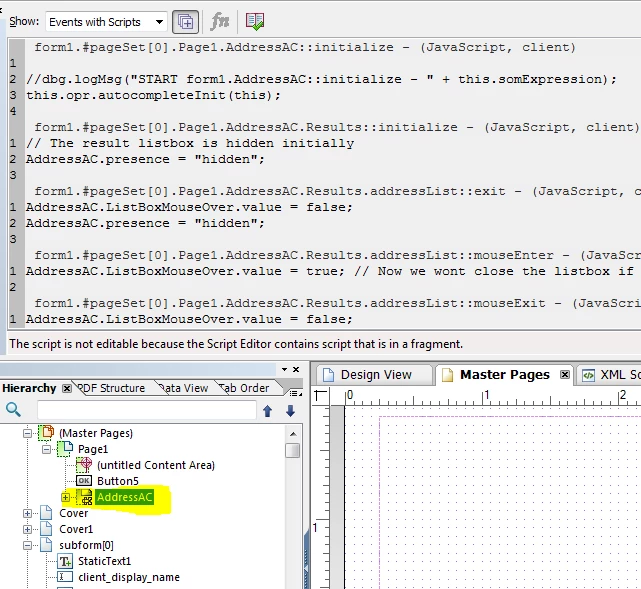
It requires a bit of editing in the XML Source but you can add your AddressAC as a "Reference Object", just drag it in the Hierarchy view to the structure tree node called "(Reference Objects)".  Then in the XML Source give it an id, so will probably look something like;

<subform w="203.2mm" layout="tb" name="AddressAC" id="AddressAC ">

Then you can turn any subform into a AddressAC object by adding a use attribute, something like;

<subform w="203.2mm" layout="tb" name="AddressAC2" use="$template.#subform.AddressAC">

To save editing the XML for every reference you could create one and then make a custom object out of it.

Regards

Bruce

tarekahf
November 15, 2018

Thanks again.

I checked the proto object, and it is now clear to me how to use it.

Just to verify my understanding, in order to use the proto object, first you have to create it, then use it with the "use" attribute. But, in order to create the proto object, you must add the <proto> tag using XML source view, since you cannot use the UI to insert the proto object, correct?

What about including the fragment in the master page (which has the Autocomplete with the pull-down effect), and use it in all other subform? Do you think this will work?

Tarek

_Bruce_Robertson
November 16, 2018

Hi Tarek,

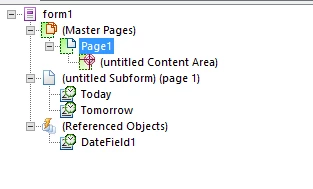
Sorry my last post was a bit limited.  Dragging the field to the (Referenced Objects) node has the same effect as adding the <proto> tab and adding a field underneath it.

So as a simple example, I have a form with two date fields that reference a date field under the <proto> tag.

There are two ways to reference the field under the <proto> tag, the XML Source for this form shows them both.

<subform name="form1" layout="tb" locale="en_AU">

   <subform w="8in" layout="tb">

   <field name="Today" w="62mm" h="9mm" use="$template.#subform.DateField1"/>

   <field name="Tomorrow" w="62mm" h="9mm" use="#Today"/>

   <?templateDesigner expand 1?></subform>

   <proto>

   <field id="Today" name="DateField1" y="41.275mm" w="62mm" h="9mm">

   <ui>

      <dateTimeEdit>

      <border>

      <edge stroke="lowered"/>

      </border>

      <margin/>

      </dateTimeEdit>

   </ui>

   <font typeface="Myriad Pro"/>

   <margin topInset="1mm" bottomInset="1mm" leftInset="1mm" rightInset="1mm"/>

   <para vAlign="middle"/>

   <value>

      <date/>

   </value>

   <caption reserve="25mm">

      <para vAlign="middle"/>

      <value>

      <text>Date Field</text>

      </value>

   </caption>

   <border>

      <edge presence="hidden"/>

   </border>

   </field>

   </proto>

  </subform>

</p>

To get the use attributes on the field you need to use the XML Source view.  If you are using the second method you also need to use the XML Source to add the id attribute.

It was to avoid using the XML Source view to add the use attribute that I suggested creating a custom object.

But once setup  you can use the UI to change say the border color of the field under the "(Referenced Objected)" and all the fields that reference it will pick up the change

You can have a subform under a <proto> tag and that is how I would suggest you handle the AddressAC object rather than adding it to the master page

tarekahf
November 16, 2018

Very clear ...

I think <proto> objects are better than custom objects, because you can change the reference objects, and the change will be reflected everywhere. I don't think custom objects have this feature.

In relation to <proto> object, I tried to modify the "use" attribute using javascript, but it didn't work. I got error during runtime that the assigned value is not valid or something like that.

This feature <proto> object is awesome, but why it is not well documented in the Adobe References/Help resources? Also, when I came across a reference PDF, it is mentioned everywhere that <proto> and "use" attributes are deprecated, so is it safe to use such feature in the production environment?

Tarek

_Bruce_Robertson
November 19, 2018

Hi Tarek,

Adobe used the <proto> element to implement the styles that came with ES3 so I believe they are safe to use.  But don't understand why there's not more documentation about them, John Brinkman did do an example Track PDF Forms with Omniture

My idea of creating a custom object was just to save having to add the use attribute in the XML Source, in the case above I could define a ProtoDateField which already has the "use="$template.#subform.DateField1" attribute in it.

Bruce

tarekahf
November 21, 2018

Thank BR001​..

So far everything looks fine on my side, I will add my findings below to help improve the reusability of such components in the future...

  • I tried to use a fragment inserted on the master page, which will be used to how/hide the Autocomplete subform (component). This approach worked with limited success. I was able to show/hide the instance on the designated page, however, I need to solve two problems:
    • If there are other elements on the same position of the list box of Autocomplete, and if they are clickable, then the click event of the listbox will not work.
    • I need to get the absolute position of the element, and use it to set the position of the Autocomplete component. This is because the Autocomplete component coordinates are relative to the master page, and the coordinates of the Search Box are relative to the content subform, and they don't align with each other. I believe I have seen script that will take care of this issue. I will have to look for it.

The code below I used to get a reference to the Autocomplete component (inserted in the master page) from the Enter Event of the search field:

// form1.subform[0].address_field::enter - (JavaScript, client)

var pgNo = xfa.layout.page(this);

var strAutocomplete = "form1[0].#pageSet[0].Page1[" + (pgNo-1) + "].AddressAC[0]";

sfAutocomplete = xfa.resolveNode(strAutocomplete);

For now, I will insert the subform fragment "AddressAC" in each main page where it is needed.

Tarek