Searchable drop down menu? | Community
Skip to main content
November 5, 2009
Solved

Searchable drop down menu?

  • November 5, 2009
  • 66 replies
  • 37509 views

I have several drop down lists in a PDF I am creating. These drop down lists contain diagnoses to be used by physicians. With there being a LOT of diagnoses, it would be extremely convenient if I had a "search" function of some kind that could be utilized as the wording of the descriptions for the codes/diagnoses can vary: (Ex. "Rib Pain" or "Pain in Rib")

As of now, the only option is to select the first letter of the name they believe the diagnosis to have. Using this example, they would select the drop down menu and press "R" and the list would jump down to the beginning of the R's. But, if the name is actually "Pain in Rib", they would have to search through all the other diagnosis codes to locate it.

I believe a search function would be the most appropriate for something like this. But, I am having some trouble locating any info on coding for something of this nature. If there are any suggestions that could make this, (or something that accomplishes the same task), possible, I am all ears.

Thanks!

I included a pdf with the fragment with the drop down menus as well as a list of the diagnoses I have in them.

I appreciate any help or ideas. I've never been let down by the people here in these forums.

This post is no longer active and is closed to new replies. Need help? Start a new post to ask your question.
Best answer by tarekahf

I was able to use the Net.HTTP and SOAP object to access the same DMTI service, but it worked only on the console window:

var jData;

var prm =

{cVerb:"GET",

aHeaders: [{name: "Authorization", value:"authentication-token"}],

cURL: "https://app2.dmtispatialxxx.com/servicesxxx/rest/suggest?limit=60&includePostalCode=true&address=20%20crown%20ste",

oHandler: {

   response: function (msg, uri, e) {

    console.println("\nThis is the response method:");

    console.println("msg=" + msg);

    //for (var p in msg) {

    //  console.println("p=" + p);

    //  console.println("msg[p]=" + msg[p]);

    //}

    var data = SOAP.stringFromStream(msg);

    jData = JSON.parse(data);

    console.println("Length of json data: " + jData.length);

    console.println("data=" + data);

    console.println("e=" + e);

   }

}

};

Net.HTTP.request(prm);

Response from the console window:

This is the response method:

msg=[object Stream]

Length of json data: 5

data=[{"matchCount":1,"suggestion":"20 CROWN STEEL DR MARKHAM ON L3R9X9","aliasSuggest":null},{"matchCount":1,"suggestion":"20 CROWN ST QUINTE WEST ON K8V1N6","aliasSuggest":null},{"matchCount":1,"suggestion":"20 CROWN ST ST. CATHARINES ON L2M3L3","aliasSuggest":null},{"matchCount":1,"suggestion":"20 CROWN ST THUNDER BAY ON P7B3J6","aliasSuggest":null},{"matchCount":1,"suggestion":"20 RUE CROWN DANVILLE QC J0A1A0","aliasSuggest":null}]

e=undefined

Unfortunately, the above method didn't work from a the click event of a button (in Adobe LiveCycle form). I got this error:

NotAllowedError: Security settings prevent access to this property or method.

Net.HTTP.request:19:XFA:form1[0]:subform[2]:Button4[0]:click

It looks like the only option now is to develop a wrapper component that can be invoked using the simple URL and to include the authentication token in the query parameters. Also, there is another problem... I have to get authentication code every time it is expired. Currently, there is Java code responsible for this part.

Question:

Why not develop a simple javascript program that can be invoked using HTML or jsp code, and return the result by clearing the output and just dump the result from the xhr response object? While I can develop the server component, but it seems a lot more easier to develop such component using only HTML and javascript. But, I am not  sure if it can be done, I just think it is possible.

66 replies

Moonraker046
September 12, 2017

Hi Bruce,

I would suggest this web service http://www.webservicex.net/country.asmx?WSDL  (Download the XML, save it as *.wsdl file and create a new data connection within Designer with the saved *.wsdl).

The web service handles over a XML based list of all countries.

Regards
Moonraker

_Bruce_Robertson
September 13, 2017

This webserive does not seem to offer a partial match search, I assume you want people to be able to type something like "new" and get all the countries that contain "new" in their name? 

Still I can see this being useful, I might try the google places API, Google Places API  |  Google Developers , and see if I can get that to work, but this is a REST service not a SOAP one.

Will let you know,

Bruce

_Bruce_Robertson
September 16, 2017

Hi,

Here is a sample using the Google Places web service, seem to work ok once you do the "trust document" thing on the yellow message bar that is displayed at the top of the form.

https://sites.google.com/site/livecycledesignercookbooks/home/GooglePlaces.pdf?attredirects=0&d=1

You will need to get a Google Places API key which you can get at Get a key for Google Places API Web Service  |  Google Places API Web Service  |  Google Developers

Bruce

tarekahf
September 16, 2017

BR001​ Thank you so much! We have migrated most of our forms from Adobe LiveCycle PDF to HTML5, and implemented autocomplete feature for address lookup.

The other day I heard some business users asking for this feature (autocomplete) to be implemented on some legacy PDF forms. I think your sample will be of a great help.

Thank you!

Tarek

Moonraker046
September 21, 2017

Thank you very much BR001​ for the very helpful example.

Would it be possible to change the response format of the Google Places API to XML and parse the XML response into the XFA form?

_Bruce_Robertson
September 22, 2017

Hi,

Getting an XML response would mean changing url bit from

    https://maps.googleapis.com/maps/api/place/autocomplete/json

to

    https://maps.googleapis.com/maps/api/place/autocomplete/xml

And then using the usual resolveNode methods;

if (googlePlacesResult !== "") { // probably not a trusted document yet

  var AutocompletionResponse = XMLData.parse( googlePlacesResult, true )

  if (AutocompletionResponse.status.value === "OK") {

   var predictions = AutocompletionResponse.resolveNodes("prediction[*]")

   for (var i = 0; i < predictions.length; i++) {

    var prediction = predictions.item(i);

    list.push([prediction.resolveNode("description").value.replace(/,/g, "\\,"), prediction.resolveNode("place_id").value]);

   }

  }

}

Then I guess you would have to make similar changes to the listbox click event

Bruce

tarekahf
November 7, 2018

Hi BR001​,

Could you please take a look at this post:

Re: Using fragment to implement Drop-Down List Field with search / auto populate

I was able to reimplement your code in the form to perform autocomplete based on Google Places API. Now I need to use another service based on DMTI not Google Maps. The problem is that I have to authenticate using xhr.setRequestHeader() function before I can invoke the URL. How I can do that?

Appreciate your help.

Tarek

_Bruce_Robertson
November 8, 2018

Hi Tarek,

There is the Net.HTTP object in the Acrobat JS reference, https://wwwimages2.adobe.com/content/dam/acom/en/devnet/acrobat/pdfs/AcrobatDC_js_api_reference.pdf?nameddest=G5.1957619

But I haven't used it and believe there's some security issues to resolve.

You can't update the headers using the FormCalc GET function I used.

Maybe you can write a service on your server for the PDF form to call and pass to DMTI?

Bruce

tarekahf
tarekahfAccepted solution
November 8, 2018

I was able to use the Net.HTTP and SOAP object to access the same DMTI service, but it worked only on the console window:

var jData;

var prm =

{cVerb:"GET",

aHeaders: [{name: "Authorization", value:"authentication-token"}],

cURL: "https://app2.dmtispatialxxx.com/servicesxxx/rest/suggest?limit=60&includePostalCode=true&address=20%20crown%20ste",

oHandler: {

   response: function (msg, uri, e) {

    console.println("\nThis is the response method:");

    console.println("msg=" + msg);

    //for (var p in msg) {

    //  console.println("p=" + p);

    //  console.println("msg[p]=" + msg[p]);

    //}

    var data = SOAP.stringFromStream(msg);

    jData = JSON.parse(data);

    console.println("Length of json data: " + jData.length);

    console.println("data=" + data);

    console.println("e=" + e);

   }

}

};

Net.HTTP.request(prm);

Response from the console window:

This is the response method:

msg=[object Stream]

Length of json data: 5

data=[{"matchCount":1,"suggestion":"20 CROWN STEEL DR MARKHAM ON L3R9X9","aliasSuggest":null},{"matchCount":1,"suggestion":"20 CROWN ST QUINTE WEST ON K8V1N6","aliasSuggest":null},{"matchCount":1,"suggestion":"20 CROWN ST ST. CATHARINES ON L2M3L3","aliasSuggest":null},{"matchCount":1,"suggestion":"20 CROWN ST THUNDER BAY ON P7B3J6","aliasSuggest":null},{"matchCount":1,"suggestion":"20 RUE CROWN DANVILLE QC J0A1A0","aliasSuggest":null}]

e=undefined

Unfortunately, the above method didn't work from a the click event of a button (in Adobe LiveCycle form). I got this error:

NotAllowedError: Security settings prevent access to this property or method.

Net.HTTP.request:19:XFA:form1[0]:subform[2]:Button4[0]:click

It looks like the only option now is to develop a wrapper component that can be invoked using the simple URL and to include the authentication token in the query parameters. Also, there is another problem... I have to get authentication code every time it is expired. Currently, there is Java code responsible for this part.

Question:

Why not develop a simple javascript program that can be invoked using HTML or jsp code, and return the result by clearing the output and just dump the result from the xhr response object? While I can develop the server component, but it seems a lot more easier to develop such component using only HTML and javascript. But, I am not  sure if it can be done, I just think it is possible.

tarekahf
November 14, 2018

Thanks BR001​...

I managed to develop a wrapper component using Java Servlet that will: 1) get authentication token then call suggest DMTI service (search as you type) and 2) get the token then call recognize DMTI service (get address parts). Also, I implemented the Servlet call from PDF using "FromCalc.Function.Get(url)" and it's honestly beautiful.

Not only it's working fine, in addition, now I have a reusable component that can be implemented on any Text field.

I have the following questions to help make the implementation more efficient (assume the component name is "AddressAC"):

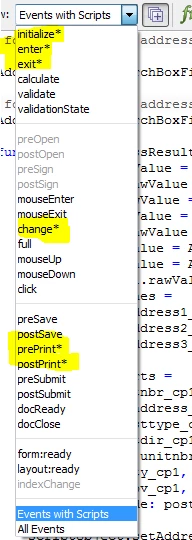
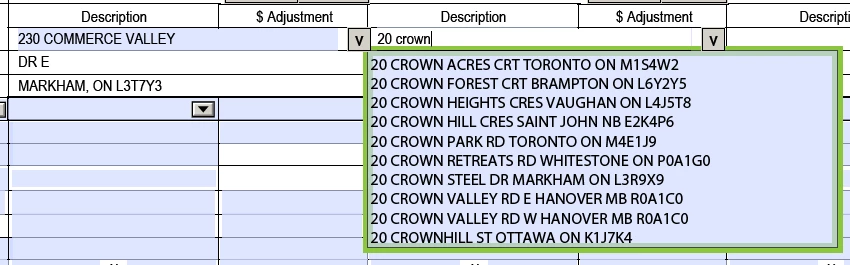
- Since I have to plugin the function calls (to the various related events of AddressAC) to the Search Field (to apply Autocomplete), is there a way to carry out this step with less effort to reduce errors? I remember that there is Prototype object or something like that, but I can't remember the exact details. See snapshots below to clarify

- Is there a way to include the component "AddressAC" only once as a fragment, say on the master page, and then reuse it on any subform? For now, I have to include the fragment in every subform to make it work. I think the problem if we use fragment form the Master Page, it will cause errors in x-y coordinates (relative vs. absolute).