How to modify height of textfield of repeating table using Javascript
Hello guys,
I need to change, by javascript code, the height of a textfield of a table repeatable n times and connected to a data connection, in order to have the same height for each textfield of each repeatable table.
Below is a screenshot of the structure of my form:
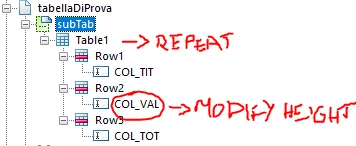
This is my Javascript code written in event layout:ready of subform "subTab":
var numTab = xfa.resolveNodes("Table1[*]").length;
var heightTab = [];
var heightTabMax = 0;
for (var i=0; i<numTab ;i++){
heightTab[i] = xfa.layout.h(xfa.resolveNode("Table1["+i+"]").Row2.COL_VAL, "cm");
if (heightTab[i]>heightTab[i-1]){
heightTabMax = heightTab[i];
}
}
xfa.host.messageBox("heightTabMax: "+heightTabMax);
for (var j=0; j<numTab ;j++){
xfa.resolveNode("Table1["+j+"]").Row2.COL_VAL.h = heightTabMax + "cm";
xfa.host.messageBox("h: "+xfa.resolveNode("Table1["+j+"]").Row2.COL_VAL.h);
}
The only instruction that does not work on my Javascript code is the assignment of the recovered height or the following line:
xfa.resolveNode("Table1["+j+"]").Row2.COL_VAL.h = heightTabMax + "cm";
the value printed with the instruction xfa.host.messageBox("h: "+xfa.resolveNode("Table1["+j+"]").Row2.COL_VAL.h) is correct but in preview pdf I do not see the desired result but I see this:

Can you help me find the solution to this problem?
Thank you,
Francesca