How to hide dynamic table row based on cell2 data | Community
Skip to main content
April 2, 2020
Solved

How to hide dynamic table row based on cell2 data

  • April 2, 2020
  • 1 reply
  • 10051 views

Hi,

I'm trying to hide a row inside a dynamic table if data in cell2 has "Old Statement".


If cell2 has the name "Old Statement". Hide that whole row.


My code only hides the 1st row.

if (statementForm.sfStatementForm.sfStatementSummary.sfStatementEntries.tblstatementEntry.rwStatementEntry.Cell2.rawValue == "Old Statement")
{
statementForm.sfStatementForm.sfStatementSummary.sfStatementEntries.tblstatementEntry.rwStatementEntry.presence = "hidden";
}
else
{
statementForm.sfStatementForm.sfStatementSummary.sfStatementEntries.tblstatementEntry.rwStatementEntry.presence = "visible";
}
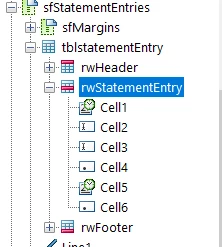


I'm new to Livecycle designer and would really appreciate the help. 


Thank you

This post is no longer active and is closed to new replies. Need help? Start a new post to ask your question.
Best answer by radzmar

If you put the following code into the calculate event of rwStatementEntry, it should work.


this.presence = Cell2.rawValue === "Old Statement" ? "hidden" : "visible";


1 reply

radzmar
radzmarAccepted solution
Level 10
April 3, 2020

If you put the following code into the calculate event of rwStatementEntry, it should work.


this.presence = Cell2.rawValue === "Old Statement" ? "hidden" : "visible";


ManqobaAuthor
April 6, 2020
Hi @radzmar. The code is giving me syntax errors. "Error: syntax error near token '=' on line 2, column 34."