Hidding table row - presence = "hidden" not working | Community
Skip to main content
robson1976
Level 2
March 19, 2021
Solved

Hidding table row - presence = "hidden" not working

  • March 19, 2021
  • 4 replies
  • 9398 views

Hi all,


I need to hide a row from the table based on a condition and all the suggestions I found says to use .presence = "hidden", but unfortunately only the line content is being hidden and not the entire row.

This is the JavaScript I'm using:

data.#pageSet[0].Page1.BasicData::initialize - (JavaScript, client)

if ( $record.V_FLAG.value != "X" ) {
this.resolveNode("Page1.BasicData.Table1.Line2").presence = "hidden";
}


I also tried the following alternatives:


if ( $record.V_FLAG.value != "X" ) {
this.resolveNode("Page1.BasicData.Table1.Line2.Cel1").presence = "hidden";
}

if ( $record.V_FLAG.value != "X" ) {
this.Table1.Line2.presence = "hidden";
}

if ( $record.V_FLAG.value != "X" ) {
this.Table1.Line2.Cel1.presence = "hidden";
}


I appreciate any help.
This post is no longer active and is closed to new replies. Need help? Start a new post to ask your question.
Best answer by Kosta_Prokopiu1

@magus069fair enough but from the description and the word "table" you cannot pinpoint things as everyone uses terms in their way.

If this is a XFA table it should be totally easy:

You don't even need all that flowed context stuff as long as the table stands on its own, has nothing following it which needs to move and does not exceed the page boundaries.


If that does not work for you then I can only guess what the problem may be:

  • Something different in the structure of your XFA table compared to mine.
  • Is this a dynamic table, meaning Line2 is repeated vs. fixed row design?
  • Your logic is somehow not correct or not correctly placed
  • Your data is not what you expect.
  • Ideally you should place the hiding logic in the Line2 table subform if possible. Saves you the resolveNode.
    if ( $record.V_FLAG.value != "X" ) {
      this.presence = "hidden";
    }

4 replies

Magus069
Level 10
March 19, 2021

Hi there,


it is hard to say why it behaves this way, and without the hierarchy it would be hard to explain and understand... have you tried hiding Table1?

I am not sure exactly what you mean by: hiding Line1 is hiding the content only and not the row.

Kosta_Prokopiu1
Adobe Employee
Adobe Employee
March 19, 2021

my guess: you have not placed your table in a flowed top-to-bottom context. In that case hidden would hide things but they cannot flow/collapse.

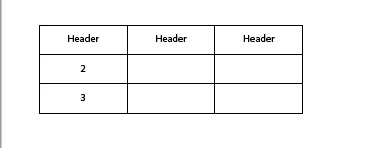
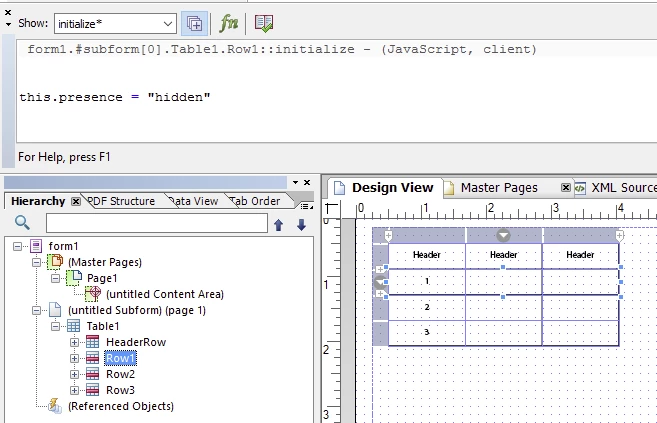
I created a table and make Line1 hidden on initialize

When Table1 is not Flowed then the wrong result:


Result with Table1 Flowed:


robson1976
Level 2
March 19, 2021
I'm sorry, I got confused
Kosta_Prokopiu1
Adobe Employee
Kosta_Prokopiu1Adobe EmployeeAccepted solution
Adobe Employee
March 22, 2021

@magus069fair enough but from the description and the word "table" you cannot pinpoint things as everyone uses terms in their way.

If this is a XFA table it should be totally easy:

You don't even need all that flowed context stuff as long as the table stands on its own, has nothing following it which needs to move and does not exceed the page boundaries.


If that does not work for you then I can only guess what the problem may be:

  • Something different in the structure of your XFA table compared to mine.
  • Is this a dynamic table, meaning Line2 is repeated vs. fixed row design?
  • Your logic is somehow not correct or not correctly placed
  • Your data is not what you expect.
  • Ideally you should place the hiding logic in the Line2 table subform if possible. Saves you the resolveNode.
    if ( $record.V_FLAG.value != "X" ) {
      this.presence = "hidden";
    }
robson1976
Level 2
March 22, 2021
Thank you so much!
robson1976
Level 2
March 22, 2021

@kosta_prokopiu1


I tried to follow your example, but it didn't work for me. The element is not collapsing.


Before this.presence = "hidden"


After


Kosta_Prokopiu1
Adobe Employee
Adobe Employee
March 22, 2021
Flowed needs to be Tabela1, not the Lines