Allow page breaks within content | Community
Skip to main content
May 3, 2011
Question

Allow page breaks within content

  • May 3, 2011
  • 11 replies
  • 13543 views

I am new to LiveCycle.  I opened a new blank form and inserted a standard text field.  On the object tab allow page breaks within content is greyed out.  How do you get this to work?

This post is no longer active and is closed to new replies. Need help? Start a new post to ask your question.

11 replies

Srini_Dhulipall
Level 10
May 3, 2011

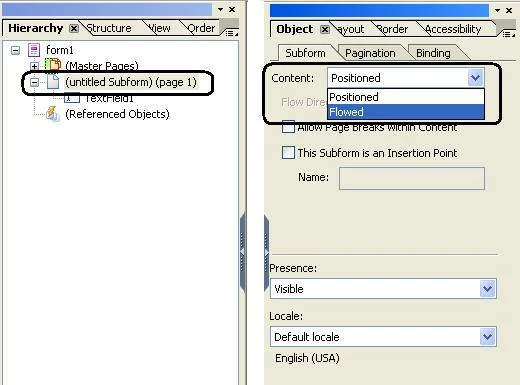
The root subform (ex: Page1) need to be set to Flowed in the Object Properties.

Then you will have access to this setting.

Thanks

Srini

littlejoeAuthor
May 3, 2011

Thanks for responding. If I select page1 and object tab I see the name of page1. I do not see where you set flowed in the object tab unless this is set somewhere else.

>>> Srini Dhulipalla <forums@adobe.com> 5/3/2011 2:35 PM >>>

The root subform (ex: Page1) need to be set to Flowed in the Object Properties.

Then you will have access to this setting.

Thanks

Srini

littlejoeAuthor
May 3, 2011

The root subform (ex: Page1) need to be set to Flowed in the Object Properties.  Where do you do this???

Srini_Dhulipall
Level 10
May 3, 2011

You might be looking at the Master Pages..

Check the below image.

Thanks

Srini

littlejoeAuthor
May 4, 2011

I did that and it still has a problem.  Message - deselecting the allow page breaks within content option of the parent object restricts this object from breaking between pages.

littlejoeAuthor
May 4, 2011

I do not understand why this should be so difficult.   What I am doing is just opening a blank form and I can either insert a text field or a subform.  I then go to check allow page breaks within content and it is greyed out on a text field.  I also can create the subform and it allows me to set it to flowed and allow page breaks but it then has a indicator that displays (Although the object is allowed to break, deselecting allow page breaks within content object of the parent object restrict this object from breaking between pages).  The only thing that makes sense is the parent is the blank page form.  I have searched all over the place and I cannot see anyplace to set the form page to allow page breaks.  The only thing that is on the form is either a check box or a subform and thats it. It keeps having a problem with a parent object.  The only 2 objects I see are the blank page and then the text field I add.  Nothing seems obvious to fix this.  This software does not appear to be very user friendly.

Srini_Dhulipall
Level 10
May 4, 2011

If you can send a screen shot of your Heirarchy tab and the Object pallette for the Page1 subform as mentioned in my previous post, that could help. Alternatively, you can send your form to LiveCycle9@gmail.com then I can have a look at it and update you..

Thanks

Srini

littlejoeAuthor
May 4, 2011

I finally figured how to get this to work, the only question is can you force the text box to the bottom of the page - when you select flowed it forces it to the top. If you do not have it set to flowed it will not page break.

>>> Srini Dhulipalla <forums@adobe.com> 5/4/2011 12:03 PM >>>

If you can send a screen shot of your Heirarchy tab and the Object pallette for the Page1 subform as mentioned in my previous post, that could help. Alternatively, you can send your form to mailto:LiveCycle9@gmail.com then I can have a look at it and update you..

Thanks

Srini

February 2, 2016

Thank you so much Srini for your initial response on making sure page1's subform is set to flowed !  That worked for me.

June 5, 2018

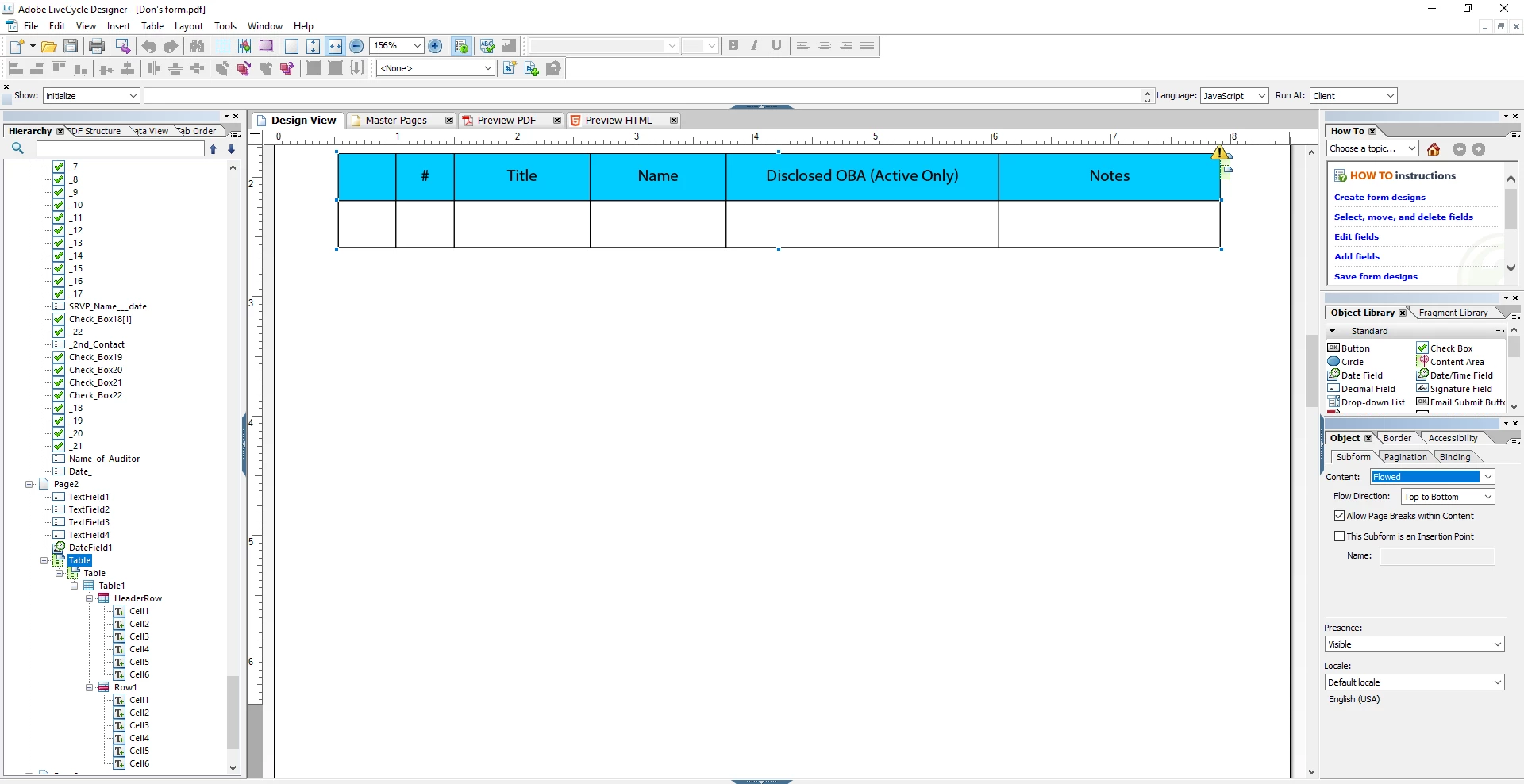
I have tried repeatedly to get the form to flow but am unable to.Here is what I show in Hierarchy and Object

My email is allan.honrath@advisorgroup.com. Thanks.