Workflow for a manager Approval | Community
Skip to main content
Level 3
June 18, 2022
Solved

Workflow for a manager Approval

  • June 18, 2022
  • 3 replies
  • 904 views

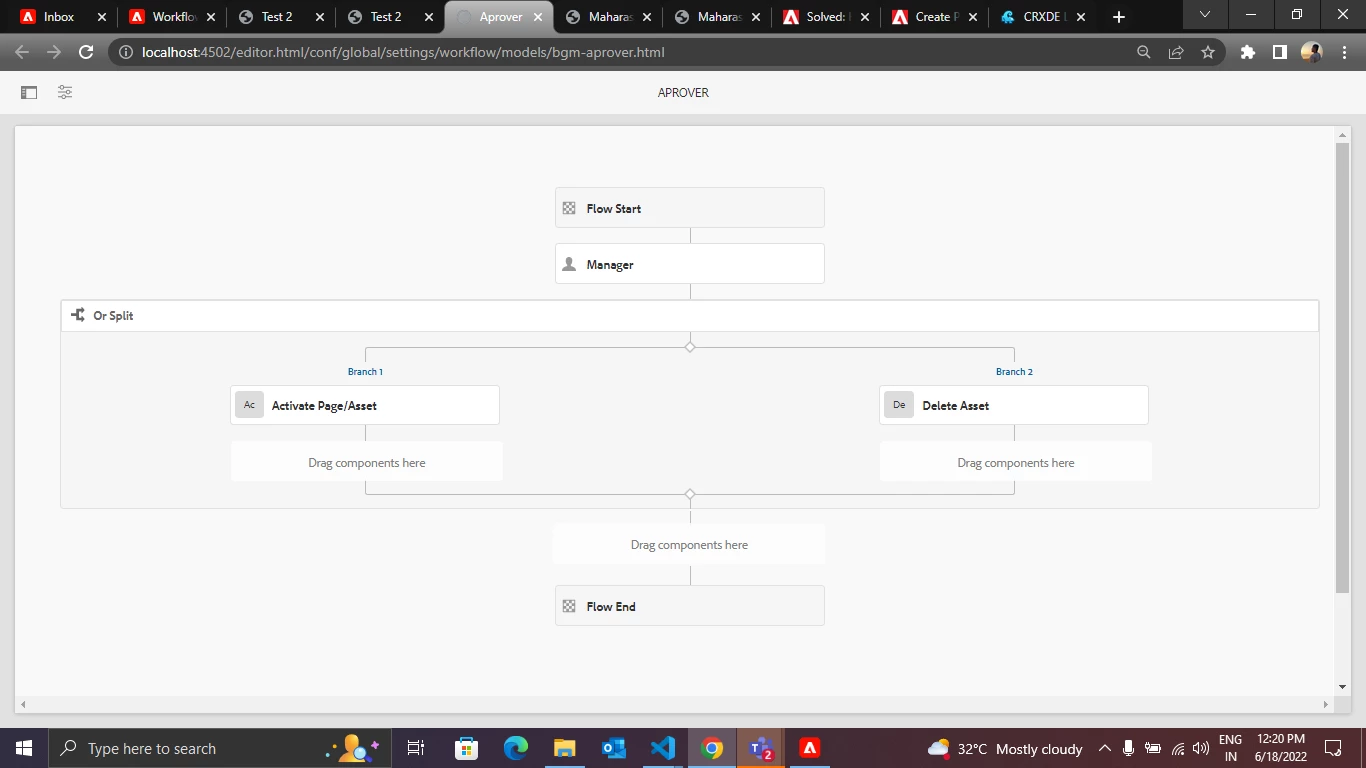
I have created a workflow and set a launcher for start when modified 

I want it to approve or Reject the content fragment 

Content fragment variation 

The workflow is working but its not deleting or deactivate the Content fragment !!!!

i want the content fragment to be disappeared if Manager REJECTS! and display only after approve.


@Arun_Patidar @SantoshSai  @DEBAL_DAS @fanindras @lukasz-m @Pulkit_Jain_ 
This post is no longer active and is closed to new replies. Need help? Start a new post to ask your question.
Best answer by DEBAL_DAS

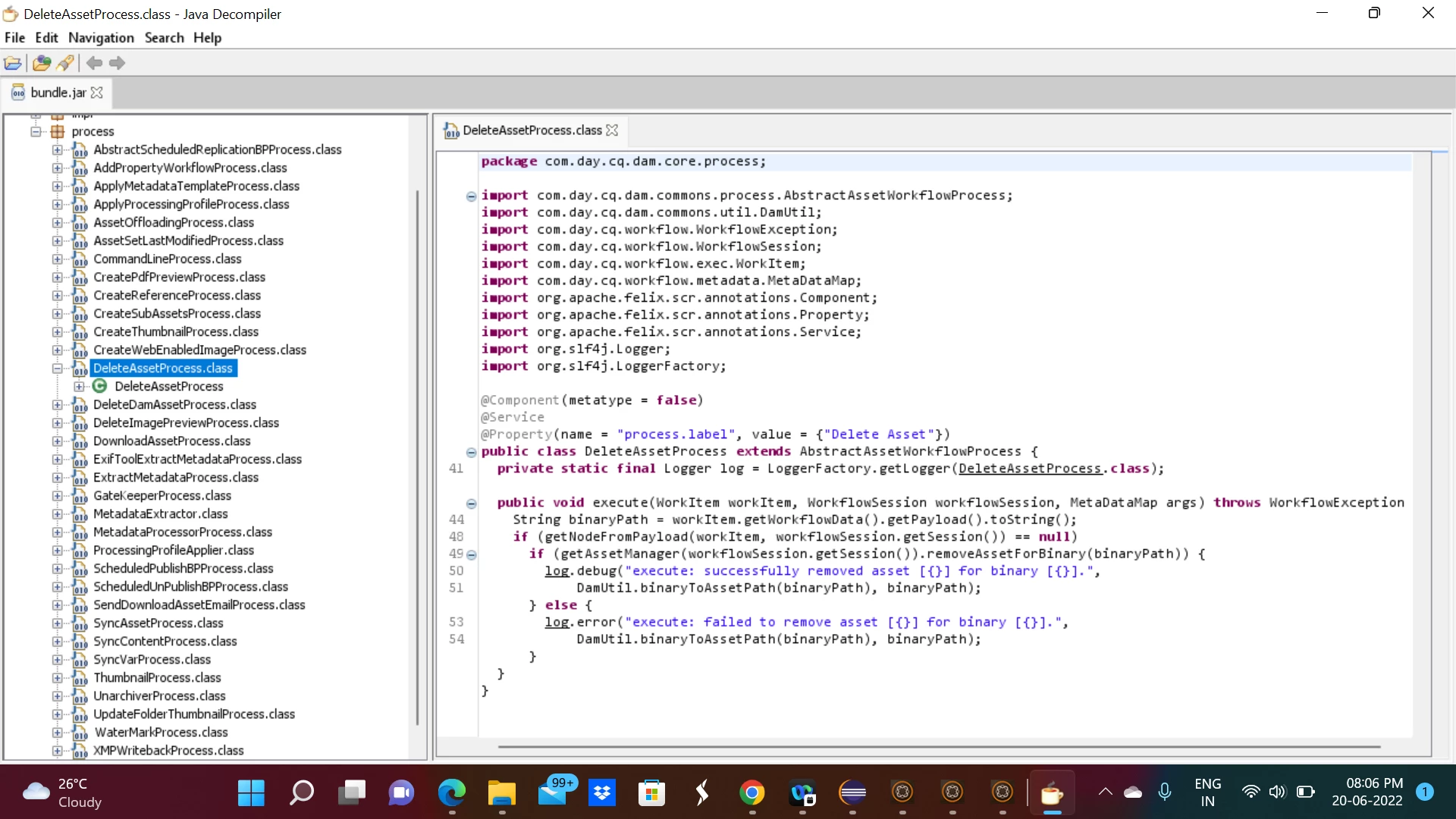
Delete Asset (component) steps involves following process step : com.day.cq.dam.core.process.DeleteAssetProcess and it is saying The DeleteAssetProcess will delete the asset content if the real asset disappears.

Example:
If /var/dam/abc.jpg is deleted via webdav then /content/dam/abc.jpg will be removed


if you decompile DeleteAssetProcess then you will be seeing below logic -


https://developer.adobe.com/experience-manager/reference-materials/6-5/javadoc/com/day/cq/dam/core/process/DeleteAssetProcess.html


Like Activate Page/Asset , could you please give a try with Deactivate Page/Asset in case of rejection.


3 replies

Kiran_Vedantam
Community Advisor
Community Advisor
June 18, 2022

Hi @harido 


What is the code in the "delete asset" step? Can you check if there is any error in the logs once the step is executed?


Thanks,

Kiran Vedantam

DEBAL_DAS
DEBAL_DASAccepted solution
New Member
June 20, 2022

Delete Asset (component) steps involves following process step : com.day.cq.dam.core.process.DeleteAssetProcess and it is saying The DeleteAssetProcess will delete the asset content if the real asset disappears.

Example:
If /var/dam/abc.jpg is deleted via webdav then /content/dam/abc.jpg will be removed


if you decompile DeleteAssetProcess then you will be seeing below logic -


https://developer.adobe.com/experience-manager/reference-materials/6-5/javadoc/com/day/cq/dam/core/process/DeleteAssetProcess.html


Like Activate Page/Asset , could you please give a try with Deactivate Page/Asset in case of rejection.


Debal Das, Senior AEM Consultant
ShaileshBassi
Community Advisor
Community Advisor
June 20, 2022

@harido Can you log the support ticket for this. Even I tried and it is not working. In the workflow history it is showing as complete but it is not working 


The step "Delete Asset", calls the java class "com.day.cq.dam.core.process.DeleteAssetProcess" which checks the 2 conditions i.e.

if (getAssetManager(workflowSession.getSession()).removeAssetForBinary(binaryPath)) {
log.debug("execute: successfully removed asset [{}] for binary [{}].",
DamUtil.binaryToAssetPath(binaryPath), binaryPath);
} else {
log.error("execute: failed to remove asset [{}] for binary [{}].",
DamUtil.binaryToAssetPath(binaryPath), binaryPath);
}

But I do not see it getting logged in the sling logs with the log level as "Debug".


Thanks