Unable to upload .mov files to AEM Author | Community
Skip to main content
This post is no longer active and is closed to new replies. Need help? Start a new post to ask your question.
Best answer by SantoshSai

Hi @ashwinissrinivas ,

I have tried uploading .mov asset to AEM 6.5.11 it worked for me, refer below screenshot.
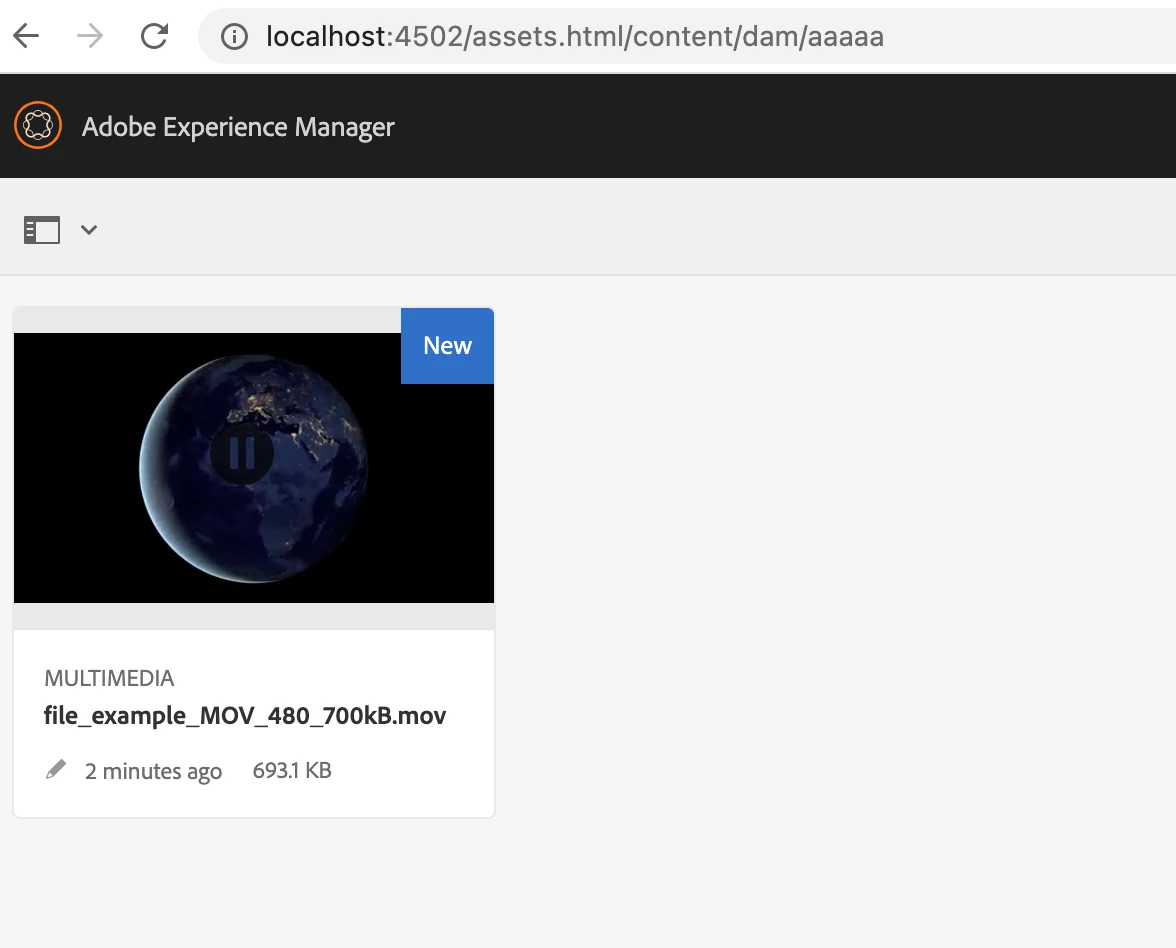
However, looking into error.log, there is error regarding ffmpeg as below

21.07.2022 21:24:19.276 *ERROR* [JobHandler: /var/workflow/instances/server0/2022-07-18/update_asset_2:/content/dam/aaaaa/file_example_MOV_480_700kB.mov/jcr:content/renditions/original] com.day.cq.dam.video.FFMpegTranscodeProcess Could not find ffmpeg's executable
com.day.cq.dam.handler.ffmpeg.FfmpegNotFoundException: Could not find ffmpeg's executable
	at com.day.cq.dam.handler.ffmpeg.FFMpegWrapper.ffmpeg(FFMpegWrapper.java:267)
	at com.day.cq.dam.handler.ffmpeg.FFMpegWrapper.transcode(FFMpegWrapper.java:548)
	at com.day.cq.dam.handler.ffmpeg.FFMpegWrapper.transcode(FFMpegWrapper.java:544)
	at com.day.cq.dam.video.FFMpegTranscodeProcess.processVideo(FFMpegTranscodeProcess.java:123)
	at com.day.cq.dam.video.AbstractFFMpegProcess.execute(AbstractFFMpegProcess.java:113)
	at com.day.cq.workflow.compatibility.CQWorkflowProcessRunner.execute(CQWorkflowProcessRunner.java:93)
	at com.adobe.granite.workflow.core.job.HandlerBase.executeProcess(HandlerBase.java:191)
	at com.adobe.granite.workflow.core.job.JobHandler.process(JobHandler.java:260)
	at org.apache.sling.event.impl.jobs.JobConsumerManager$JobConsumerWrapper.process(JobConsumerManager.java:502)
	at org.apache.sling.event.impl.jobs.queues.JobQueueImpl.startJob(JobQueueImpl.java:293)
	at org.apache.sling.event.impl.jobs.queues.JobQueueImpl.access$100(JobQueueImpl.java:60)
	at org.apache.sling.event.impl.jobs.queues.JobQueueImpl$1.run(JobQueueImpl.java:229)
	at java.base/java.util.concurrent.ThreadPoolExecutor.runWorker(ThreadPoolExecutor.java:1128)
	at java.base/java.util.concurrent.ThreadPoolExecutor$Worker.run(ThreadPoolExecutor.java:628)
	at java.base/java.lang.Thread.run(Thread.java:829)

You are getting this error because com.day.cq.dam.handler.ffmpeg.FFMpegWrapper Cannot run program "ffmpeg"

When a video is uploaded to AEM DAM, the DAM Update Asset workflow kicks in.

For these to work, ffmpeg needs to be downloaded and installed (AEM does NOT come packaged with it).
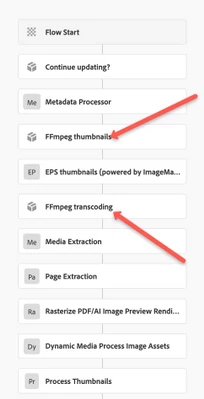
You need to download and install ffmpeg on the machine where AEM is running and set the environment variable (Windows), or Mac as runnable.

Once you complete the above steps, try to upload a new video with .MOV format and you will see in the logs that the processing will be success and you will see a "Processing ..." symbol on top of the video and the video thumbnail also will be shown. After 3-4 min (depends on the video size to complete the processing), you can play the video and it will start playing. If there is any error in processing, you will not be able to see the thumbnail like currently you are getting. Please see the example of working instance below.
Hence, for additional video format support you need to install ffmpeg 

Reference :- https://experienceleague.adobe.com/docs/experience-manager-64/assets/managing/managing-video-assets.... 

Hope that helps!

Regards,

Santosh

2 replies

Community Advisor
July 21, 2022
SantoshSai
Community Advisor
SantoshSaiCommunity AdvisorAccepted solution
Community Advisor
July 22, 2022

Hi @ashwinissrinivas ,

I have tried uploading .mov asset to AEM 6.5.11 it worked for me, refer below screenshot.

However, looking into error.log, there is error regarding ffmpeg as below

21.07.2022 21:24:19.276 *ERROR* [JobHandler: /var/workflow/instances/server0/2022-07-18/update_asset_2:/content/dam/aaaaa/file_example_MOV_480_700kB.mov/jcr:content/renditions/original] com.day.cq.dam.video.FFMpegTranscodeProcess Could not find ffmpeg's executable
com.day.cq.dam.handler.ffmpeg.FfmpegNotFoundException: Could not find ffmpeg's executable
	at com.day.cq.dam.handler.ffmpeg.FFMpegWrapper.ffmpeg(FFMpegWrapper.java:267)
	at com.day.cq.dam.handler.ffmpeg.FFMpegWrapper.transcode(FFMpegWrapper.java:548)
	at com.day.cq.dam.handler.ffmpeg.FFMpegWrapper.transcode(FFMpegWrapper.java:544)
	at com.day.cq.dam.video.FFMpegTranscodeProcess.processVideo(FFMpegTranscodeProcess.java:123)
	at com.day.cq.dam.video.AbstractFFMpegProcess.execute(AbstractFFMpegProcess.java:113)
	at com.day.cq.workflow.compatibility.CQWorkflowProcessRunner.execute(CQWorkflowProcessRunner.java:93)
	at com.adobe.granite.workflow.core.job.HandlerBase.executeProcess(HandlerBase.java:191)
	at com.adobe.granite.workflow.core.job.JobHandler.process(JobHandler.java:260)
	at org.apache.sling.event.impl.jobs.JobConsumerManager$JobConsumerWrapper.process(JobConsumerManager.java:502)
	at org.apache.sling.event.impl.jobs.queues.JobQueueImpl.startJob(JobQueueImpl.java:293)
	at org.apache.sling.event.impl.jobs.queues.JobQueueImpl.access$100(JobQueueImpl.java:60)
	at org.apache.sling.event.impl.jobs.queues.JobQueueImpl$1.run(JobQueueImpl.java:229)
	at java.base/java.util.concurrent.ThreadPoolExecutor.runWorker(ThreadPoolExecutor.java:1128)
	at java.base/java.util.concurrent.ThreadPoolExecutor$Worker.run(ThreadPoolExecutor.java:628)
	at java.base/java.lang.Thread.run(Thread.java:829)

You are getting this error because com.day.cq.dam.handler.ffmpeg.FFMpegWrapper Cannot run program "ffmpeg"

When a video is uploaded to AEM DAM, the DAM Update Asset workflow kicks in.

For these to work, ffmpeg needs to be downloaded and installed (AEM does NOT come packaged with it).

You need to download and install ffmpeg on the machine where AEM is running and set the environment variable (Windows), or Mac as runnable.

Once you complete the above steps, try to upload a new video with .MOV format and you will see in the logs that the processing will be success and you will see a "Processing ..." symbol on top of the video and the video thumbnail also will be shown. After 3-4 min (depends on the video size to complete the processing), you can play the video and it will start playing. If there is any error in processing, you will not be able to see the thumbnail like currently you are getting. Please see the example of working instance below.
Hence, for additional video format support you need to install ffmpeg 

Reference :- https://experienceleague.adobe.com/docs/experience-manager-64/assets/managing/managing-video-assets.... 

Hope that helps!

Regards,

Santosh

Santosh Sai
Nikhil_Verma
Level 4
July 22, 2022

To install FFMPEG :

1. Simply download the latest release version

2. Extract the downloaded file

3. Add the foolowing two folders in your environment PATH variable: 'ffmpeg' & 'ffprobe'. Example:

ffmpeg-git-20180203-64bit-static/ffmpeg ffmpeg-git-20180203-64bit-static/ffprobe

4. Restart AEM.

5. Done.