Hi @robertstull ,
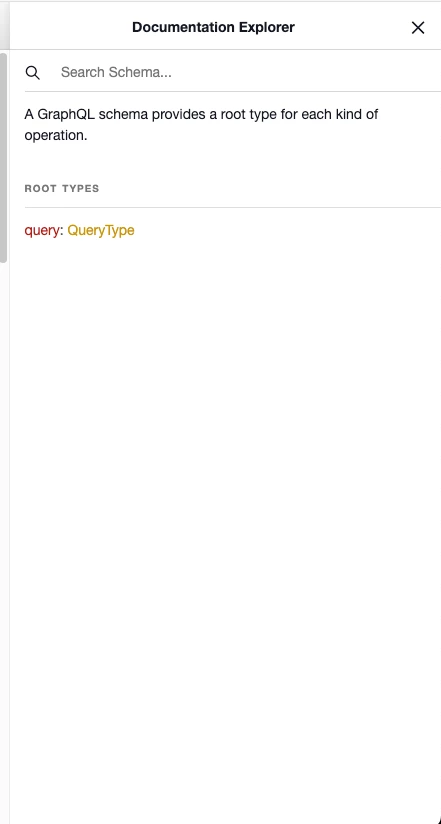
The error you're encountering indicates that the GraphQL endpoint in the AEM Preview service is having issues with the schema, specifically the QueryType not defining any fields. This often points to a configuration issue or a problem with how the models are set up and distributed to the Preview service.
Here are steps to troubleshoot and resolve the issue:
1. Verify GraphQL Schema
Ensure that the GraphQL schema in your Preview environment is correctly set up and includes all necessary fields. The schema must define one or more fields for the QueryType.
2. Validate Model Distribution
Confirm that the models have been correctly distributed to the Preview environment:
- Deployment -> Distribution -> Preview: Ensure that your models and endpoints are correctly listed and successfully distributed.
- Check the logs for any errors or warnings during the distribution process.
3. Check Content Distribution
Ensure that the content has been published correctly to the Preview service:
- Publish the required content to the Preview service.
- Verify the content availability in the Preview environment.
4. Verify Persisted Queries
Make sure that the persisted queries are correctly set up and published to the Preview service:
- Create and test the persisted queries in your author instance.
- Publish the persisted queries to the Preview environment.
- Validate that the structure and schema used in these queries match what is expected in the Preview service.
5. Inspect Configuration
Check your AEM GraphQL configuration for any discrepancies between your production and preview environments:
- OSGi Configuration: Ensure that the GraphQL configurations (like com.adobe.aem.graphql.impl.servlet.GraphQLServlet) are consistent between environments.
- Endpoint Configuration: Verify that the GraphQL endpoint for Preview is correctly configured and pointing to the right models and schemas.
6. Enable Detailed Logging
Enable detailed logging for the GraphQL services to get more insights into what might be going wrong:
- Go to the AEM Web Console: /system/console/configMgr.
- Find and configure the following loggers to DEBUG or TRACE:
- com.adobe.aem.graphql.impl
- com.adobe.cq.graphql.client
This will provide more detailed logs that can help identify the root cause of the issue.
Example Steps to Verify and Update Configurations
Check Model Configuration:
- Ensure the models used in the QueryType are correctly defined and distributed.
Update GraphQL Endpoint Configuration:
curl -u admin:admin -F operation=publish -F path=/conf/global/settings/graphql/environments/preview -F recursive=true http://localhost:4502/bin/wcmcommand
Validate Schema:
- Use the GraphQL introspection query to validate the schema in the Preview environment
{
__schema {
queryType {
name
fields {
name
}
}
}
}
Compare Production and Preview Schema:
- Ensure that the schema definitions in production and preview match.
Potential Fixes
- Re-distribute Models: If the schema validation indicates missing fields, try re-distributing the models to the Preview environment.
- Fix Model Definitions: Ensure that all necessary fields are defined in your model definitions.
- Persisted Query Structure: Make sure that the structure of your persisted queries is valid and adheres to the schema.
By following these steps and validating configurations, you should be able to identify and resolve the issue causing the QueryType to lack defined fields in the Preview environment. If the problem persists, consider reaching out to Adobe Support for further assistance.