any way to create usable URL for cloud AEM author instances, instead of https://author-p29345-f121051.adobeaemcloud.com/ etc. | Community
Skip to main content
Level 8
August 27, 2021
Solved

any way to create usable URL for cloud AEM author instances, instead of https://author-p29345-f121051.adobeaemcloud.com/ etc.

  • August 27, 2021
  • 2 replies
  • 3911 views

We have 7 AEM cloud envs, e.g. 

dev = https://author-p29234-f121051.adobeaemcloud.com/

uat = https://author-p23425-e098098.adobeaemcloud.com/

prod = https://author-p29345-f121058.adobeaemcloud.com/ 

etc.


The problem is, it's impossible to remember these, or know which env you are on.

You might think you are on dev, create or delete some content, then realise its uat, screwing up the testing.


Is there any way to create a nice name/url?  


Neither DNS CNAMES nor Aliases work.
 

This post is no longer active and is closed to new replies. Need help? Start a new post to ask your question.
Best answer by Asutosh_Jena_

Hi @tb3dock 


No there is no way we can update these URLs.

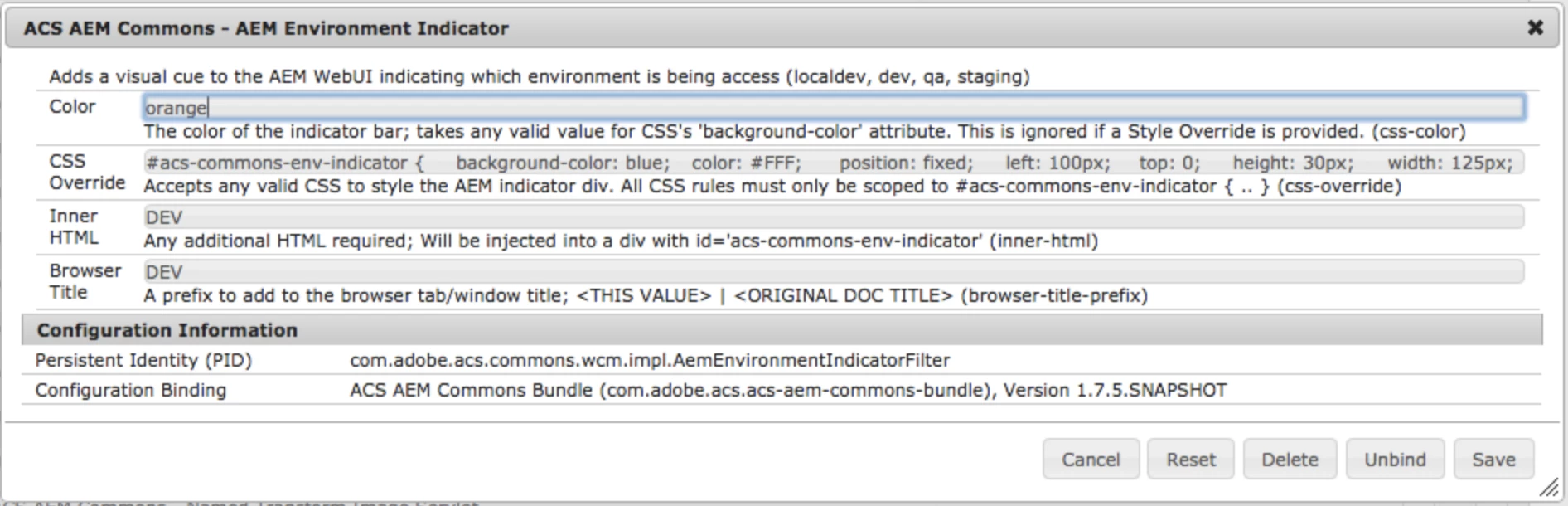
But you can think of using "AEM Environment Indicator" from ACS Commons with which you can define a color code for each of the environment and using that you can identify which environment it is.

https://adobe-consulting-services.github.io/acs-aem-commons/features/environment-indicator/index.html


Thanks!

2 replies

Asutosh_Jena_
Community Advisor
Asutosh_Jena_Community AdvisorAccepted solution
Community Advisor
August 27, 2021

Hi @tb3dock 


No there is no way we can update these URLs.

But you can think of using "AEM Environment Indicator" from ACS Commons with which you can define a color code for each of the environment and using that you can identify which environment it is.

https://adobe-consulting-services.github.io/acs-aem-commons/features/environment-indicator/index.html


Thanks!

TB3dockAuthor
Level 8
August 27, 2021

Hi, thanks for that. Unfortunately, this article only applies to on prem AEM. Cloud AEM does not allow editing or viewing of the OSGI properties. We can do it through code, but for that we need to know the name of the osgi configuration file. Any ideas what this might be?

Asutosh_Jena_
Community Advisor
Community Advisor
August 28, 2021

@tb3dock You can start your local AEM instance with "dev" run mode, by adding the below property in sling.properties file which is located under <AEM installation directory>/crx-quickstart/conf.


sling.run.modes=dev, author


You can create the OSGi configuration as I mentioned above and test it on local.


Inner HTML will add a text showing as "author" along with the color.


Hi @tb3dock 


I have configured my local AEM as Cloud Service instance to run with "dev" run mode and added the OSGi configuration in code to identify the dev instance with green color code.


Just ensure you have ACS Commons https://adobe-consulting-services.github.io/acs-aem-commons/ installed on your instance.


Thanks!

Adobe Employee
August 27, 2021

Hi @tb3dock ,


There is no way we can change the urls, but Adobe is working on this.

Custom Author environments' domains - Adobe Experience League Community - 413262


As suggested by @asutosh_jena_, you can use "AEM Environment Indicator" .


Hope this helps!!
Thanks