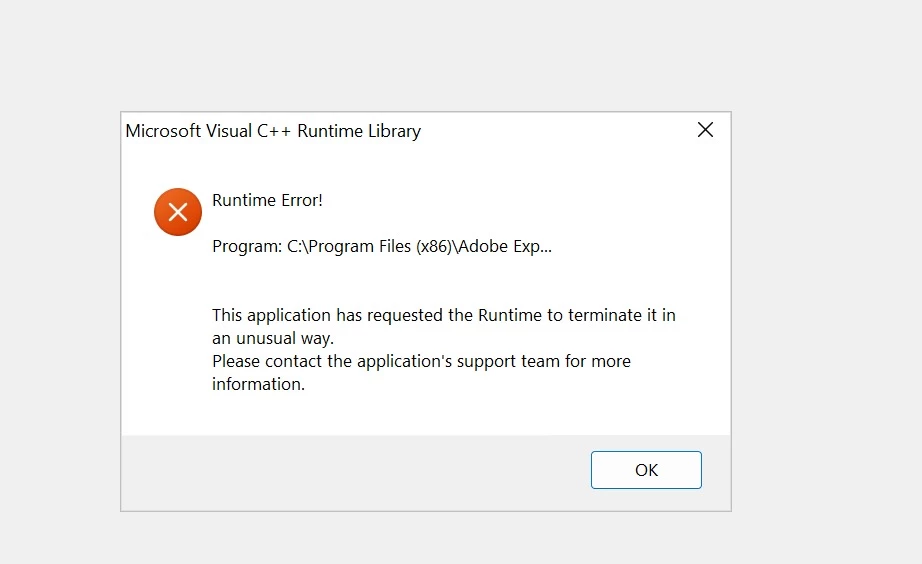
Hi Pulkit,
Please find below log messages. Also, the system is running with Windows 11.
!SESSION 2023-05-01 12:31:57.448 -----------------------------------------------
eclipse.buildId=unknown
java.version=1.8.0_151
java.vendor=Oracle Corporation
BootLoader constants: OS=win32, ARCH=x86, WS=win32, NL=en_US
Framework arguments: #Product Runtime Configuration File
Command-line arguments: -os win32 -ws win32 -arch x86 #Product Runtime Configuration File -debug
!ENTRY org.eclipse.osgi 2 1 2023-05-01 12:31:58.281
!MESSAGE NLS missing message: Product_ReleaseVersion in: com.adobe.livecycle.workbench.core.messages.messages
!ENTRY com.adobe.lcide.rcp 1 0 2023-05-01 12:32:01.496
!MESSAGE Workbench started at: Mon May 01 12:32:01 UTC 2023
!ENTRY org.eclipse.osgi 2 1 2023-05-01 12:32:01.900
!MESSAGE NLS missing message: LoginDialog_LoginFailed_AuthorizationnError in: com.adobe.ide.singlesignon.messages.messages
!ENTRY com.adobe.ide.singlesignon 1 0 2023-05-01 12:32:01.902
!MESSAGE Workbench version '6.5.0.v201903281006'
!ENTRY org.eclipse.ui.workbench 2 0 2023-05-01 12:32:03.083
!MESSAGE A handler conflict occurred. This may disable some commands.
!SUBENTRY 1 org.eclipse.ui.workbench 2 0 2023-05-01 12:32:03.083
!MESSAGE Conflict for 'AUTOGEN:::com.adobe.lcide.rcp.startpage.OpenStartPage/com.qualityeclipse.favorites.browseWeb':
HandlerActivation(commandId=AUTOGEN:::com.adobe.lcide.rcp.startpage.OpenStartPage/com.qualityeclipse.favorites.browseWeb,
handler=ActionDelegateHandlerProxy(null,org.eclipse.help.ui.browser.LaunchURL),
expression=AndExpression(ActionSetExpression(com.adobe.lcide.rcp.startpage.OpenStartPage,org.eclipse.ui.internal.WorkbenchWindow@1c7528f),WorkbenchWindowExpression(org.eclipse.ui.internal.WorkbenchWindow@1c7528f)),sourcePriority=16640)
HandlerActivation(commandId=AUTOGEN:::com.adobe.lcide.rcp.startpage.OpenStartPage/com.qualityeclipse.favorites.browseWeb,
handler=ActionDelegateHandlerProxy(null,org.eclipse.help.ui.browser.LaunchURL),
expression=AndExpression(ActionSetExpression(com.adobe.lcide.rcp.startpage.OpenStartPage,org.eclipse.ui.internal.WorkbenchWindow@1c7528f),WorkbenchWindowExpression(org.eclipse.ui.internal.WorkbenchWindow@1c7528f)),sourcePriority=16640)
!ENTRY com.adobe.ide.singlesignon 1 0 2023-05-01 12:32:35.243
!MESSAGE User 'administrator' logged in to server 'localhost' (hostname: 'localhost')
!SESSION 2023-05-01 12:33:24.654 -----------------------------------------------
eclipse.buildId=unknown
java.version=1.8.0_151
java.vendor=Oracle Corporation
BootLoader constants: OS=win32, ARCH=x86, WS=win32, NL=en_US
Framework arguments: #Product Runtime Configuration File
Command-line arguments: -os win32 -ws win32 -arch x86 #Product Runtime Configuration File -debug
!ENTRY org.eclipse.osgi 2 1 2023-05-01 12:33:25.472
!MESSAGE NLS missing message: Product_ReleaseVersion in: com.adobe.livecycle.workbench.core.messages.messages
!ENTRY com.adobe.lcide.rcp 1 0 2023-05-01 12:33:28.690
!MESSAGE Workbench started at: Mon May 01 12:33:28 UTC 2023
!ENTRY org.eclipse.core.resources 2 10035 2023-05-01 12:33:29.014
!MESSAGE The workspace exited with unsaved changes in the previous session; refreshing workspace to recover changes.
!ENTRY org.eclipse.osgi 2 1 2023-05-01 12:33:29.122
!MESSAGE NLS missing message: LoginDialog_LoginFailed_AuthorizationnError in: com.adobe.ide.singlesignon.messages.messages
!ENTRY com.adobe.ide.singlesignon 1 0 2023-05-01 12:33:29.123
!MESSAGE Workbench version '6.5.0.v201903281006'
!ENTRY org.eclipse.ui.workbench 2 0 2023-05-01 12:33:30.313
!MESSAGE A handler conflict occurred. This may disable some commands.
!SUBENTRY 1 org.eclipse.ui.workbench 2 0 2023-05-01 12:33:30.314
!MESSAGE Conflict for 'AUTOGEN:::com.adobe.lcide.rcp.startpage.OpenStartPage/com.qualityeclipse.favorites.browseWeb':
HandlerActivation(commandId=AUTOGEN:::com.adobe.lcide.rcp.startpage.OpenStartPage/com.qualityeclipse.favorites.browseWeb,
handler=ActionDelegateHandlerProxy(null,org.eclipse.help.ui.browser.LaunchURL),
expression=AndExpression(ActionSetExpression(com.adobe.lcide.rcp.startpage.OpenStartPage,org.eclipse.ui.internal.WorkbenchWindow@9a0cdb),WorkbenchWindowExpression(org.eclipse.ui.internal.WorkbenchWindow@9a0cdb)),sourcePriority=16640)
HandlerActivation(commandId=AUTOGEN:::com.adobe.lcide.rcp.startpage.OpenStartPage/com.qualityeclipse.favorites.browseWeb,
handler=ActionDelegateHandlerProxy(null,org.eclipse.help.ui.browser.LaunchURL),
expression=AndExpression(ActionSetExpression(com.adobe.lcide.rcp.startpage.OpenStartPage,org.eclipse.ui.internal.WorkbenchWindow@9a0cdb),WorkbenchWindowExpression(org.eclipse.ui.internal.WorkbenchWindow@9a0cdb)),sourcePriority=16640)
!ENTRY com.adobe.ide.singlesignon 1 0 2023-05-01 12:33:42.578
!MESSAGE User 'administrator' logged in to server 'localhost' (hostname: 'localhost')