Solved
The param"globals" using in custom functions displayed in the rule editor
We are working on adaptive forms based on form core components (Service pack: 6.5.21, Form version: 1.1.64). I need to write some custom functions which need "globals" as a param.
I am using the examples form the documentation: https://experienceleague.adobe.com/en/docs/experience-manager-cloud-service/content/forms/adaptive-forms-authoring/authoring-adaptive-forms-core-components/create-an-adaptive-form-on-forms-cs/create-and-use-custom-function-core-component/custom-function-core-components-use-cases
   /**
    * resetField
    * @2175539  resetField
    * @90521 {string} input1
    * @90521 {object} field
    * @90521 {scope} globals
    */
    function  resetField(field,globals)
    {

        globals.functions.reset(field);

    }
However when I chose this function from the rule editor, the "gobals" appeared as below:
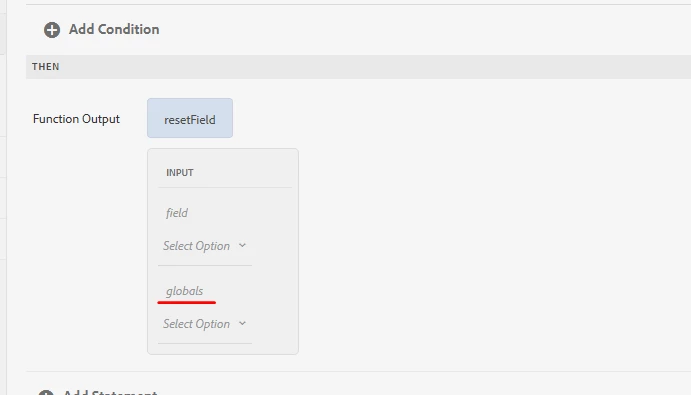
This prevented me to save the rule.
I can't see any console errors. The custom functions works well if there is no "globals" param.
Any ideas on this?