Spanish characters entered in form's input fields not saved correctly in PDF | Community
Skip to main content
Level 5
November 9, 2021
Solved

Spanish characters entered in form's input fields not saved correctly in PDF

  • November 9, 2021
  • 1 reply
  • 1991 views

Hi,


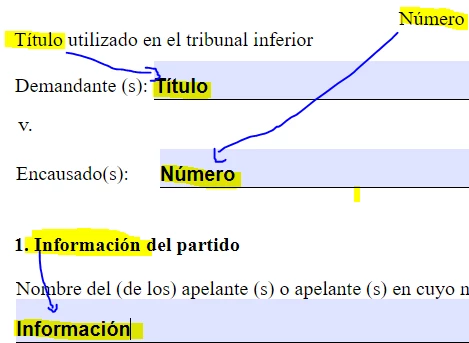
A XDP template is created using Spanish(USA) locale. The special characters used in the text of the form appear correctly both in the form and in the saved PDF, but the text entered in the input field, even thought it appears correctly in the form, it does not save it in the same way in the PDF. Here is an example


XDP form rendered as HTML in the browser
 

Saved as PDF file
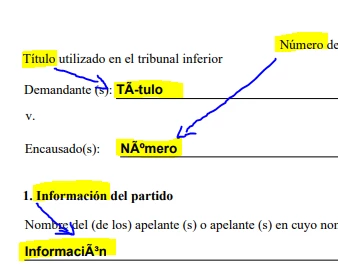
What can cause this, and how can this be fixed?

Thanks,

Leena


This post is no longer active and is closed to new replies. Need help? Start a new post to ask your question.
Best answer by Mayank_Tiwari

Hi Mayank,

I learnt something new today, thank you!. 

a. I am not sure if I understand this clearly...on reading the 'Make fonts available' link you had provided, I need to make sure the same Spanish(Argentina) fonts are available in the Windows server that is running the AEM Publish instance that is used to save the form as PDF. Is this correct? 

b. For AEM 6.5 OSGi framework how do I navigate to the below setting? 

    " 1. In administration console, click Settings > Core Systems Settings > Configurations."

c. In general, where will be the default location be for the custom font folder?

Thanks,

Leena


@aemuser001 

For OSGi stack(author and publish), you can configure the same via 

CQ-DAM-Handler-Gibson Font Manager Service[0]. Thanks!

[0]: https://experienceleague.adobe.com/docs/experience-manager-65/forms/install-aem-forms/osgi-installation/install-configure-document-services.html?lang=en#configuring-the-font-manager-service

1 reply

Mayank_Tiwari
Adobe Employee
Adobe Employee
November 9, 2021

@aemuser001,

Please make sure the required font is available in the Windows Fonts folder, as Designer refers to Windows Fonts folder for the same. Also, if you are using Acrobat, then try installing the font package[0]. Thanks!


[0]: https://helpx.adobe.com/acrobat/kb/windows-font-packs-32-bit-reader.html

Level 5
November 9, 2021

Hi Mayank,

Thanks for the response. I looked at the URL you had provided and the 2021.x(Continuous) has Asian fonts and not Spanish for Windows OS. What font package has the Spanish fonts for Acrobat Reader?

Thanks,

Leena

Mayank_Tiwari
Adobe Employee
Adobe Employee
November 9, 2021

Hi Mayank,

How do I add the sample PDF file to this discussion? Is there an email address to which I can send the file?

Thanks,

Leena


You may send it to me at maytiwar@adobe.com.