

Sample | Implement Autocomplete in an Adaptive form
I have created two sample in case you want to implement Autocomplete in your Adaptive form. The sample uses the jQuery UI Autocomplete. You may refer to the API doc for more details.
The below sample assumes that you have a text field with Element Name as texbox1, the script needs to placed on field initialize.
Example 1:
You have a small List of elements and the elements are not meant to be updated frequently. Let's take an example of a few countries in an array. This Array of strings would be used as a source to the Jquery autocomplete. Here is a simple script for the hard-coded list.
var values = ["Afghanistan","Albania","Algeria","Andorra","Angola","Anguilla","Argentina","Armenia","Aruba","Australia","Austria","Azerbaijan"];
$(".textbox1 input").autocomplete({
minLength: 1,
source: values,
delay: 0
});
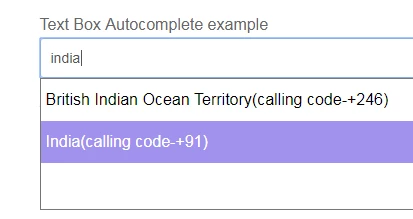
Example 2: You want to call a service which would return the elements to be displayed in JSON data. Here we are making an AJAX call and firing the Jquery Autocomplete on success event.
$.ajax({
url: "https://restcountries.eu/rest/v2/all",
dataType: "json",
success: function (data) {
var vals = data.map(function(item){
return {
label: item.name +'(calling code-' + '+' + item.callingCodes +')',
value: item.name
};
});
$(".textbox1 input").autocomplete({
minLength: 1,
source : vals,
classes: {
"ui-autocomplete": "highlight"
}
});
}
});
Note: minLength states the minimum number of characters a user must type before a search is performed. Zero is useful for local data with just a few items, but a higher value should be used when a single character search could match a few thousand items.
Additional use case:
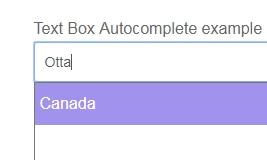
You may also have a requirement to allow the user to search for currency or even the country code but want to populate the country name only as a Label. For example, user search for Ottawa and the suggestion for Canada is shown. In such a case, you can create your own custom filter for pattern matching. Here is a sample script for the above use case.
$(".textbox1 input").autocomplete({
source: function(request, response) {
$.ajax({
url: "https://restcountries.eu/rest/v2/all",
dataType: "json",
success: function (availableTags) {
var list = availableTags.filter(function(tag) {
if (JSON.stringify(tag).indexOf(request.term) !== -1)
return tag;
});
response(list.map(function(listItem) {
return {
label: listItem.name,
value: listItem.timezones
};
}));
}
});
}
});