


[Sample] How to create and use Modal in an Adaptive Form
A modal is a dialog box/popup window that is displayed on top of the current page. You can use it to display additional information related to your form or even the field. One such use case that a person asked me was to show rules to fill the form in the dialog.
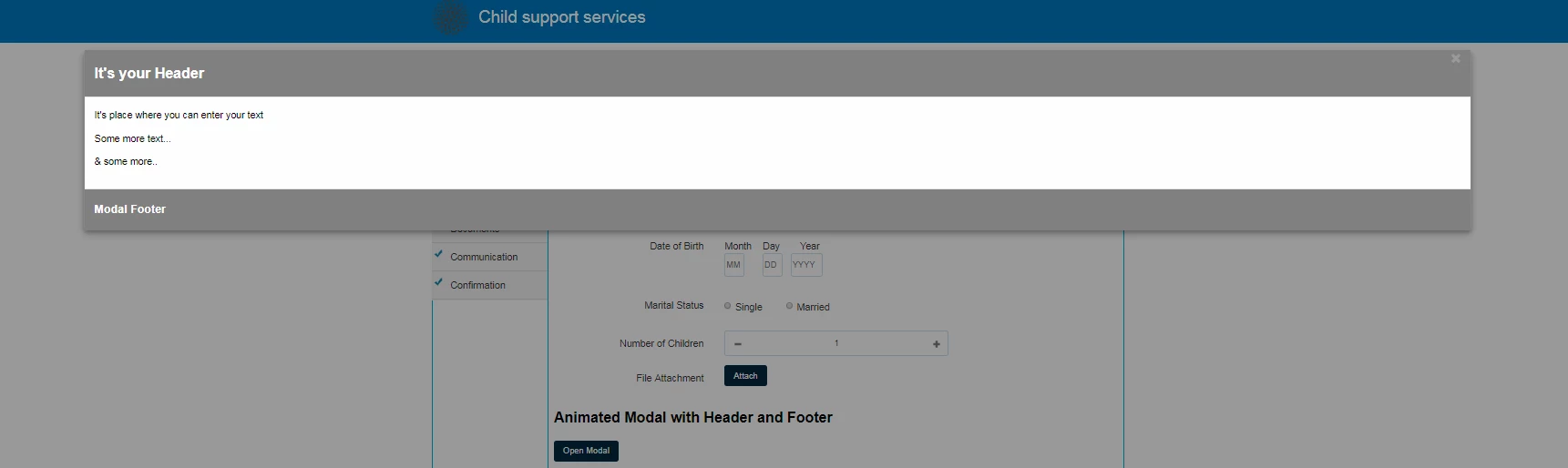
Let's Begin
JS
Place the below Script on form initialize
var modal = document.getElementById('myModal');
// Get the button that opens the modal
var btn = document.getElementById("myBtn");
// Get the <span> element that closes the modal
var span = document.getElementsByClassName("close")[0];
// When the user clicks the button, open the modal
btn.onclick = function() {
modal.style.display = "block";
};
// When the user clicks on <span> (x), close the modal
span.onclick = function() {
modal.style.display = "none";
};
// When the user clicks anywhere outside of the modal, close it
window.onclick = function(event) {
if (event.target == modal) {
modal.style.display = "none";
}
};
CSS
Place the below CSS in your clientlibs, we basically need the CSS to be loaded along with the form. If you are not using clientLibs, place it in your theme CSS.
.modal-content {
position: relative;
background-color: #fefefe;
margin: auto;
padding: 0;
border: 1px solid #888;
width: 80%;
box-shadow: 0 4px 8px 0 rgba(0,0,0,0.2),0 6px 20px 0 rgba(0,0,0,0.19);
-webkit-animation-name: animatetop;
-webkit-animation-duration: 0.4s;
animation-name: animatetop;
animation-duration: 0.4s
}
/* Add Animation */
@-webkit-keyframes animatetop {
from {top:-300px; opacity:0}
to {top:0; opacity:1}
}
@keyframes animatetop {
from {top:-300px; opacity:0}
to {top:0; opacity:1}
}
/* The Close Button */
.close {
color: white;
float: right;
font-size: 28px;
font-weight: bold;
}
.close:hover,
.close:focus {
color: #000;
text-decoration: none;
cursor: pointer;
}
.modal-header {
padding: 2px 16px;
background-color: #5cb85c;
color: white;
}
.modal-body {padding: 2px 16px;}
.modal-footer {
padding: 2px 16px;
background-color: #5cb85c;
color: white;
text-align: left;
}
HTML
Code to be placed on Static Text field: Source Edit
On how to work with Static text: source edit please refer my other post [Sample] Embedding a pdf or a Video in an Adaptive form )
<h2>Sample Modal</h2>
<p><button id="myBtn">Open Modal</button></p>
<div id="myModal" class="modal"><div class="modal-content"><div class="modal-header"><span class="close">×</span><h2>It's your Header</h2>
</div>
<div class="modal-body"><p>It's place where you can enter your text</p>
<p>Some more text...</p>
<p>& some more..</p>
</div>
<div class="modal-footer"><h3>Modal Footer</h3>
</div>
</div>
</div>