remove Form Data Model | Community
Skip to main content
ayecona
Level 5
July 26, 2019
Solved

remove Form Data Model

  • July 26, 2019
  • 15 replies
  • 6492 views

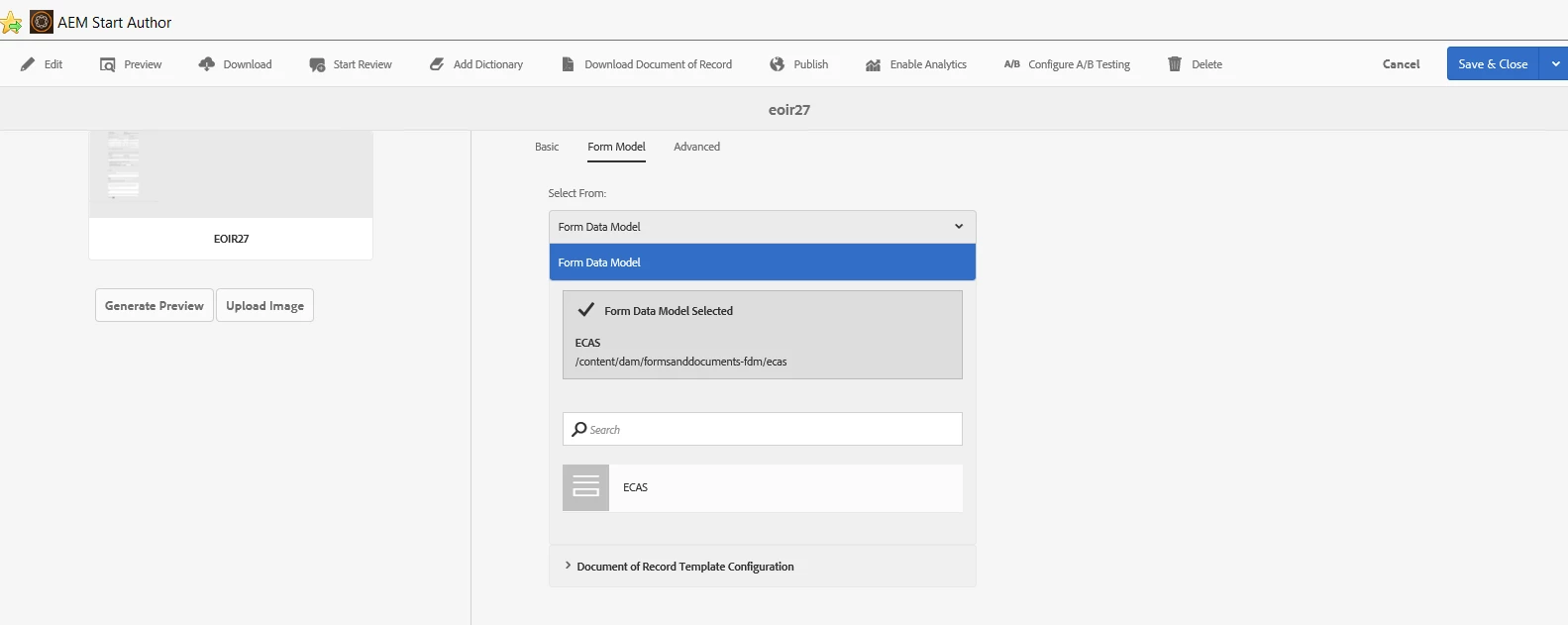
how do I remove the Form data model? once it is selected I cannot choose anything else to either remove it or replace it.
This post is no longer active and is closed to new replies. Need help? Start a new post to ask your question.
Best answer by workflowuser

why not just create new data sources

you cannot delete data sources from the UI and deleting from crx is not recommended

15 replies

Mayank_Gandhi
Adobe Employee
Adobe Employee
July 26, 2019

From UI you cannot. You can do that from CRX DE.

ayecona
ayeconaAuthor
Level 5
July 26, 2019

Mayank Gandhi​ how do you do that?

Mayank_Gandhi
Adobe Employee
Adobe Employee
July 26, 2019

Mayank_Gandhi
Adobe Employee
Adobe Employee
July 26, 2019

Mayank_Gandhi
Adobe Employee
Adobe Employee
July 26, 2019

Mayank_Gandhi
Adobe Employee
Adobe Employee
July 26, 2019

These are for XSD schema removal so it will be slightly different as there will be form data model for you instead of XSD but the approach remains the same.

Adobe Employee
July 26, 2019

BTW these are not recommended

why not just delete the FDM and create a new one

Mayank_Gandhi
Adobe Employee
Adobe Employee
July 26, 2019

What if the FDM is associated with multiple forms and the respective FDM was selected in one form by mistake. Deleting the complete FDM would result in more efforts.

ayecona
ayeconaAuthor
Level 5
July 26, 2019

workflowuser​ do you mean this below?

will it then disappear from the forms as their data model?

workflowuserAdobe EmployeeAccepted solution
Adobe Employee
July 26, 2019

why not just create new data sources

you cannot delete data sources from the UI and deleting from crx is not recommended