
QR Code object Greys out when the user starts typing in the connected field | Community
Skip to main content
nowackem
Level 5
July 8, 2021
Solved

QR Code object Greys out when the user starts typing in the connected field

  • July 8, 2021
  • 2 replies
  • 2410 views

Hi All,

We have a form that was developed by one of my teammates. The QR code box turns grey once the user types in the Date field (or any fields connected to the collection related to the QR code). The problem is that this issue does not occur for a couple of us but it does for others. So I'm trying to figure out what the difference is between us. If anyone has any ideas please let me know. I have included a screenshot below of what it looks like and have uploaded the files if anyone want to take a stab at it.


There are two files located here:

https://drive.google.com/drive/folders/1cGttqWp0lzAagL44zXQ9D-BSzTfPRXBM?usp=sharing

  • OC 107 - the two fields connected to the QR code are the Date Submitted and EID
  • BoBS 120 - just the Date field is connected to the QR code.

Below is the screenshot from my teammate. This is what is happening on her computer where mine is working just fine.
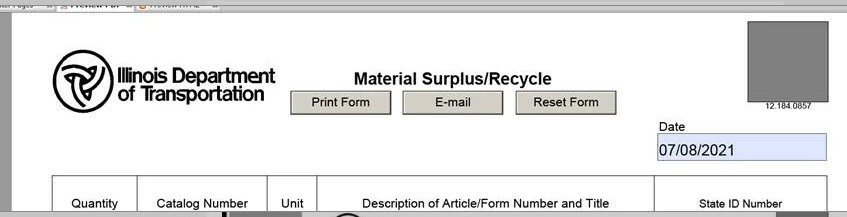
 

Thank you!


This post is no longer active and is closed to new replies. Need help? Start a new post to ask your question.
Best answer by Kosta_Prokopiu1

Hi @nowackem ,

the PDF works fine here with Acrobat Professional. I assume you have Acrobat Pro as well?

Do your teammates use Adobe Reader when it does not work? In that case the PDF is missing so called Reader Extensions. You can extend the PDF with Acrobat but not for the barcode option as far as I know. You need to have AEM Forms server for that.

Regards

Kosta


See barcode - acrobat 8.0 - javascript - free reader -... - Adobe Experience League Community - 111642

2 replies

Level 8
July 8, 2021

Make sure you both are using Adobe reader / Acrobat

Kosta_Prokopiu1
Adobe Employee
Kosta_Prokopiu1Adobe EmployeeAccepted solution
Adobe Employee
July 9, 2021

Hi @nowackem ,

the PDF works fine here with Acrobat Professional. I assume you have Acrobat Pro as well?

Do your teammates use Adobe Reader when it does not work? In that case the PDF is missing so called Reader Extensions. You can extend the PDF with Acrobat but not for the barcode option as far as I know. You need to have AEM Forms server for that.

Regards

Kosta


See barcode - acrobat 8.0 - javascript - free reader -... - Adobe Experience League Community - 111642