PDF to XML conversion using adobe acrobat | Community
Skip to main content
June 25, 2025
Solved

PDF to XML conversion using adobe acrobat

  • June 25, 2025
  • 2 replies
  • 1453 views
Hi guys, I wanted to convert my pdf to xml format using the sdk. I did try to do it directly from the app, but after few pages, the structure is getting messed up, like every single sub heading is just under one header. So i had to make multiple small pdfs for the same pdf and manually convert them through the app. But this is eating away my time. I wanted to ask if: 1) Am i doing something wrong with the software? 2) Is there option to convert pdf to xml sdk? if yes can anyone provide me with the code please.
This post is no longer active and is closed to new replies. Need help? Start a new post to ask your question.
Best answer by sharoon23

Hi,

Situation
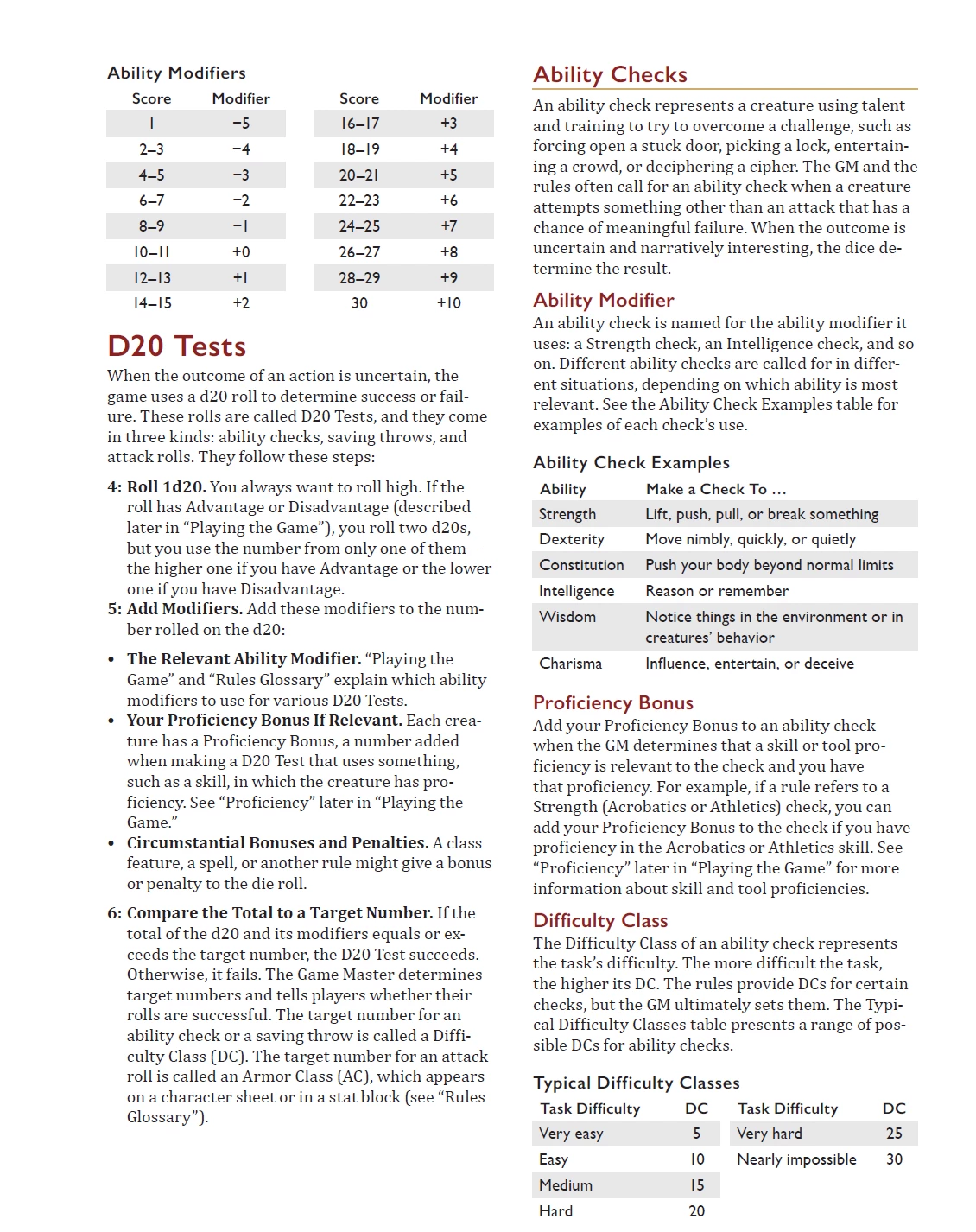
So i have a ocr'd pdf like this(please look at the attachements), Now What im currently doing is, i manually converted the the ocr pdf to xml file. The pdf has around 350 pages, and converting everything at a time into xml is not keeping the format, so i had to do 2 pages convertion everytime. 


I tried sdk but it doest have a pdf to xml convertion option(atleast whats available in the readme file).

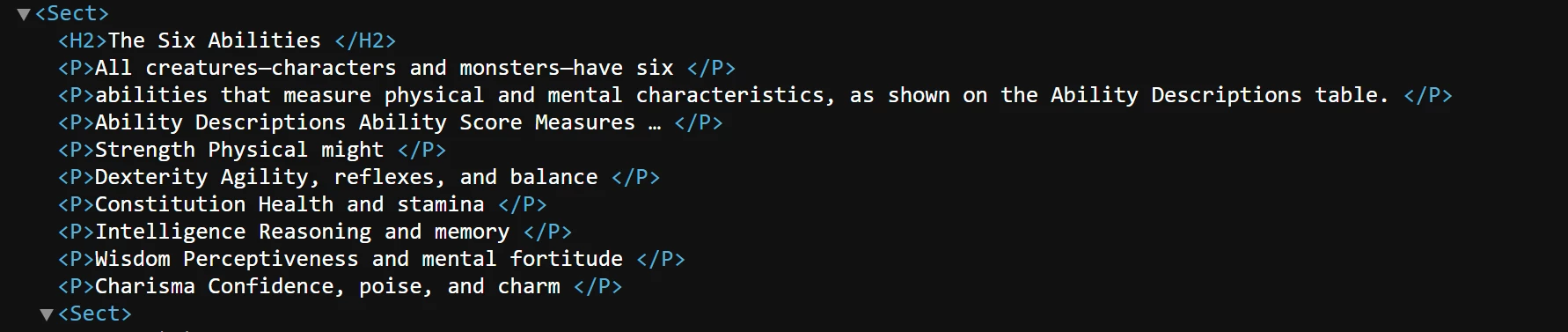
Manually converted xml is nice and all but there some cases where its not taking the tables. Like below where it should have been a table but ended up a sub heading.


Needed output

The final i put i want is in the form of jsonl, converting pdf to xml is keeping the hierarchial structure including the tables, thats what i want.


What im currently doing


Currently i converted my pdf to json, which is keeping the structure, but needs a lot of parsing.

Im working not making a vector data base for my RAG model, and having perfectly formatted data is key. So thats the reason im going extreme lengths to keep the formating of the tables.


Hi @yaswanth_reddybh , 


What is the software being used for this conversion? Are you using AEM Forms product for this conversion? Or are you using Acrobat PDF Services APIs? Or automation written on top of Acrobat? 


My guess is you are using Acrobat PDF Services APIs. You have posted this question on AEM Forms forums which is not the right place for this question. 


Regards, 
Sufyan

2 replies

Adobe Employee
June 25, 2025

How was your pdf created?

was it from xml document. If pdf was created from word document and if you export it as xml the results will be unpredictable 

ideally source of the pdf and the export format has to be the same to get best results 

June 26, 2025

Hi,

Situation
So i have a ocr'd pdf like this(please look at the attachements), Now What im currently doing is, i manually converted the the ocr pdf to xml file. The pdf has around 350 pages, and converting everything at a time into xml is not keeping the format, so i had to do 2 pages convertion everytime. 


I tried sdk but it doest have a pdf to xml convertion option(atleast whats available in the readme file).

Manually converted xml is nice and all but there some cases where its not taking the tables. Like below where it should have been a table but ended up a sub heading.


Needed output

The final i put i want is in the form of jsonl, converting pdf to xml is keeping the hierarchial structure including the tables, thats what i want.


What im currently doing


Currently i converted my pdf to json, which is keeping the structure, but needs a lot of parsing.

Im working not making a vector data base for my RAG model, and having perfectly formatted data is key. So thats the reason im going extreme lengths to keep the formating of the tables.

kautuk_sahni
Community Manager
Community Manager
June 27, 2025

@yaswanth_reddybh Just checking in — were you able to resolve your issue?
We’d love to hear how things worked out. If the suggestions above helped, marking a response as correct can guide others with similar questions. And if you found another solution, feel free to share it — your insights could really benefit the community. Thanks again for being part of the conversation!

Kautuk Sahni