Need dropdown choice from one table to be added to a new table with a click of a button | Community
Skip to main content
Level 5
December 29, 2021
Solved

Need dropdown choice from one table to be added to a new table with a click of a button

  • December 29, 2021
  • 2 replies
  • 2219 views

Good day,  I have a table which have dropdown lists within it. The table also have several buttons.  One of them is a button which adds a new blank table so that the user can choose whatever they like from the dropdown lists.  There are incidents where a choice from one of the drop down lists will be the same for multiple tables.  I do not want the user to have to choose the same choice every time they create a new table.  I would like the user to click another button which would add the additional table, and also keep certain choices selected in the previous table so that they don't have to choose it every time they create a new table.  Is this possible?  Just to elaborate more:  Example:  The table lists automobiles.  Within the table the user will need to enter 30 automobiles made by "Ford" but the automobiles have different models.  When the user chooses "Ford" from the drop down menu of the first table and enter all pertinent information, I want  "Ford" to be automatically entered into the next table when the button to create a similar table is chosen.
This post is no longer active and is closed to new replies. Need help? Start a new post to ask your question.
Best answer by Mayank_Tiwari

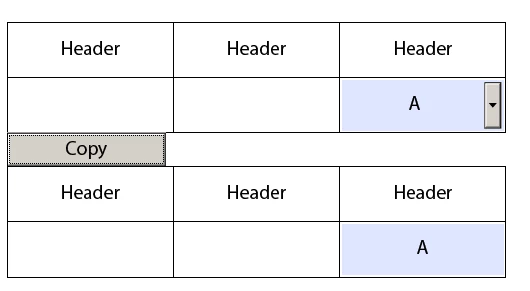
Please check this form in which I have copied the value from the dropdown in one table to the other table, on the click of a button - "Copy".


2 replies

Mayank_Tiwari
Adobe Employee
Mayank_TiwariAdobe EmployeeAccepted solution
Adobe Employee
December 29, 2021

Please check this form in which I have copied the value from the dropdown in one table to the other table, on the click of a button - "Copy".


Level 5
January 25, 2022

Good day,

I'm still in need of assistance on this....Please see my questions below and dated 07-01-2022 below.  My form starts off with only one table which has a button that creates another blank table.  I am going to create another button, which the user will click that will create a table that will have some of the same entries that were chosen in the first table. This is because I do not want the user to have to enter the same entries in the subsequent tables that are created.  I would like the initial entries to be "global" or something similar to the global affect when the new table or tables are created by clicking the new button.  Is this possible?


Your script in the click button of your example lists:

var h= event.target.getField("form1.Table1.Row1.Cell3");
form1.Table2.Row1.Cell3.rawValue = form1.TextField1.rawValue;


Your example starts off with two tables instead of one.  


Level 5
January 29, 2022

This is great!  One question...I see that the "Table" is no longer listed. How did you move the fields into a repeatable field exactly?  


posted in the wrong place.

MHWinter
Level 4
December 29, 2021

should the new table still have the dropdown list, and assign the value (i.e. "Ford"), or do you only need the value, not the dropdown list?


Level 5
January 7, 2022

Yes, the new table should have the dropdown list, and assign the value.