How to make an XDP accessible using form desinger | Community
Skip to main content
Level 3
April 10, 2025

How to make an XDP accessible using form desinger

  • April 10, 2025
  • 3 replies
  • 2007 views

Hi,


I am new to Form Designer app and I have a requirement to make fields in an XDP file accessible. Is there any way to make fields accessible on an XDP file and not using a tagged PDF file. Thank you.

3 replies

Adobe Employee
April 10, 2025

Hi @smrithig1,

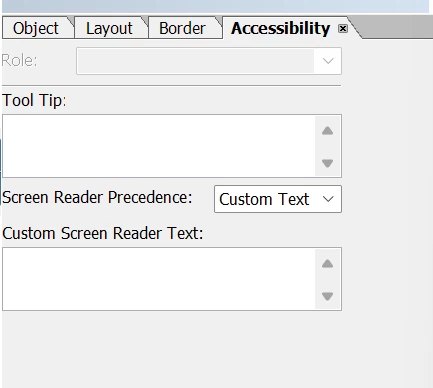
If you want to make the form accessible then you can use the Accessibility tab to set the specific tooltip for the the specified fields on the forms. You can also select the screen reader preference to set the values for the form fields.


Thanks

Pranay

SmrithiG1Author
Level 3
April 10, 2025

Thank you I can see the Accessibility as you showed in form designer app.


Do you have an example for a tooltip script, on how to make a text field accessible. Thank you

Vijay_Katoch
Community Advisor
Community Advisor
April 10, 2025

You can add below snippet in initialize event of the field.

this.assist.toolTip = "Hello tooltip";

Adobe Employee
May 8, 2025

The rendered pdf will be accessible 

SmrithiG1Author
Level 3
May 9, 2025

Happy to hear that, is there any way I can message you separately to check on the issue? May be it could be a minor one. The things I tried:

1. Added this.assit.toolTip= "message " for a single field on XDP using form designer.

2. save the file as PDF on my machine

3. opened it using acrobat Pro to check if the tags are added, and they are not.

Please check and let me know if its correct, as this a huge blocker for us right now. Appreciate any support on this matter. 

SmrithiG1Author
Level 3
May 9, 2025

Hi @smrithig1,

Can you please attach the Accessibility report from Acrobat and the PDF to the chat and I can review the information that you have shared.

Thanks
Pranay


For the generated PDF, I can see that many features in accessibility check are disabled. So, I am unable to send the report. Trying to check why the features are disabled for the PDF. 

Adobe Employee
May 12, 2025

Hi @smrithig1 ,

I have reviewed the thread. Could you please try the following options:

  1. Write the script to runAt server, then save the output as a static PDF. Verify if it functions as expected.
  2. If the above does not work, add a tooltip via the property sheet, save it again as a static PDF, and check if the issue persists.
  3. If neither approach resolves the issue, kindly share the PDF files generated during the above steps for further analysis.

Query:
Could you please clarify the type of PDF you are aiming for—static or dynamic?


Thank you.


SmrithiG1Author
Level 3
May 12, 2025

Hi @vijaysr1 , Thanks a lot for your suggestion. 

On saving the XDP as static PDF, i could see the accessibility tags when opened in Acrobat Pro.

I was always trying to save it as dynamic PDF, because as per our use case, the generated PDF can be edited later for updating the form data.


One thing I noticed as saving as a static PDF, is that, the PDF is still dynamic. i.e I can still edit the PDF and save the values entered in each field.