How to import this component "com.adobe.cq.forms.core.components.models.aemform" | Community
Skip to main content
Level 5
June 25, 2023
Solved

How to import this component "com.adobe.cq.forms.core.components.models.aemform"

  • June 25, 2023
  • 2 replies
  • 2433 views

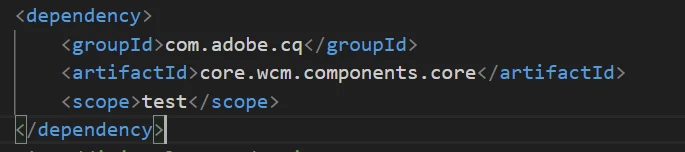
For my case i need to extend the AEMForm core component which is under "com.adobe.cq.forms.core.components.models.aemform" this package. I added the following dependency. Still not able to resolve the import. And i tried the package for "com.adobe.cq.forms.core" this but didn't find any. Any advice or solution. Thanks in advance.
 

This post is no longer active and is closed to new replies. Need help? Start a new post to ask your question.
Best answer by aravindS

We need to add the following dependency in repo pom. 

<dependency>
<groupId>com.adobe.aem</groupId>
<artifactId>aem-forms-sdk-api</artifactId>
<version>2023.06.19.00-230400</version>
</dependency>

and check the includeFormsenrollment=y in archetype.properties file.

Thanks

2 replies

SivakumarKanoori
Community Advisor
Community Advisor
June 27, 2023

@aravinds 


Can try to add below 

<dependency>
 <groupId>com.adobe.cq</groupId>
 <artifactId>core.wcm.components.core</artifactId>
 <scope>provided</scope>
 </dependency>


and what is the version you added .

If needed you can have a look on the below.

https://github.com/adobe/aem-core-forms-components/blob/master/bundles/core/pom.xml


Thanks,Siva
aravindSAuthor
Level 5
June 28, 2023

Not working as expected, still getting the error


aravindSAuthorAccepted solution
Level 5
June 29, 2023

We need to add the following dependency in repo pom. 

<dependency>
<groupId>com.adobe.aem</groupId>
<artifactId>aem-forms-sdk-api</artifactId>
<version>2023.06.19.00-230400</version>
</dependency>

and check the includeFormsenrollment=y in archetype.properties file.

Thanks