How do I get the execEvent("mouseEnter") and ("mouseExit") work | Community
Skip to main content
Level 2
August 5, 2021
Solved

How do I get the execEvent("mouseEnter") and ("mouseExit") work

  • August 5, 2021
  • 3 replies
  • 1753 views

I am using the following JS Code in the exit event of another date field


Date2SubFrm.endd.execEvent("mouseEnter");
Date2SubFrm.endd.execEvent("mouseExit");

This post is no longer active and is closed to new replies. Need help? Start a new post to ask your question.
Best answer by Kosta_Prokopiu1

ok, let's approach this one by one:

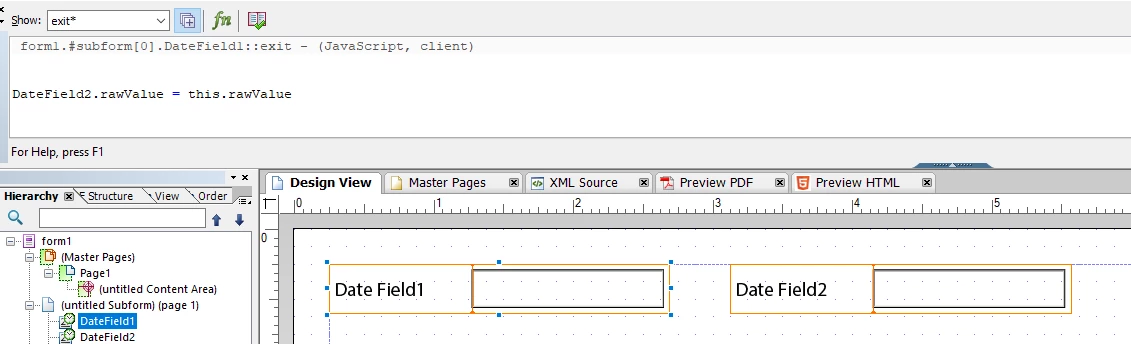
DateField1 is to push its value to DateField2. You can use the exit event of DateField1 for that:
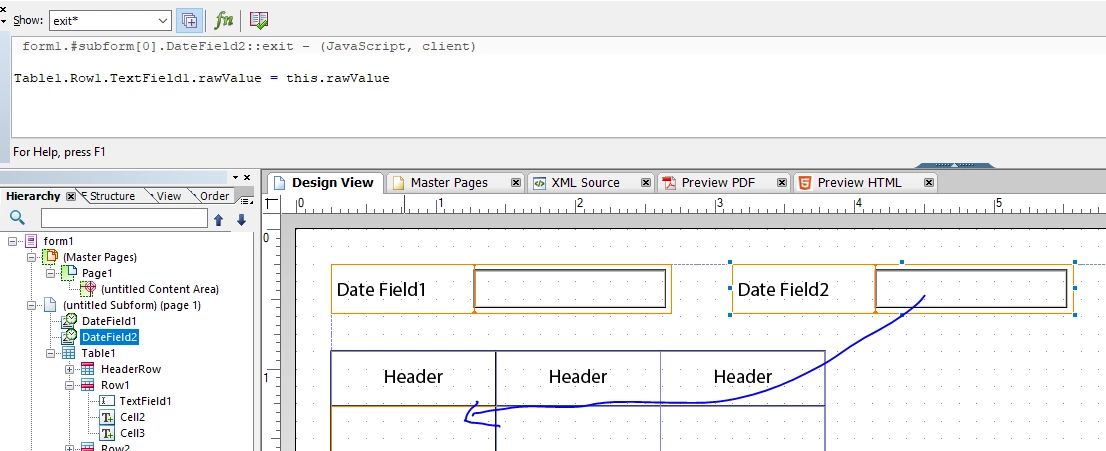
To do some manipulations in the table on exit of Field2:
This is completely interactive. It requires the user to step through the fields and exit the fields again.

mouseEnter and mouseExit are not required for this.

Is this want you want to achieve?

3 replies

IanFlemAuthor
Level 2
August 5, 2021
form1.Main.DATable.DExp.Table1.Row1.endd::exit - (JavaScript, client) Date2SubFrm.endd.execEvent("mouseEnter"); Date2SubFrm.endd.execEvent("mouseExit");
Kosta_Prokopiu1
Adobe Employee
Adobe Employee
August 5, 2021

Hi @ianflem 

I fail to see what you want to achieve. mouseEnter and mouseExit are interactive events triggered by the position of the mouse in an interactive XFA form.

Why would you trigger mouse events from one field to another field although the user does not have the mouse in there?

BTW, these events do not work in a print-rendition of the form. 

What code do you have in the two events and could you not just execute the code inside the first date field onExit?

Kosta

IanFlemAuthor
Level 2
August 5, 2021
Hi thanks for the reply. I have two date fields. The second date field gets it value from the first date field but at the same time the second date field needs to trigger some code on the exit event so that a table is populated.
Kosta_Prokopiu1
Adobe Employee
Kosta_Prokopiu1Adobe EmployeeAccepted solution
Adobe Employee
August 6, 2021

ok, let's approach this one by one:

DateField1 is to push its value to DateField2. You can use the exit event of DateField1 for that:

To do some manipulations in the table on exit of Field2:

This is completely interactive. It requires the user to step through the fields and exit the fields again.

mouseEnter and mouseExit are not required for this.

Is this want you want to achieve?

IanFlemAuthor
Level 2
August 6, 2021
Thanks so much in the end I only used execEvent("exit"); in the first date field to get it work.