
How do I check for duplicate Employee Names throughout a form with multiple repeating tables? | Community
Skip to main content
nowackem
Level 5
October 27, 2021
Solved

How do I check for duplicate Employee Names throughout a form with multiple repeating tables?

  • October 27, 2021
  • 1 reply
  • 2041 views

Good Afternoon,

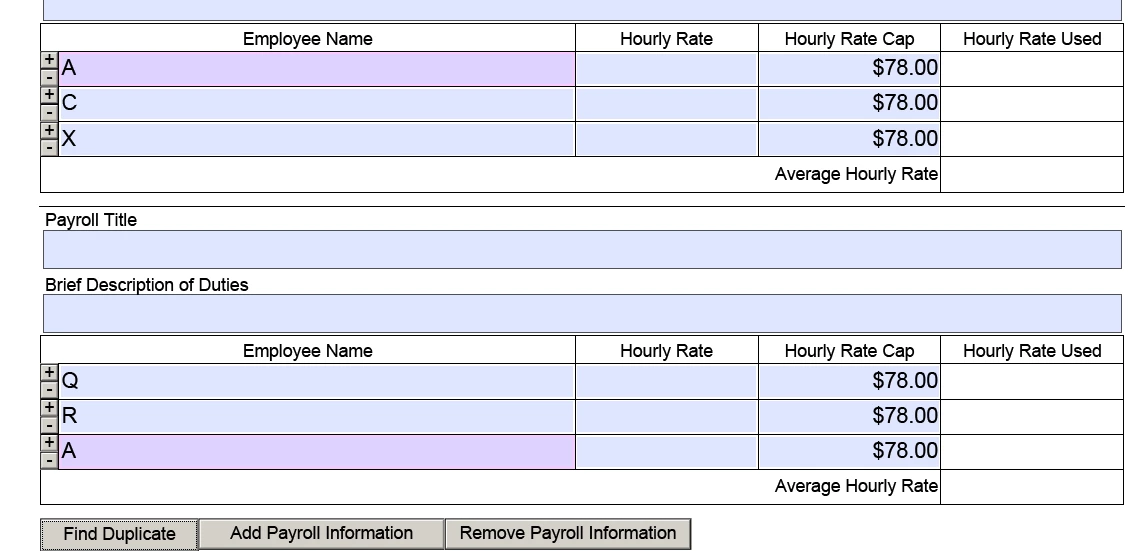
@pulkit_jain_ this is the form you just helped me with. I'm hoping you or someone can help me as this request is a little more complicated. I need to run a script that will check for duplicates within the employeeName field but this table has a repeating row AND the entire table is running an add and instance script. A pop up window will work or even highlighting the duplicated names would work.

Please see the form here: 

https://drive.google.com/file/d/1oVWCDknyCNWwImMSOHKK0990-1O7ITzB/view?usp=sharing

Thank you,

Emilee
 

This post is no longer active and is closed to new replies. Need help? Start a new post to ask your question.
Best answer by Mayank_Tiwari

Please forgive me, I just cant get this to work. Can you look at my document and see where I'm going wrong? I need to specify where the duplicates are and highlight them somehow when the button is clicked. I've tried a few things but I still cant get the script to check any table but the first one. Thank you again for your help.


I got it working. Please see below and confirm that's what you wanted. Duplicates are highlighted in all the tables on button click.


Update Form: https://drive.google.com/file/d/1RQhNjPKf28AjUuNbPmnv73ZrZU-N-8jq/view?usp=sharing

1 reply

Pulkit_Jain_
Adobe Employee
Adobe Employee
October 27, 2021

@nowackem 

I see that there could be multiple rows/employee names in a table and multiple tables (with "Add payroll information")

What event do you want to check the duplicate values with? I don't see any submit button or option to save the form. We can check for the duplicate names but wanted to understand the use-case better.


nowackem
nowackemAuthor
Level 5
October 27, 2021

@pulkit_jain_ The idea is that the users/customers would submit the form but the user wouldnt really be the ones looking at the duplicates, it would be our employees who would look for duplicates. If we had to create a button for our people to click to find them easily that would work. What do you suggest?

nowackem
nowackemAuthor
Level 5
October 28, 2021

You need to merge the repeatingRow array from each of the subPayRollInfo instance into a single array, by using a loop. And then apply the same logic on the merged array to find the duplicates. 


Please forgive me, I just cant get this to work. Can you look at my document and see where I'm going wrong? I need to specify where the duplicates are and highlight them somehow when the button is clicked. I've tried a few things but I still cant get the script to check any table but the first one. Thank you again for your help.