Highlighting Fillable Sections in Adobe Experience Manager PDF Form | Community
Skip to main content
November 1, 2023

Highlighting Fillable Sections in Adobe Experience Manager PDF Form

  • November 1, 2023
  • 3 replies
  • 1932 views

Hi community members,


I'm working on a PDF form in Adobe Experience Manager. Currently, I can highlight the entire object border when it's empty using code and subsequent output.

function highlightField(field) { field.borderColor = "255,0,0"; // Set border color to red }

 

However, I'd like to focus on highlighting just the user-fillable part, like in the example below.
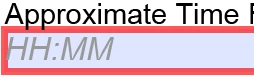
 

Any suggestions on code adjustments would be appreciated!

This post is no longer active and is closed to new replies. Need help? Start a new post to ask your question.

3 replies

Level 3
November 1, 2023

I would use the nullTest property. This is usually set using Designer's UI in the Object Palette/Value Tab/Type: User Entered - Required.

You can either set the nullTest that way or with code on the initialize event: The code works better because it will look at the field and determine if it has a value or not. This is a good because if the user saves the form and re-opens it later the red border will not show for fields that already have a value.

if (this.rawValue == null)
{
this.validate.nullTest = "error";
}
else
{
this.validate.nullTest = "";
}


Then in the exit event you would put the same code so if the user enters a value you turn the red border off.

if (this.rawValue == null)
{
this.validate.nullTest = "error";
}
else
{
this.validate.nullTest = "";
}

I would do as you are doing it by creating a function and re-use the function on initialize and exit events.


November 3, 2023

Thank you for your response @koolforms  


I'd not prefer to use the "Required" option. This is because when the PDF form is opened, it displays a red border, which I'd like to avoid.


Ideally, I'd like the form to appear as it does the first time a user opens it. Then, at the end of the form, I have a button. When the user presses this button, it will check all the mandatory fields (kept in an array or through some other logic). If any required fields have not been filled or selected, I will use the function mentioned above to highlight them.


Now I can highlight the whole object using the function but not the fillable part as provided screenshot with the question. 

Vijay_Katoch
Community Advisor
Community Advisor
November 2, 2023

Use the below script code in the initialize event:


this.validate.nullTest = (this.rawValue) ? "" : "error";

November 3, 2023

Thanks @vijay_katoch 


I'd not prefer to use the "Required" option. This is because when the PDF form is opened, it displays a red border, which I'd like to avoid.


Ideally, I'd like the form to appear as it does the first time a user opens it. Then, at the end of the form, I have a button. When the user presses this button, it will check all the mandatory fields (kept in an array or through some other logic). If any required fields have not been filled or selected, I will use the function mentioned above to highlight them.


Now I can highlight the whole object using the function but not the fillable part as provided screenshot with the question. 

radzmar
Level 10
November 7, 2023

You can execute a script to disable the field highlighting of the PDF viewer. 

app.runtimeHighlight = false;


To create a border around the input area of a field use the following script as follows:

Textfeld1.ui.oneOfChild.border.edge.color.value = "255,0,0"; // Create a red border


kautuk_sahni
Community Manager
Community Manager
November 9, 2023

@0experience Did you find the suggestions from users helpful? Please let us know if more information is required. Otherwise, please mark the answer as correct for posterity. If you have found out solution yourself, please share it with the community.

Kautuk Sahni
November 9, 2023

@kautuk_sahni I appreciate your suggestions, but unfortunately, I didn't find them helpful in solving the problem. I also tried to find a solution on my own, but without success. Thank you for your assistance.