Form will not submit using the File Attachment OOTB Component in the Publish Server | Community
Skip to main content
briankasingli-4
Level 2
June 7, 2018
Solved

Form will not submit using the File Attachment OOTB Component in the Publish Server

  • June 7, 2018
  • 15 replies
  • 8186 views

Submitting the form does not submit when the "File Attachment" adaptive form component exists on the adaptive form. No logged in users are proceeded, the form is published, and the submit action is the simple out of the box email submit action.

On submit, in the network tab, I can see that the HTTP Request URL stops at /content/forms/af/my-test-adaptive-form/jcr:content/guideContainer.af.internalsubmit.jsp. Typically on a successful submission, the HTTP Request URL should go to /content/forms/af/s/jcr:content/guideContainer.af.submit.jsp

I performed some tests:

test 1: logged in as admin

- works perfectly

test 2: logged in as test-user; this user is a member of form-user group

- works perfectly

test 3: anonymous user (not logged in)

- like the description above, the HTTP Request URL is stuck /content/forms/af/my-test-adaptive-form/jcr:content/guideContainer.af.internalsubmit.jsp

test 4: anonymous user (not logged in); his user is a member of the administrator's group

- like the description above, the HTTP Request URL is stuck /content/forms/af/my-test-adaptive-form/jcr:content/guideContainer.af.internalsubmit.jsp

Questions

  1. What can I do to enable the file attachment component for anonymous users in my published adaptive form?
  2. I understand the flow of a submission. Files are uploaded when only when files exist, but what is the implementation of this? I need a lower level understanding of what engineering decisions were in this case, because of anonymous users not able to upload files. Documentation - Adobe Experience Manager Help | Writing custom Submit action for adaptive forms

Additional Details:

  • File Attachment Component - /libs/fd/af/components/guidefileupload
  • Submission Action - /libs/fd/af/components/guidesubmittype/email
  • Adaptive Form Status: Published
This post is no longer active and is closed to new replies. Need help? Start a new post to ask your question.
Best answer by briankasingli-4

It's a Mac OSX problem. I've put together an adaptive form with the exact same setup on a Windows machine, and everything is working fine; anonymous can successfully attach files. In the past, working with the Forms add-on package, Windows usually performs the best; I usually get problems on the Mac OSX machines.

However, please explain the temporary location and files attachments are actually uploaded to the adaptive form? Documentation skips this low level detail.

Thanks.

15 replies

smacdonald2008
Level 10
June 7, 2018

We asked the Form team to look here.

Adobe Employee
June 8, 2018

Hello Brian,

Can you please share more details about the server? Because its working fine at our end.

Although preview of the attachment is disabled by default but that has no relation with submission failure. Is it working fine for anonymous user without attachment?

briankasingli-4
Level 2
June 8, 2018

Hello Davin,

Can you please share more details about the server?

AEM 6.3
Package: AEM 6.3.2.0 (service pack 2)

Package: AEM Forms 6.3.2.0 MACOSX  (service pack 2)

Is it working fine for the anonymous user without attachment?

Yes, in submitting an adaptive form in the publish environment without no files attached works fine.

Here's the setup of the adaptive form.

- New Adaptive Form
     - GuideContainer

          - Submit Action = OOTB email action

          - Panel
              - Email Address Component

              - File Attachment (Component)
              - Submit (Component)


Then Publish.     

An Anonymous User in Publish Environment views adaptive form. He/She files in the form with their email address and attaches a file. The user presses on submit, the form prompts a loading icon and its stuck. He/She checks the network tab in Chrome debugger, and realizes that the last HTTP Request made was to /content/forms/af/my-test-adaptive-form/jcr:content/guideContainer.af.internalsubmit.jsp.

The Anonymous User tries to submit the form again with their email address and a file attachment, and the outcome is the same.

The lesson we see here is, if an anonymous user attaches a file, in the publish instance, the submission will never be fulfilled, unless if you are logged in.

Let me know if this is enough details.

briankasingli-4
briankasingli-4AuthorAccepted solution
Level 2
June 8, 2018

It's a Mac OSX problem. I've put together an adaptive form with the exact same setup on a Windows machine, and everything is working fine; anonymous can successfully attach files. In the past, working with the Forms add-on package, Windows usually performs the best; I usually get problems on the Mac OSX machines.

However, please explain the temporary location and files attachments are actually uploaded to the adaptive form? Documentation skips this low level detail.

Thanks.

Mayank_Gandhi
Adobe Employee
Adobe Employee
June 14, 2018

Hi BrianKli,

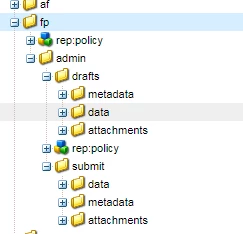
You may login to crx de console and check for the saved and submitted data under(in case of form portal submit) /crx/de/index.jsp#/content/forms/fp

briankasingli-4
Level 2
June 14, 2018

Hey Thanks,

But I am not using the forms portal. Where are the files saved in this case?

Mayank_Gandhi
Adobe Employee
Adobe Employee
June 14, 2018

Pretty much all the forms that you save would be going in the CRX, you also have the option to store them in the database[1]. The Submit action that you choose would define whether the form would be submitted to a workflow, email or to a REST endpoint.

[1]Adobe Experience Manager Help | Sample for integrating drafts & submissions component with database

Level 2
August 22, 2018

Not sure how this is a mac osx issue. Especially when a login session is available it uploads successfully and when not logged in, it fails.

I'm using 6.4 AEM forms and facing same in mac machine and windows 10 / chrome / ie browsers.

Found that when a logged in session is available , it creates the temp file under

/tmp/fd/af/<form>/fileupload

thinking that the /tmp/fd/af needs read/write/modify permission, I gave those to 'everyone' group, but still the file upload is not working.

Created a ticket with Adobe AEM CS, waiting response...

Mayank_Gandhi
Adobe Employee
Adobe Employee
August 22, 2018

Does this happen on Author or while submitting the form via Publish? Can you confirm if you have enabled anonymous access or not?

Level 2
August 22, 2018

This happens in the publisher.  I have enabled anonymous access on the tmp folders.  As part of troubleshooting we enabled crx/de on publisher (PRODUCTION mode) and logged in as admin, then the form attachment worked !!.  Our use case is that the form need to work without any user loggin in.