FLOATING TEXTS | Community
Skip to main content
Level 2
May 20, 2021
Solved

FLOATING TEXTS

  • May 20, 2021
  • 4 replies
  • 2816 views

I've created a form using floating texts.  One of the fields is a dropdown list with two options: One (1) or Two (2).  I labeled this as: fltObligate.  The other field is a floating text field.  I labeled as: fltAmount.  What I'm trying to do is this: if I make a selection from the dropdown list, I would like it to return an amount value in fltAmount.  

So, if I choose "One (1)", I would like it to insert an amount of "$10,000".  Similarly, if I choose "Two (2)", the amount would be "$20,000".

I was able to do this in Adobe DC.  However, I wanted to use the floating text feature in AEM.  Here's the code I used for Adobe DC.

var Obligate = this.getField("Obligate").value;
if (Obligate=="One (1) Year") event.value = "$10,000";
else if (Obligate=="Two (2) Years") event.value = "$20,000";
else event.value = ""

Can anyone assist in converting this code to AEM?
This post is no longer active and is closed to new replies. Need help? Start a new post to ask your question.
Best answer by Pulkit_Jain_

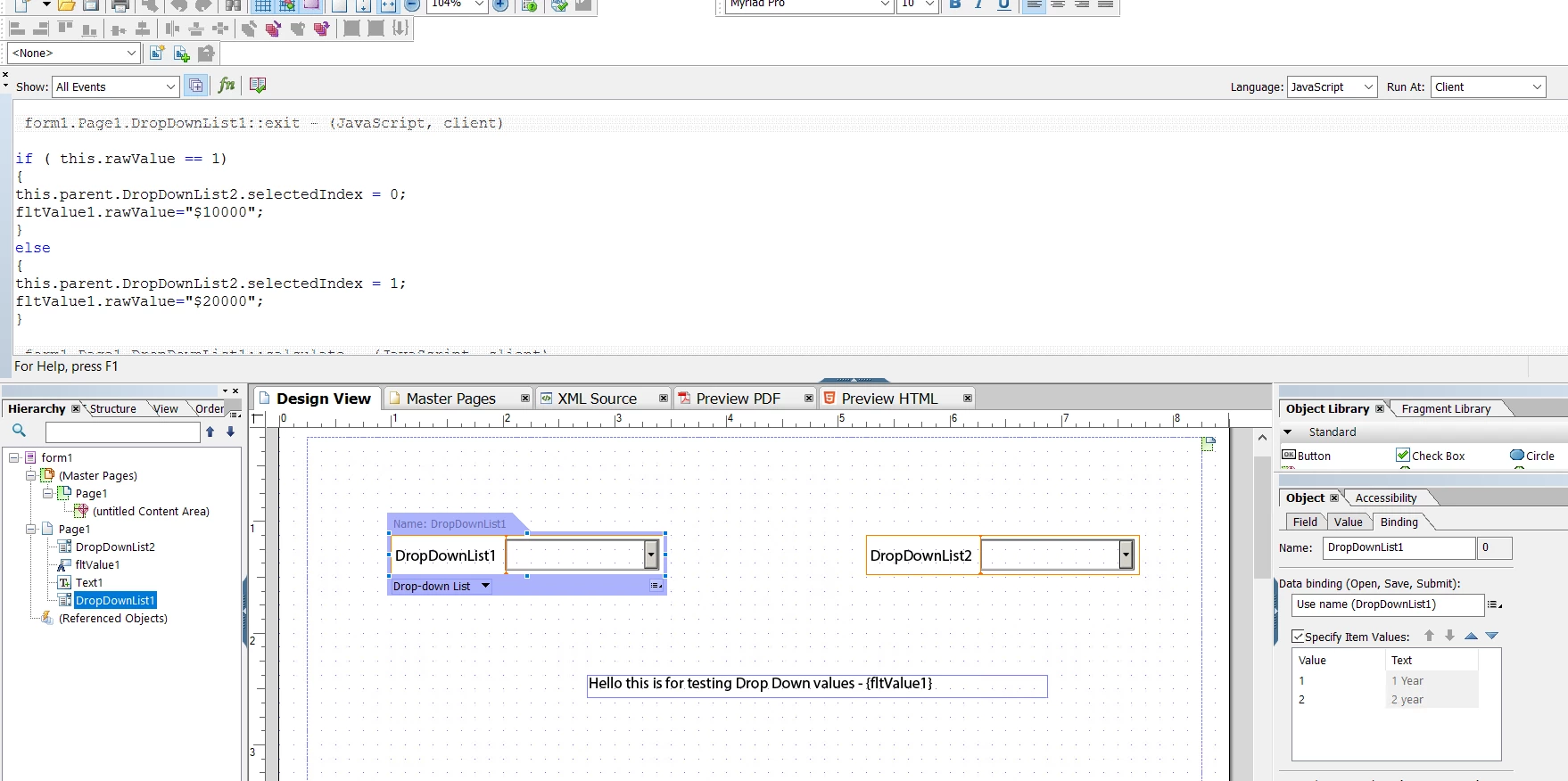
@neohavix Below is a sample form based on the use case that you explained.


When you select a value in the dropdown1 then the value of the dropdown2 changes and the floating field is updated.

if ( this.rawValue == 1) { this.parent.DropDownList2.selectedIndex = 0; fltValue1.rawValue="$10000"; } else { this.parent.DropDownList2.selectedIndex = 1; fltValue1.rawValue="$20000"; }


Hope this helps! 


4 replies

Pulkit_Jain_
Adobe Employee
Adobe Employee
May 20, 2021

@neohavix 

If you are referring to Adaptive Forms then you can execute this logic via a simple condition-action rule construct, more information hereOtherwise, in the case of AEM Designer forms you can use the current logic.

neohavixAuthor
Level 2
May 20, 2021
@pulkit_jain_: I would like to send you a screenshot of what I'm trying to do. How do I do this on this forum?
Kosta_Prokopiu1
Adobe Employee
Adobe Employee
May 20, 2021

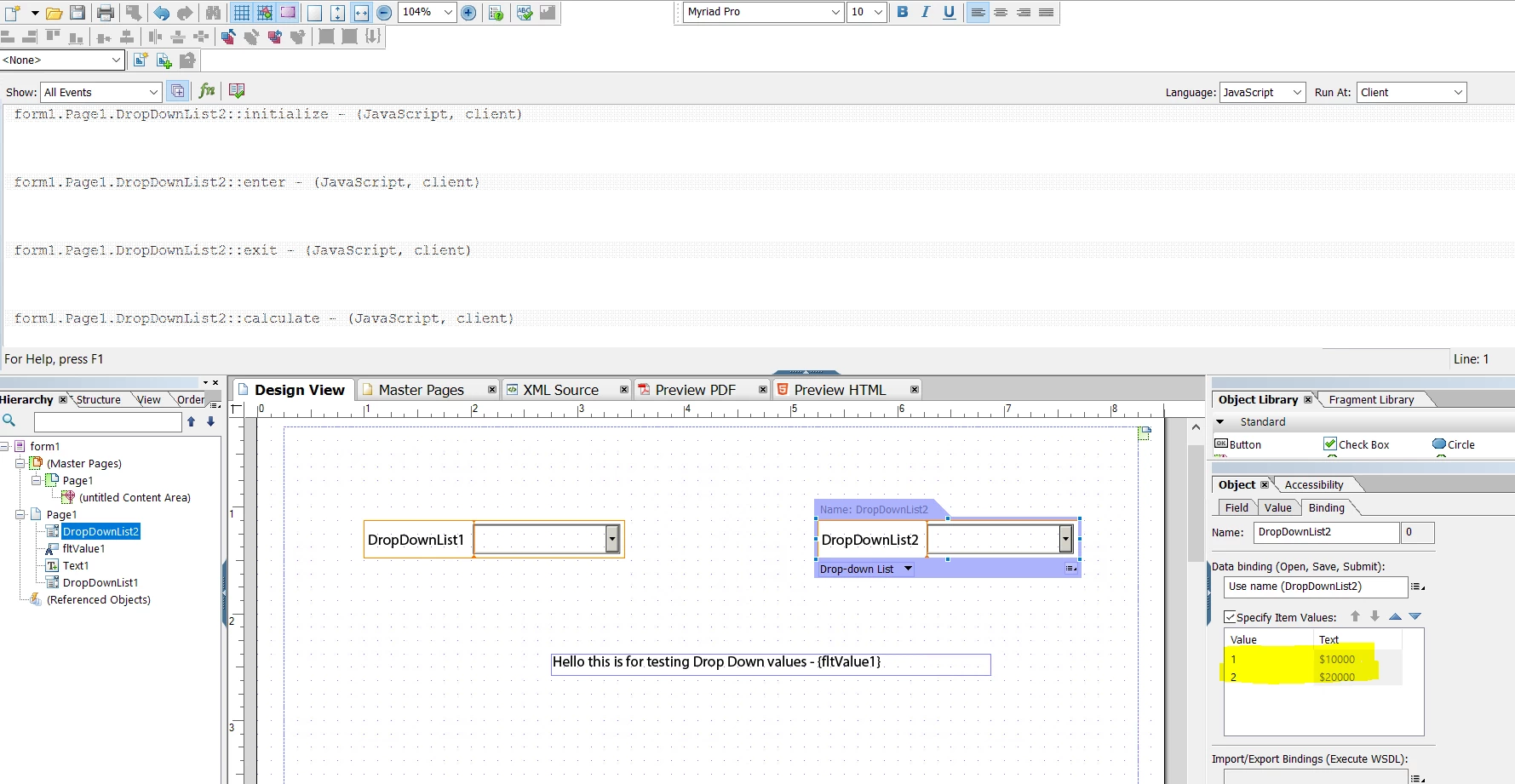
If this is to be a PDF with Designer this is how you can do this:

Place a drop-down like this

And a static text object for which you want to change the tool-tip (what Acrobat floating texts are called here).

When you select the drop-down the text is used to change the tool-tip.


neohavixAuthor
Level 2
May 20, 2021

@PulkiJain: this is a screenshot of what I'm trying to accomplish.  I would like the "I Obligate" dropdown list to populate the "For the amount of" dropdown list whenever I chose from the "I Obligate" list.  The choices are: "One (1) year" or "Two (2) years".  If I choose One (1) year, I would like the "For the amount of" list to show $10,000.  Similarly, Two (2) years = $20,000.  At the same time, when I choose from the "I Obligate" list, it will also populate the {fltObligate} based on my choice.  Similarly, I would like the {fltAmount} to be populated when the "For the amount of" list is populated. 

Hope this helps.

Pulkit_Jain_
Adobe Employee
Pulkit_Jain_Adobe EmployeeAccepted solution
Adobe Employee
May 21, 2021

@neohavix Below is a sample form based on the use case that you explained.


When you select a value in the dropdown1 then the value of the dropdown2 changes and the floating field is updated.

if ( this.rawValue == 1) { this.parent.DropDownList2.selectedIndex = 0; fltValue1.rawValue="$10000"; } else { this.parent.DropDownList2.selectedIndex = 1; fltValue1.rawValue="$20000"; }


Hope this helps! 


neohavixAuthor
Level 2
May 21, 2021
This worked. Then I a modified it a little more from your previous post. This is what I did: