Floating field in table will not flow to the next page | Community
Skip to main content
Level 5
May 16, 2021
Solved

Floating field in table will not flow to the next page

  • May 16, 2021
  • 3 replies
  • 2260 views

I have a form which has a floating field in the header of a table that is changed prior to filling out the form.  When the table flows to the next page, I have it so that the headers populate to the next page.  The problem is that the floating field information in the header does not appear on the next page. It's just a blank space.  Only the other headers, which are not changed, appears on the next page.  What can I do?  
This post is no longer active and is closed to new replies. Need help? Start a new post to ask your question.
Best answer by Kosta_Prokopiu1

Hi,

you surely use data binding for the floating field and your problem is that a data field in the XML can only be used once - when consumed by the first header floating field it will not be filled again for all the others.

I have a simple form and a simple XML:

<root>
    <testhdr>test</testhdr>
</root>

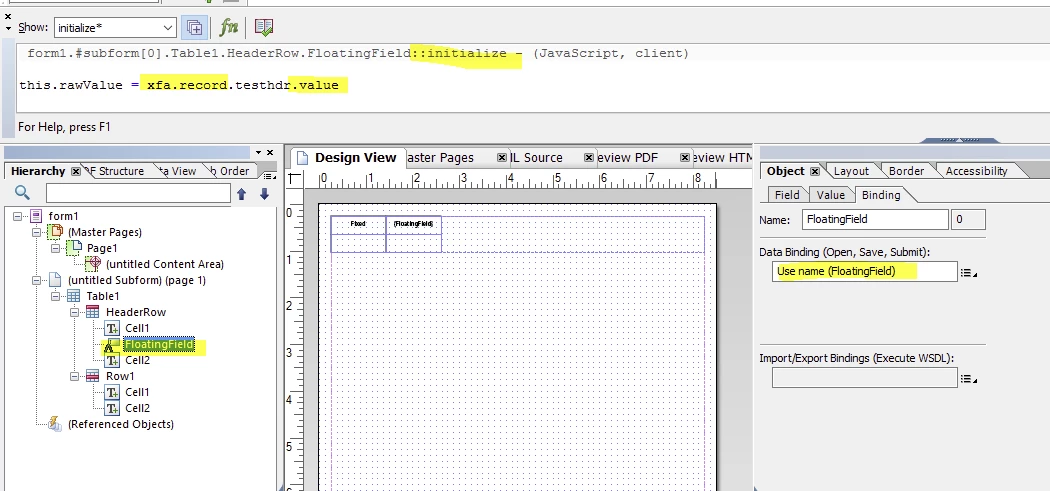
To make this work use name binding for the floating field and in the initialize event of the field put

this.rawValue = xfa.record.testhdr.value;

The "testhdr" is the path in your XML without the root-node and .value is required to get the content of the tag in the XML.

That will solve your problem


3 replies

Kosta_Prokopiu1
Adobe Employee
Kosta_Prokopiu1Adobe EmployeeAccepted solution
Adobe Employee
May 17, 2021

Hi,

you surely use data binding for the floating field and your problem is that a data field in the XML can only be used once - when consumed by the first header floating field it will not be filled again for all the others.

I have a simple form and a simple XML:

<root>
    <testhdr>test</testhdr>
</root>

To make this work use name binding for the floating field and in the initialize event of the field put

this.rawValue = xfa.record.testhdr.value;

The "testhdr" is the path in your XML without the root-node and .value is required to get the content of the tag in the XML.

That will solve your problem


Level 5
May 22, 2021
For some reason, it's not working. I do not see "testhdr" in the hierarchy in your example, so I do not know what to enter in it's place. Also, should it be "xfa.record" and do I enter the ; after value or not. Your picture does not have the semi colon at the end. FYI - I'm using live-cycle.?
Level 5
May 22, 2021

For some reason, it's not working. I do not see "testhdr" in the hierarchy section in your example, so I do not know what to enter in it's place. Also, should it be "xfa.record" and do I enter the ; after value or not. Your picture does not have the semi colon at the end. FYI - I'm using live-cycle.

Level 5
May 22, 2021

Let me be more specific with my question.  On my form, I have a drop down box listing choices.  The item chosen from the drop down list is populated into a floating field which is in the header of the table.  When the table flows to the next page, the headers of the table flows to the next page as well.  My problem is that the information that is in the floating field of the header on the first page does not move to the next page.  The header box on the next page is empty.  Maybe this explanation is better and will result in a fix.  Your help is greatly appreciated.