Error on rendering PDF using formService.renderPDF by passing XDP template which has exData | Community
Skip to main content
September 8, 2025
Solved

Error on rendering PDF using formService.renderPDF by passing XDP template which has exData

  • September 8, 2025
  • 1 reply
  • 1521 views

Hi,

I am using com.adobe.fd.forms.api.FormService.renderPDFForm for rendering dynamic PDF for a use case.


Here I am passing like this:

formsService.renderPDFForm("crx://" + xdpPath, xmlDataDocument, renderOptions)


The rendered PDF from the above service works for all the cases, except when the XDP template as 

<value>
    <exData contentType="text/html">
        <body xmlns="http://www.w3.org/1999/xhtml" xmlns:xfa="http://www.xfa.org/schema/xfa-data/1.0/"><p>sample text</p></body>
    </exData>
</value>
 
the exData is not loading on the rendered PDF. Can anyone help me understand the reason. Is it a bug with the service?


Best answer by Pranay_M

Hi @pranay_m , Sorry, I dont have sample xdp files to share here. In this case the PDF is rendered , but the text within exData is not rendered on the PDF.  


Hi @smrithigo,

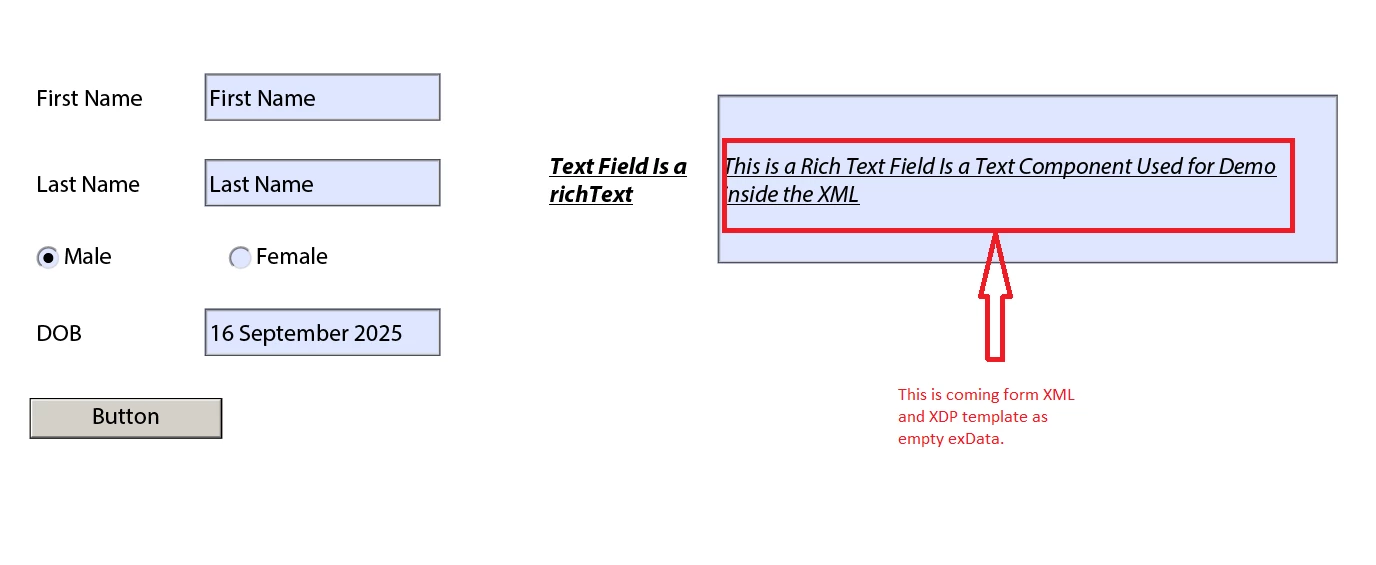
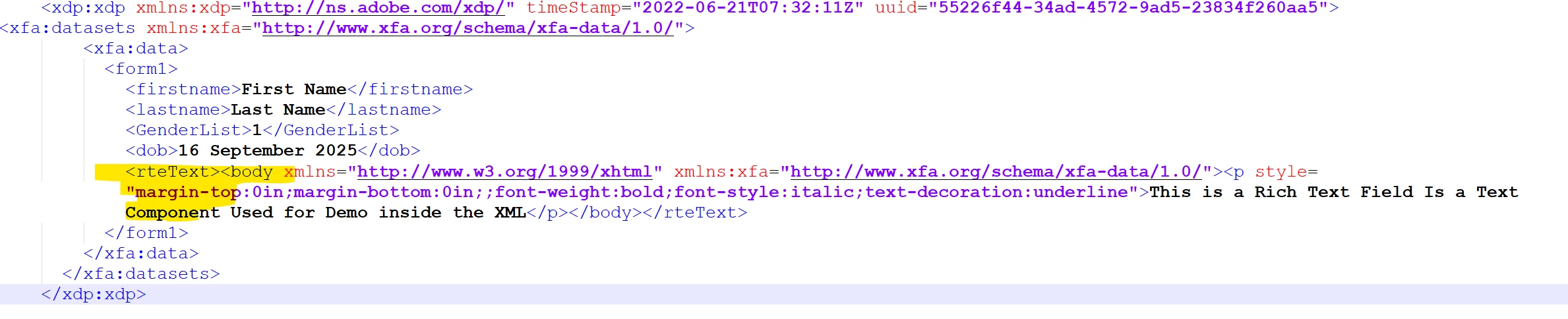
I have attachted a folder "Personal_info_Original.zip" and inside that zip you will find a couple for files, namely: Personal_info.xdp and Personal_info_Original.xml. The XDP has a field that accepts the value in the <exData> format(Rich Text) from the XML. I used the same XDP and the XML  and passed the files from the Forms Service to get the resultant PDF: FormsPDFOutput.pdf.


To summarise the use case is working perfectly on my end and you might need to validate either the XDP or the XML souce.

Thanks

Pranay

1 reply

Adobe Employee
September 16, 2025

Hi @smrithigo,

Thanks
Pranay

XFA <exData> with contentType="text/html" is meant to store rich text (RTF-like content with XHTML tags).The FormsService renderPDFForm API will honor <exData> only if:


  • The XDP field is configured as a Rich Text field in Designer (not plain text).

  • The incoming <value><exData ...> is well-formed XHTML, matching Adobe’s expected schema.

  • If the <exData> content isn’t parsed properly, the renderer often just ignores it, leaving the field blank

Alternative binding

  • Instead of passing <exData>, try passing the same rich text under the field’s rawValue in the XML. This should fix the issue on your end. I gave a quick try and was able to generate the PDF correctly.

Example:

 
<fieldName> <value> <richText> <body xmlns="http://www.w3.org/1999/xhtml"> <p>sample text</p> </body> </richText> </value> </fieldName>
Thanks
Pranay


SmrithiGoAuthor
September 16, 2025

HI @pranay_m , Another question, that I have is, is there any way to parse the <exData> correctly.


  • If the <exData> content isn’t parsed properly, the renderer often just ignores it, leaving the field blank

As I have the control when the PDF is rendered, is there any way to parse this tag value and then render PDF.

Adobe Employee
September 16, 2025

Hi @pranay_m, I have one more question here. Can you please clarify.

Is the text "This is a Rich Text Field Is a Text Component Used for Demo inside the XML" passed as XML string at the time of generation of PDF. Thanks


Hi @smrithigo,

The value is not passed a XML string, it is passed as a parameter in the XML. If you look at the "Personal_info_Original.xml" file you should see the parameter. Same Way you can use any data in the RichText


Thanks
Pranay