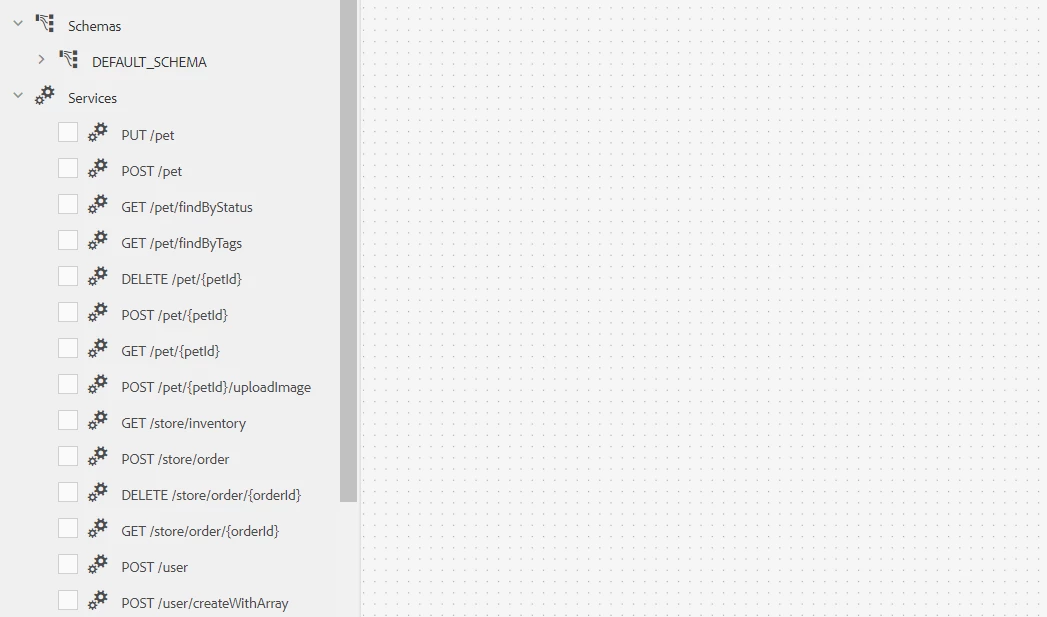
Solved
Error on fetching data source in a Data model integration.
Hi,
I'm getting the following error message when I try to create a new data model based on the Data Source integration.
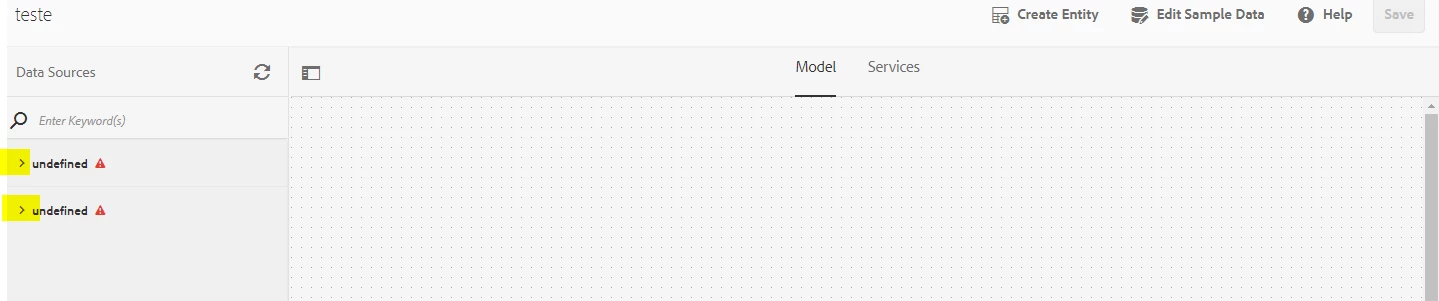
I saw other questions quite related to this topic but there was a JDBC configuration which is not my case.
Just to give you guys a little context. This is what I did:
- I've created a data source based on a swagger file with the swagger version of 2.0 and upload it to AEM in Cloud Services -> Data Sources configuration
- Set the service type as RESTful service and there was not needed any authentication configuration
- Finally, I've created a Data Model based on that configuration.
The swagger file works just fine in other author environments, so I don't think the problem would be the swagger implementation, I tested other samples and got the same error.
This is the swagger file that I used:
swagger: "2.0"
info:
  description: "This is a sample server Petstore server.  You can find out more about     Swagger at [http://swagger.io](http://swagger.io) or on [irc.freenode.net, #swagger](http://swagger.io/irc/).      For this sample, you can use the api key `special-key` to test the authorization     filters."
  version: "1.0.0"
  title: "Swagger Petstore"
  termsOfService: "http://swagger.io/terms/"
  contact:
    email: "apiteam@swagger.io"
  license:
    name: "Apache 2.0"
    url: "http://www.apache.org/licenses/LICENSE-2.0.html"
host: "petstore.swagger.io"
basePath: "/v2"
tags:
- name: "pet"
  description: "Everything about your Pets"
  externalDocs:
    description: "Find out more"
    url: "http://swagger.io"
- name: "store"
  description: "Access to Petstore orders"
- name: "user"
  description: "Operations about user"
  externalDocs:
    description: "Find out more about our store"
    url: "http://swagger.io"
schemes:
- "https"
- "http"
paths:
  /pet:
    post:
      tags:
      - "pet"
      summary: "Add a new pet to the store"
      description: ""
      operationId: "addPet"
      consumes:
      - "application/json"
      - "application/xml"
      produces:
      - "application/xml"
      - "application/json"
      parameters:
      - in: "body"
        name: "body"
        description: "Pet object that needs to be added to the store"
        required: true
        schema:
          $ref: "#/definitions/Pet"
      responses:
        "405":
          description: "Invalid input"
      security:
      - petstore_auth:
        - "write:pets"
        - "read:pets"
    put:
      tags:
      - "pet"
      summary: "Update an existing pet"
      description: ""
      operationId: "updatePet"
      consumes:
      - "application/json"
      - "application/xml"
      produces:
      - "application/xml"
      - "application/json"
      parameters:
      - in: "body"
        name: "body"
        description: "Pet object that needs to be added to the store"
        required: true
        schema:
          $ref: "#/definitions/Pet"
      responses:
        "400":
          description: "Invalid ID supplied"
        "404":
          description: "Pet not found"
        "405":
          description: "Validation exception"
      security:
      - petstore_auth:
        - "write:pets"
        - "read:pets"
  /pet/findByStatus:
    get:
      tags:
      - "pet"
      summary: "Finds Pets by status"
      description: "Multiple status values can be provided with comma separated strings"
      operationId: "findPetsByStatus"
      produces:
      - "application/xml"
      - "application/json"
      parameters:
      - name: "status"
        in: "query"
        description: "Status values that need to be considered for filter"
        required: true
        type: "array"
        items:
          type: "string"
          enum:
          - "available"
          - "pending"
          - "sold"
          default: "available"
        collectionFormat: "multi"
      responses:
        "200":
          description: "successful operation"
          schema:
            type: "array"
            items:
              $ref: "#/definitions/Pet"
        "400":
          description: "Invalid status value"
      security:
      - petstore_auth:
        - "write:pets"
        - "read:pets"
  /pet/findByTags:
    get:
      tags:
      - "pet"
      summary: "Finds Pets by tags"
      description: "Muliple tags can be provided with comma separated strings. Use         tag1, tag2, tag3 for testing."
      operationId: "findPetsByTags"
      produces:
      - "application/xml"
      - "application/json"
      parameters:
      - name: "tags"
        in: "query"
        description: "Tags to filter by"
        required: true
        type: "array"
        items:
          type: "string"
        collectionFormat: "multi"
      responses:
        "200":
          description: "successful operation"
          schema:
            type: "array"
            items:
              $ref: "#/definitions/Pet"
        "400":
          description: "Invalid tag value"
      security:
      - petstore_auth:
        - "write:pets"
        - "read:pets"
      deprecated: true
  /pet/{petId}:
    get:
      tags:
      - "pet"
      summary: "Find pet by ID"
      description: "Returns a single pet"
      operationId: "getPetById"
      produces:
      - "application/xml"
      - "application/json"
      parameters:
      - name: "petId"
        in: "path"
        description: "ID of pet to return"
        required: true
        type: "integer"
        format: "int64"
      responses:
        "200":
          description: "successful operation"
          schema:
            $ref: "#/definitions/Pet"
        "400":
          description: "Invalid ID supplied"
        "404":
          description: "Pet not found"
      security:
      - api_key: []
    post:
      tags:
      - "pet"
      summary: "Updates a pet in the store with form data"
      description: ""
      operationId: "updatePetWithForm"
      consumes:
      - "application/x-www-form-urlencoded"
      produces:
      - "application/xml"
      - "application/json"
      parameters:
      - name: "petId"
        in: "path"
        description: "ID of pet that needs to be updated"
        required: true
        type: "integer"
        format: "int64"
      - name: "name"
        in: "formData"
        description: "Updated name of the pet"
        required: false
        type: "string"
      - name: "status"
        in: "formData"
        description: "Updated status of the pet"
        required: false
        type: "string"
      responses:
        "405":
          description: "Invalid input"
      security:
      - petstore_auth:
        - "write:pets"
        - "read:pets"
    delete:
      tags:
      - "pet"
      summary: "Deletes a pet"
      description: ""
      operationId: "deletePet"
      produces:
      - "application/xml"
      - "application/json"
      parameters:
      - name: "api_key"
        in: "header"
        required: false
        type: "string"
      - name: "petId"
        in: "path"
        description: "Pet id to delete"
        required: true
        type: "integer"
        format: "int64"
      responses:
        "400":
          description: "Invalid ID supplied"
        "404":
          description: "Pet not found"
      security:
      - petstore_auth:
        - "write:pets"
        - "read:pets"
  /pet/{petId}/uploadImage:
    post:
      tags:
      - "pet"
      summary: "uploads an image"
      description: ""
      operationId: "uploadFile"
      consumes:
      - "multipart/form-data"
      produces:
      - "application/json"
      parameters:
      - name: "petId"
        in: "path"
        description: "ID of pet to update"
        required: true
        type: "integer"
        format: "int64"
      - name: "additionalMetadata"
        in: "formData"
        description: "Additional data to pass to server"
        required: false
        type: "string"
      - name: "file"
        in: "formData"
        description: "file to upload"
        required: false
        type: "file"
      responses:
        "200":
          description: "successful operation"
          schema:
            $ref: "#/definitions/ApiResponse"
      security:
      - petstore_auth:
        - "write:pets"
        - "read:pets"
  /store/inventory:
    get:
      tags:
      - "store"
      summary: "Returns pet inventories by status"
      description: "Returns a map of status codes to quantities"
      operationId: "getInventory"
      produces:
      - "application/json"
      parameters: []
      responses:
        "200":
          description: "successful operation"
          schema:
            type: "object"
            additionalProperties:
              type: "integer"
              format: "int32"
      security:
      - api_key: []
  /store/order:
    post:
      tags:
      - "store"
      summary: "Place an order for a pet"
      description: ""
      operationId: "placeOrder"
      produces:
      - "application/xml"
      - "application/json"
      parameters:
      - in: "body"
        name: "body"
        description: "order placed for purchasing the pet"
        required: true
        schema:
          $ref: "#/definitions/Order"
      responses:
        "200":
          description: "successful operation"
          schema:
            $ref: "#/definitions/Order"
        "400":
          description: "Invalid Order"
  /store/order/{orderId}:
    get:
      tags:
      - "store"
      summary: "Find purchase order by ID"
      description: "For valid response try integer IDs with value >= 1 and <= 10.         Other values will generated exceptions"
      operationId: "getOrderById"
      produces:
      - "application/xml"
      - "application/json"
      parameters:
      - name: "orderId"
        in: "path"
        description: "ID of pet that needs to be fetched"
        required: true
        type: "integer"
        maximum: 10.0
        minimum: 1.0
        format: "int64"
      responses:
        "200":
          description: "successful operation"
          schema:
            $ref: "#/definitions/Order"
        "400":
          description: "Invalid ID supplied"
        "404":
          description: "Order not found"
    delete:
      tags:
      - "store"
      summary: "Delete purchase order by ID"
      description: "For valid response try integer IDs with positive integer value.         Negative or non-integer values will generate API errors"
      operationId: "deleteOrder"
      produces:
      - "application/xml"
      - "application/json"
      parameters:
      - name: "orderId"
        in: "path"
        description: "ID of the order that needs to be deleted"
        required: true
        type: "integer"
        minimum: 1.0
        format: "int64"
      responses:
        "400":
          description: "Invalid ID supplied"
        "404":
          description: "Order not found"
  /user:
    post:
      tags:
      - "user"
      summary: "Create user"
      description: "This can only be done by the logged in user."
      operationId: "createUser"
      produces:
      - "application/xml"
      - "application/json"
      parameters:
      - in: "body"
        name: "body"
        description: "Created user object"
        required: true
        schema:
          $ref: "#/definitions/User"
      responses:
        default:
          description: "successful operation"
  /user/createWithArray:
    post:
      tags:
      - "user"
      summary: "Creates list of users with given input array"
      description: ""
      operationId: "createUsersWithArrayInput"
      produces:
      - "application/xml"
      - "application/json"
      parameters:
      - in: "body"
        name: "body"
        description: "List of user object"
        required: true
        schema:
          type: "array"
          items:
            $ref: "#/definitions/User"
      responses:
        default:
          description: "successful operation"
  /user/createWithList:
    post:
      tags:
      - "user"
      summary: "Creates list of users with given input array"
      description: ""
      operationId: "createUsersWithListInput"
      produces:
      - "application/xml"
      - "application/json"
      parameters:
      - in: "body"
        name: "body"
        description: "List of user object"
        required: true
        schema:
          type: "array"
          items:
            $ref: "#/definitions/User"
      responses:
        default:
          description: "successful operation"
  /user/login:
    get:
      tags:
      - "user"
      summary: "Logs user into the system"
      description: ""
      operationId: "loginUser"
      produces:
      - "application/xml"
      - "application/json"
      parameters:
      - name: "username"
        in: "query"
        description: "The user name for login"
        required: true
        type: "string"
      - name: "password"
        in: "query"
        description: "The password for login in clear text"
        required: true
        type: "string"
      responses:
        "200":
          description: "successful operation"
          schema:
            type: "string"
          headers:
            X-Rate-Limit:
              type: "integer"
              format: "int32"
              description: "calls per hour allowed by the user"
            X-Expires-After:
              type: "string"
              format: "date-time"
              description: "date in UTC when token expires"
        "400":
          description: "Invalid username/password supplied"
  /user/logout:
    get:
      tags:
      - "user"
      summary: "Logs out current logged in user session"
      description: ""
      operationId: "logoutUser"
      produces:
      - "application/xml"
      - "application/json"
      parameters: []
      responses:
        default:
          description: "successful operation"
  /user/{username}:
    get:
      tags:
      - "user"
      summary: "Get user by user name"
      description: ""
      operationId: "getUserByName"
      produces:
      - "application/xml"
      - "application/json"
      parameters:
      - name: "username"
        in: "path"
        description: "The name that needs to be fetched. Use user1 for testing. "
        required: true
        type: "string"
      responses:
        "200":
          description: "successful operation"
          schema:
            $ref: "#/definitions/User"
        "400":
          description: "Invalid username supplied"
        "404":
          description: "User not found"
    put:
      tags:
      - "user"
      summary: "Updated user"
      description: "This can only be done by the logged in user."
      operationId: "updateUser"
      produces:
      - "application/xml"
      - "application/json"
      parameters:
      - name: "username"
        in: "path"
        description: "name that need to be updated"
        required: true
        type: "string"
      - in: "body"
        name: "body"
        description: "Updated user object"
        required: true
        schema:
          $ref: "#/definitions/User"
      responses:
        "400":
          description: "Invalid user supplied"
        "404":
          description: "User not found"
    delete:
      tags:
      - "user"
      summary: "Delete user"
      description: "This can only be done by the logged in user."
      operationId: "deleteUser"
      produces:
      - "application/xml"
      - "application/json"
      parameters:
      - name: "username"
        in: "path"
        description: "The name that needs to be deleted"
        required: true
        type: "string"
      responses:
        "400":
          description: "Invalid username supplied"
        "404":
          description: "User not found"
securityDefinitions:
  petstore_auth:
    type: "oauth2"
    authorizationUrl: "http://petstore.swagger.io/oauth/dialog"
    flow: "implicit"
    scopes:
      write:pets: "modify pets in your account"
      read:pets: "read your pets"
  api_key:
    type: "apiKey"
    name: "api_key"
    in: "header"
definitions:
  Order:
    type: "object"
    properties:
      id:
        type: "integer"
        format: "int64"
      petId:
        type: "integer"
        format: "int64"
      quantity:
        type: "integer"
        format: "int32"
      shipDate:
        type: "string"
        format: "date-time"
      status:
        type: "string"
        description: "Order Status"
        enum:
        - "placed"
        - "approved"
        - "delivered"
      complete:
        type: "boolean"
        default: false
    xml:
      name: "Order"
  Category:
    type: "object"
    properties:
      id:
        type: "integer"
        format: "int64"
      name:
        type: "string"
    xml:
      name: "Category"
  User:
    type: "object"
    properties:
      id:
        type: "integer"
        format: "int64"
      username:
        type: "string"
      firstName:
        type: "string"
      lastName:
        type: "string"
      email:
        type: "string"
      password:
        type: "string"
      phone:
        type: "string"
      userStatus:
        type: "integer"
        format: "int32"
        description: "User Status"
    xml:
      name: "User"
  Tag:
    type: "object"
    properties:
      id:
        type: "integer"
        format: "int64"
      name:
        type: "string"
    xml:
      name: "Tag"
  Pet:
    type: "object"
    required:
    - "name"
    - "photoUrls"
    properties:
      id:
        type: "integer"
        format: "int64"
      category:
        $ref: "#/definitions/Category"
      name:
        type: "string"
        example: "doggie"
      photoUrls:
        type: "array"
        xml:
          name: "photoUrl"
          wrapped: true
        items:
          type: "string"
      tags:
        type: "array"
        xml:
          name: "tag"
          wrapped: true
        items:
          $ref: "#/definitions/Tag"
      status:
        type: "string"
        description: "pet status in the store"
        enum:
        - "available"
        - "pending"
        - "sold"
    xml:
      name: "Pet"
  ApiResponse:
    type: "object"
    properties:
      code:
        type: "integer"
        format: "int32"
      type:
        type: "string"
      message:
        type: "string"
externalDocs:
  description: "Find out more about Swagger"
  url: "http://swagger.io"
I took a look at the bundles related to AEM Forms and all of them are active. No error is thrown in logs and I am unable to delete a data model after creating it.
Please let me know if you have any suggestion or solution for this.
Thanks.