Error Message: ALC-PDG-016-004 | Community
Skip to main content
September 10, 2018

Error Message: ALC-PDG-016-004

  • September 10, 2018
  • 2 replies
  • 7789 views

We have a newly installed AEM 6.4 server. Office 2016 and Adobe DC was installed prior to AEM being installed.

When I log into the adminui, I go to the PDF Generator and then to Create PDF.

I get this error anytime I browse and select an Office document. Example, docx, doc and xlsx

I am able to go to create PDF and create a PDF from a jpg or png at this point. It just seems the Office files are giving me trouble.

Any help on where to start looking would be great.

I don't know much about AEM other than our team is responsible for updating the templates and importing them.

We're now responsible for configuring the new AEM 6.4 servers.

Thanks in advanced.

This post is no longer active and is closed to new replies. Need help? Start a new post to ask your question.

2 replies

Adobe Employee
September 10, 2018

Hi,

what is the specific error in the log? can you upload it or share the snippet?

please verify you have followed these steps prior to PDFG native conversions at [1]. PLease also consider the additional system requirements in the preparing to install guide here at [2]

[1] Adobe Experience Manager Help | Install and configure PDF Generator

[2] https://helpx.adobe.com/content/dam/help/en/experience-manager/6-4/forms/pdf/prepare-install-single-server.pdf [section 10.3 in the appendix]

Mayank_Gandhi
Adobe Employee
Adobe Employee
September 10, 2018

Let's start by checking the conversion of office files to pdf from Acrobat and Office plugin.

Check if Application Server(Assuming JBoss) is running as LSA.

Grant R/W Permissions in C:\Windows\Temp for all the PDFG user explicitly.

Next, run the SRT and check for the report to capture any missing elements. Though below blog is for LiveCycle, apart from folder name change toAdobe Experience Manager all things would remain same.

LiveCycle PDF Generator ES2 System Readiness Tool (SRT) | Adobe LiveCycle Blog

Also, I would like to know the OS, Application server detail and see the server logs captured during the conversion failure.

Thanks,

Mayank

September 11, 2018

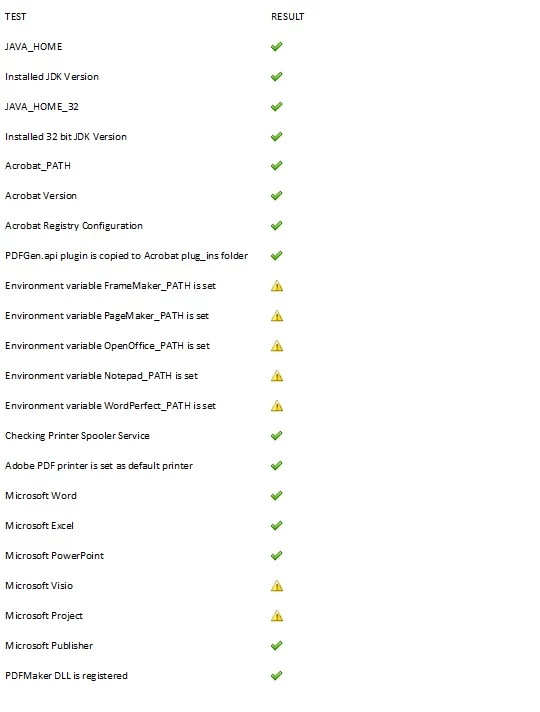
Thank you for reply. I was able to convert to pdf from a word doc. I set the permissions as you suggested. Running srt, the only warnings I received were for some of the environment variables. I, however was not sure what you meant by running jboss as LSA.

Mayank_Gandhi
Adobe Employee
Adobe Employee
September 11, 2018

Hi,

The SRT looks all good. LSA is local system account. So, if I get correctly the issue is resolved now post setting permissions.