
Display multiple tables based on values from xml | Community
Skip to main content
mankuu33664440
Level 2
December 15, 2020
Solved

Display multiple tables based on values from xml

  • December 15, 2020
  • 4 replies
  • 2514 views

Hi, I'm new to livecycle designer. 

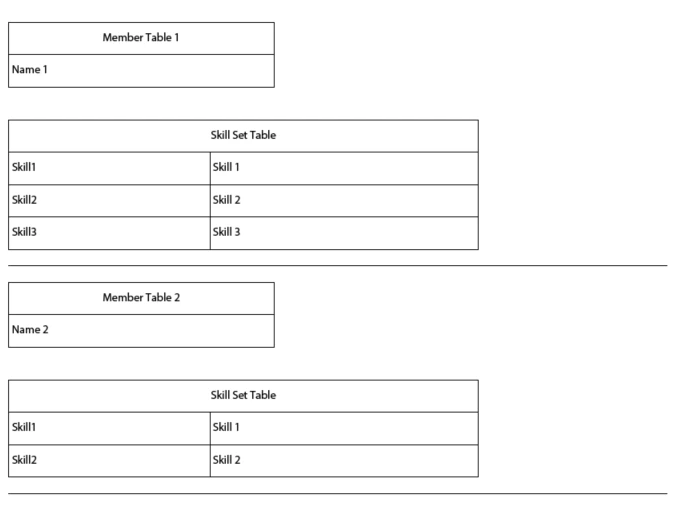
We have a requirement of displaying multiple tables from the xml values. 


<member_table num=1>

     <name>

    <skills>

        <SKILL1>

        <SKILL2>

        <SKILL3>

   </skills>

</member_table>

<member_table num=2>

     <name>

     <skills>

        <SKILL1>

        <SKILL2>

   </skills>

</member_table>


For each member number,

1. I should display member table which has one row with name

2. I should display skill table with all skills listed (this differs from member to member) 


Approach :

Built member table and skill table in a subform, and used action builder to repeat the subform for every member. I am able to get member table correctly as it has only one row. But skill table is getting with only one row, and first value is getting filled.


Please help on how to retrieve all the skills into all the skills tables based on member number. 
This post is no longer active and is closed to new replies. Need help? Start a new post to ask your question.
Best answer by Kosta_Prokopiu1

OK, here we go: https://documentcloud.adobe.com/link/track?uri=urn:aaid:scds:US:0b9769f5-5a7c-489f-99fa-9de489d4a89b

The structure of the data is vital for success here. See if you can adapt your data accordingly. Check also the Binding tab under Object.

I hope that helps - it is only a quick sample - you may have to adapt to your data and real form....


4 replies

mankuu33664440
Level 2
December 15, 2020

If my xml has 10 members data, then I should be displaying all 10 members member tables and 10 skill tables.


Please give me some idea on how to further implement this


@

Kosta_Prokopiu1
Adobe Employee
Adobe Employee
December 16, 2020

There is a reason for that 🙂

You have created a hierarchical data structure and want to consume the data in more than one dynamic subform/table construct. That does not work because the data is gone through once (your member table) and then there is no "Reset" so your skills table are out of data. For that to work you could restructure your XML data like so:


<root>
    <member_table>
        <member>
            <number>1</number>
            <name>Name 1</name>
        </member>
        <member>
            <number>2</number>
            <name>Name 2</name>
        </member>
    </member_table>

    <skills_tables>
        <skill_table>
            <number>1</number>
            <name>if required in the skill table</name>
            <skills>
                <skill1>Skill 1</skill1>
                <skill2>Skill 2</skill2>
                <skill3>Skill 3</skill3>
            </skills>
        </skill_table>
        <skill_table>
            <number>2</number>
            <name>if required in the skill table</name>
            <skills>
                <skill1>Skill 1</skill1>
                <skill2>Skill 2</skill2>
            </skills>
        </skill_table>
    </skills_tables>
</root>


Kosta_Prokopiu1
Adobe Employee
Adobe Employee
December 16, 2020
I just realizeed - loose the numbers in the skill tags. <skill> instead of <skill1> etc - then you are truely dynamic
mankuu33664440
Level 2
December 16, 2020


Kosta_Prokopiu1
Adobe Employee
Adobe Employee
December 16, 2020
ok, that I can work with 🙂
Kosta_Prokopiu1
Adobe Employee
Kosta_Prokopiu1Adobe EmployeeAccepted solution
Adobe Employee
December 16, 2020

OK, here we go: https://documentcloud.adobe.com/link/track?uri=urn:aaid:scds:US:0b9769f5-5a7c-489f-99fa-9de489d4a89b

The structure of the data is vital for success here. See if you can adapt your data accordingly. Check also the Binding tab under Object.

I hope that helps - it is only a quick sample - you may have to adapt to your data and real form....