Different layouts in Theme Editor | Community
Skip to main content
Level 4
October 16, 2017
Solved

Different layouts in Theme Editor

  • October 16, 2017
  • 3 replies
  • 2254 views

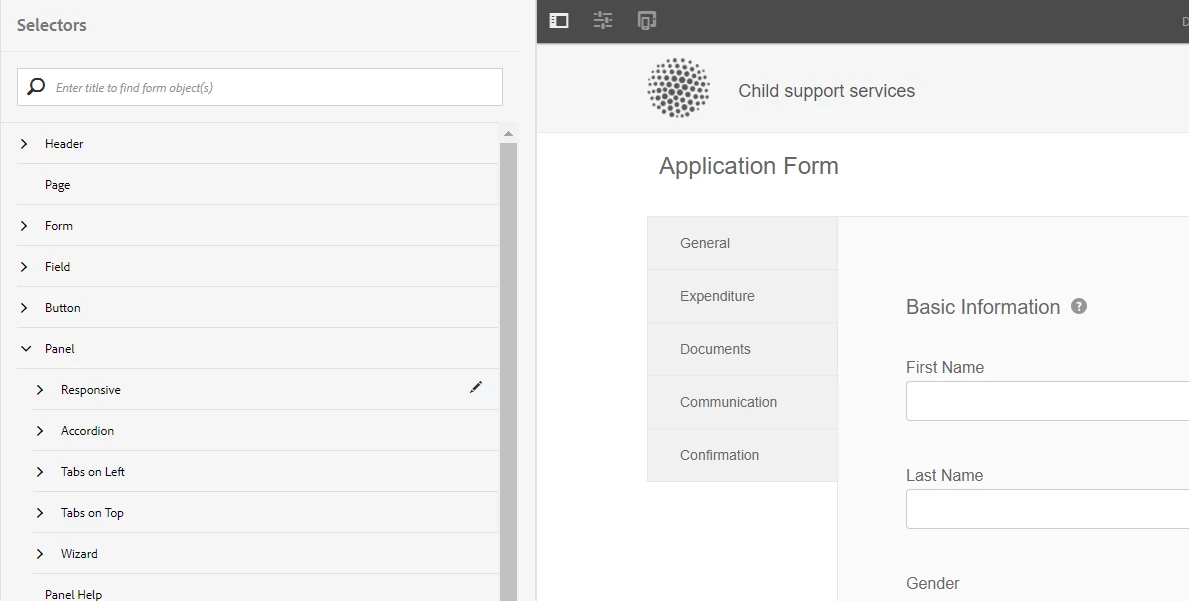
I'm working with Theme Editor, and have built my theme for the Tabs on Left layout, which is in the default Child Support Services form. However, now I need to do styling  for Accordion, Responsive, and Tabs on Top, but I can't find a way to change the layout in Theme Editor.

In actual Form Editor, I can choose the different panel layouts by clicking on the Panel properties, but I don't have that option in Theme Editor.  I'd rather not do a separate theme for each layout, as maintenance will become an issue.

Is there a way to change the layout of the panels in Theme Editor, or will I just need to update the Theme CSS manually?

Thanks!
This post is no longer active and is closed to new replies. Need help? Start a new post to ask your question.
Best answer by sudhansh

Hi Chris,

You can style various layout using the Theme editor. For this you can use the property sheet on the side panel to choose the desired panel layout, and provide the styling.

For performing a WYSIWYG styling you can choose a form which has the desired panel layout (Theme Options > Configure > Preview Form) and use either the property sheet on left to select the desired element, or the content frame on the right to select the specific panel element.

3 replies

sudhansh
Adobe Employee
sudhanshAdobe EmployeeAccepted solution
Adobe Employee
October 27, 2017

Hi Chris,

You can style various layout using the Theme editor. For this you can use the property sheet on the side panel to choose the desired panel layout, and provide the styling.

For performing a WYSIWYG styling you can choose a form which has the desired panel layout (Theme Options > Configure > Preview Form) and use either the property sheet on left to select the desired element, or the content frame on the right to select the specific panel element.

baronforoAuthor
Level 4
October 27, 2017

That's what I was afraid of. It is counter-intuitive to force people to choose to load different forms when the different layouts are listed there.

Having a Tabs on Left layout and then trying to style other layouts without being able to see them is fairly useless.  Also, I tried loading in a different form, but then not all options were available.

I'll say this question is answered, but choosing the layouts on the fly (like one can in an actual form) would be a great future update. I ended up just manually changing CSS in code rather than WYSWIG, as the Theme Editor didn't have all options needed anyway.

kautuk_sahni
Community Manager
Community Manager
October 30, 2017

Hi Christopher

Thanks a lot for the good suggestions. I would recommend you to create a ticket with support to keep it tracking.

~kautuk

Kautuk Sahni